User Administration > SAML single sign-on > Configuring SAML single sign-on for IDMC
  

Configuring SAML single sign-on for IDMC

Configure SAML single sign-on (SSO) in IDMC to exchange authentication and authorization information with your identity provider.
Tip:
To watch a video that describes the SAML configuration procedure, see https://youtu.be/4DewSNbvJBc?si=VAeGj5-5Oq0HbXtF.
SAML single sign-on requires an identity provider and service provider. Examples of identity providers include: Okta, Microsoft Azure AD, and PingFederate. In this scenario, the service provider is IDMC.
Before you can configure SAML SSO in IDMC, it must already be set up in your identity provider. For information about configuring two common identity providers, see the following articles on the Informatica network:
To configure SAML single sign-on for IDMC:
  1. 1Contact your identity provider team for the following information:
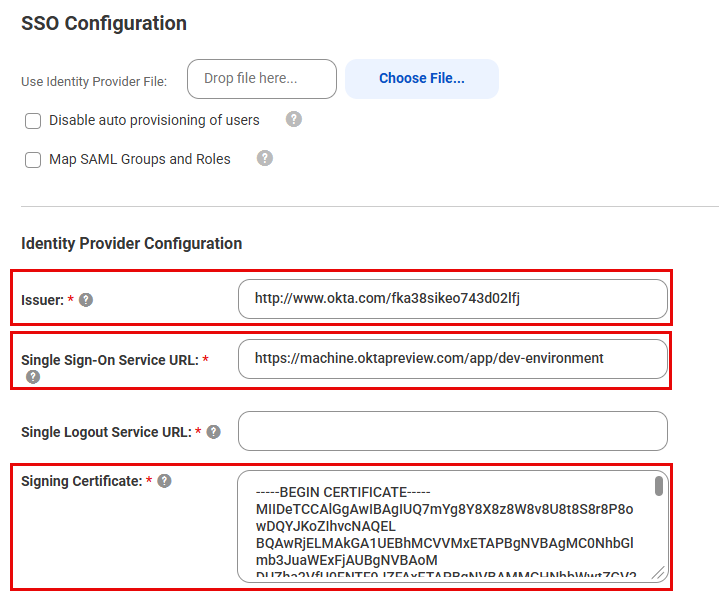
  2. 2Enter the information into the corresponding fields in Identity Provider Configuration section of the SAML Setup page:
  3. The following images shows these fields on the SAML Setup page:
    The following fields in the Identity Provider Configuration section of the SAML Setup page are highlighted: Issuer, Single Sign-On Service URL, and Signing Certificate.
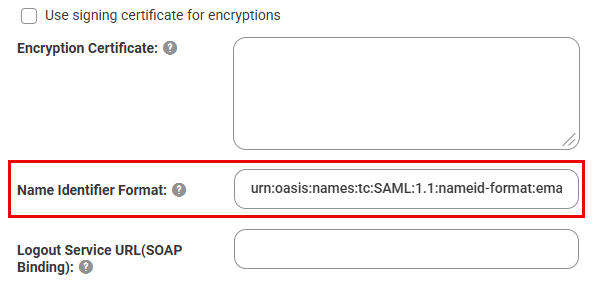
  4. 3Enter the Name Identifier Format if possible, otherwise this can be added later. The following image shows the Name Identifier Format field:
  5. The Name Identifier Format field under the Identity Provider Configuration section.
  6. 4Click Save.
  7. IDMC generates the service provider metadata file and a unique token for your organization.
  8. 5Click Download Service Provider Metadata. This downloads the file iics_saml_sp_metadata.xml to your machine. It contains information that your service provider needs to complete the configuration.
  9. 6In the Information dialog box, note the URL for single sign-on access to your IDMC organization. For example:
  10. https://dm-us.informaticacloud.com/ma/sso/<organization token>
  11. 7Send the iics_saml_sp_metadata.xml file to the identity provider administrator, along with the URL for single sign-on access.
  12. 8Complete the SAML Attribute Mapping section. For more information, see SAML attribute mapping properties.
  13. 9If you want to map SAML roles to specific roles in IDMC, perform the following steps:
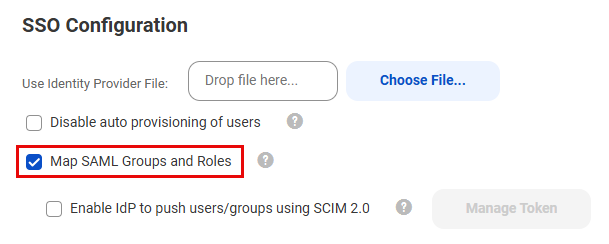
    1. aEnable Map SAML Groups and Roles. The following image shows the SAML Setup page with this option enabled:
    2. The Map SAML Groups and Roles check box under SSO Configuration on the SAML Setup page is enabled.
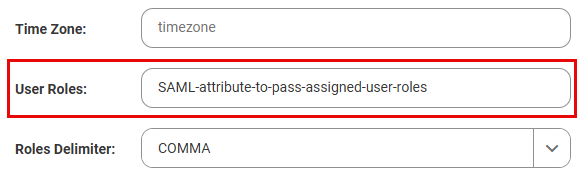
    3. bIn the User Roles field, enter the SAML attribute used to pass the assigned user roles. The following image shows the User Roles field:
    4. Mapping the SAML attribute for user roles.
      For example, if "idp_roles" is the name of the attribute from the identity provider used to pass user role information, then enter idp_roles.
    5. cMap the corresponding IDMC roles in the SAML Role Mapping tab. For more information, see SAML role and group mapping properties.
  14. 10If you don't want to map specific roles and instead just use a default role, perform the following steps:
    1. aEnsure that Map SAML Groups and Roles is not selected.
    2. bIn the SAML Role Mapping tab, scroll to the bottom of the list and select a Default Role. The following image shows the Default Role field:
    3. Defining a default IDMC role if not mapping specific roles.
      The Administrator can change the roles later.
  15. 11If you want to map SAML groups to specific groups in IDMC, perform the following steps:
    1. aSelect Map SAML Groups and Roles.
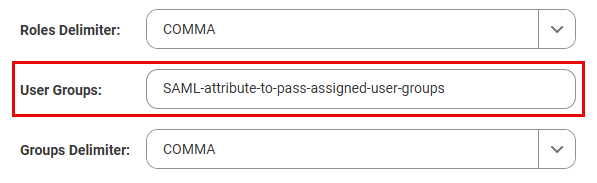
    2. bIn the User Groups field, enter the SAML attribute used to pass the assigned user groups. The following image shows the Default Groups field:
    3. Mapping the SAML attribute for user groups.
      For example, if "idp_groups" is the name of the attribute from the identity provider used to pass user group information, then enter idp_groups.
    4. cMap the corresponding IDMC groups in the SAML Group Mapping tab. For more information, see SAML role and group mapping properties.
    5. If there isn't a matching IDMC group, enter a new group name and IDMC will create this group and map it to the SAML group. Groups created this way are read-only in IDMC.
  16. 12If you don't want to map specific groups and instead just use a default group, perform the following steps:
    1. aEnsure that Map SAML Groups and Roles is not selected.
    2. bIn the SAML Group Mapping tab, scroll to the bottom of the list and select a Default Group.
    3. The Administrator can change the groups later.
  17. 13Complete the remaining fields on the SAML Setup page as necessary. For more information, see SAML configuration.