Log in to IDMC with a user account that has both the Admin and Key Admin roles. If you don't have both roles, you can't see the Security tab.
For more information about user roles, see User Administration.
If you get an error when testing the key, perform the following checks:
- - In Administrator, verify that the key settings on the Settings page match the settings for the CMK in your cloud KMS.
- - In your cloud KMS, verify that the status of the CMK is active.
- - In your cloud KMS, verify that the permissions on the CMK allow Informatica cryptographic access to the key.
If you continue to encounter errors, contact Informatica Global Customer Support.
You can rotate the key in your cloud KMS manually or on a schedule. Rotating a key creates a new version of the key. The old version of the key remains in your cloud KMS and is used for decryption only.
IDMC detects key rotation on Azure Key Vault and Google Cloud KMS. When the CMK is rotated, IDMC decrypts your organization's keys using the old CMK and then encrypts them using the new CMK.
IDMC cannot detect key rotation on AWS KMS. If you use AWS KMS, you'll need to disable customer-managed keys in IDMC and reenable it. To do this, perform the following steps:
- 1On the Settings page in Administrator, click the Security tab and note the Key ARN and Role ARN.
- 2Disable the Enable Customer Managed Keys option.
- 3Enable the Enable Customer Managed Keys option, reenter the key ARN and role ARN, and click the save icon.
If you need to update the CMK, first provision a new CMK in your cloud KMS. Then update the key details on the Settings page in Administrator.
Note:
Be sure to keep the old version of the CMK in your cloud KMS active until you update the key details in Administrator.
You can delete the old version of the CMK in your cloud KMS after you update the key details on the Settings page.
If you want Informatica to manage key encryption, you can disable the Enable Customer Managed Keys option on the Settings page in Administrator:
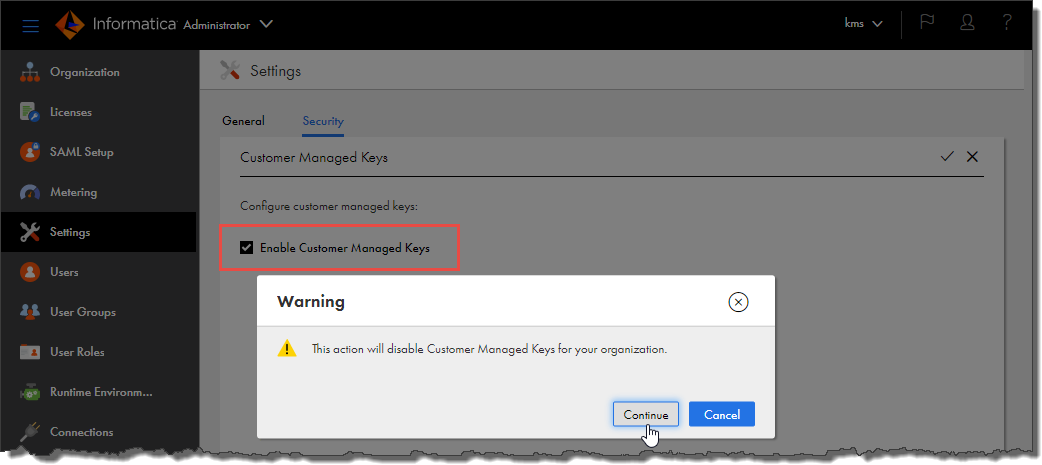
When you do this, be sure to keep the current version of the CMK in your cloud KMS active. If the CMK is not active, disabling customer-managed keys fails.
When you disable this option, your organization's encryption keys are once again encrypted using encryption keys that are managed by Informatica. It can take up to 10 minutes for the Informatica encryption keys to become active.
You can disable or delete the CMK in your cloud KMS after you disable the Enable Customer Managed Keys option in Administrator.
If you want to temporarily revoke Informatica's access to the CMK, you can disable the key in your cloud KMS.
When you disable the CMK, IDMC can no longer unencrypt your organization's encrypted data, and any jobs that use the data will fail until you reactivate the CMK in your cloud KMS.
If you want to replace the CMK, you can delete the key in your cloud KMS and create a new one.
Warning:
Deleting the CMK in your cloud KMS results in permanent loss to any encrypted data in IDMC and causes the jobs that use the data to fail.
If you need to replace the CMK, perform the following steps so that you don't lose access to the encrypted data and jobs don't fail:
- 1In Administrator, open the Settings page, click the Security tab, and disable the Enable Customer Managed Keys option.
- 2In your cloud KMS, delete the CMK.
- 3In your cloud KMS, create a new CMK.
- 4On the Settings page in Administrator, re-enable the Enable Customer Managed Keys option and enter the details for the new CMK.
Warning:
Deleting the CMK in your cloud KMS results in permanent loss to any encrypted data in IDMC and causes the jobs that use the data to fail.
If you're sure that you want Informatica to forgo all access to your encrypted data in IDMC, you can delete the CMK in your cloud KMS.