Secure Agent Services > Customer Managed Data Integration Service > Customer Managed Data Integration Service properties
  

Customer Managed Data Integration Service properties

To change or optimize the behavior of the Customer Managed Data Integration service, configure its properties in the System Configuration Details area when you edit a Secure Agent.
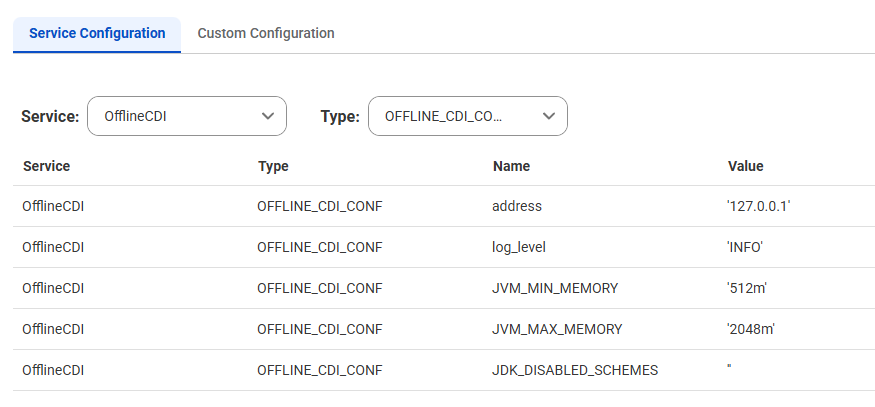
The following image shows the Customer Managed Data Integration Service properties:
The OfflineCDI service properties include the LOG4J rootLogger property, as well as the following OFFLINE_CDI_CONF properties: address, log level, JVM_MIN_MEMORY, JVM_MAX_MEMORY, and JDK_DISABLED_SCHEMES.
You can configure the following Customer Managed Data Integration service properties:
Type
Name
Description
OFFLINE_CDI_CONF
JVM_MIN_MEMORY
Amount of memory allocated for the Customer Managed Data Integration service when the service starts.
Default is 512 MB.
OFFLINE_CDI_CONF
JVM_MAX_MEMORY
Maximum memory allocated for the Customer Managed Data Integration service.
Default is 2048 MB.
OFFLINE_CDI_CONF
JDK_DISABLED_SCHEMES
Note:
Do not change the values of other Customer Managed Data Integration service properties unless Informatica Global Customer Support instructs you to do so.