Type | Name | Description |
|---|---|---|
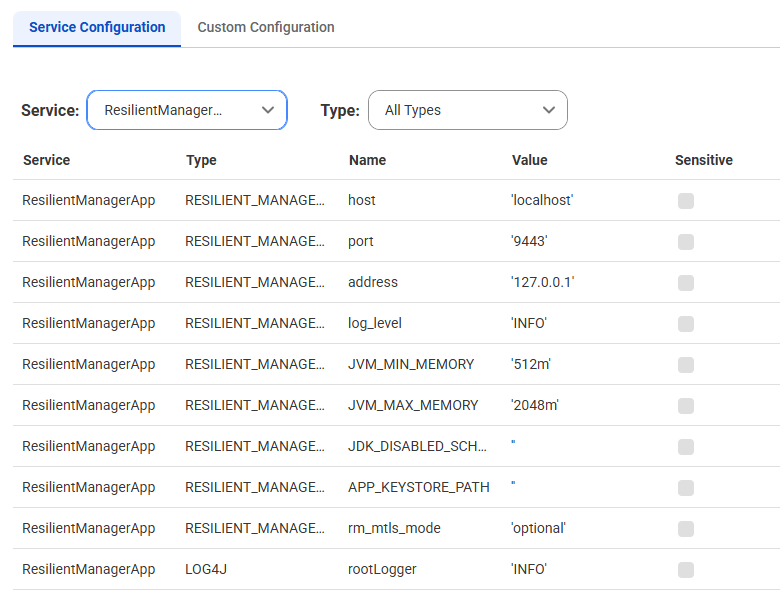
RESILIENT_MANAGER_APP_CONF | port | Network port the Resilient Manager app listens on. Change this if the default port is already in use on the machine or your network rules require a different port. Default is 9443. |
RESILIENT_MANAGER_APP_CONF | JVM_MIN_MEMORY | Amount of memory allocated for the ResilientManagerApp service when the service starts. Specify a number followed by 'm' (megabytes) or 'g' (gigabytes). Default is 512m. |
RESILIENT_MANAGER_APP_CONF | JVM_MAX_MEMORY | Maximum memory allocated for the ResilientManagerApp service. Specify a number followed by 'm' (megabytes) or 'g' (gigabytes). Default is 2048m. |
RESILIENT_MANAGER_APP_CONF | log_level | Amount of detail the app writes to its log files. Valid values are ERROR, WARN, INFO, and DEBUG. Use DEBUG for more detail when troubleshooting. Default is INFO |
LOG4J | rootLogger | Default amount of detail written to the logs by libraries and components other than those owned by Informatica. Valid values are ERROR, WARN, INFO, and DEBUG. Default is INFO |
Note: Do not change the values of other ResilientManagerApp service properties unless Informatica Global Customer Support instructs you to do so. | ||