Getting Started with Informatica MCP Servers > Introduction to Informatica MCP servers
Introduction to Informatica MCP servers
MCP (Model Context Protocol) is an open-source standard for connecting AI applications to external data sources, tools, and workflows. You can use MCP to connect your AI applications to Informatica’s MCP servers. This enables your AI agents to ground their responses using your IDMC organization’s trusted data.
MCP eliminates the need to create complex point-to-point integrations for each tool that your AI application interacts with. You no longer need to handle the API connectivity, authentication, data access, and code manually. MCP acts as a universal translator for each external tool that you want your AI application to interact with.
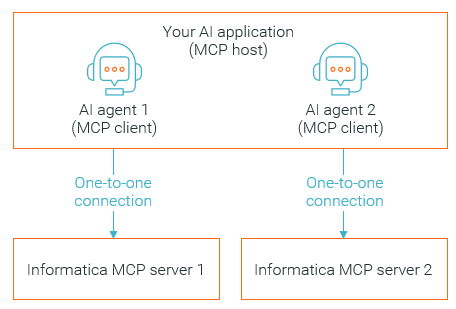
When you connect to Informatica MCP servers, your AI application acts as an MCP host, and each of your AI agents acts as an MCP client. Each MCP client maintains a one-to-one connection with an Informatica MCP server.
The following image illustrates the process:
Each MCP server exposes the tools that are available to your AI agent. For example, the CDGC Metadata Search server provides tools for getting asset details (get_asset_details) and searching metadata (search_metadata). When you configure your AI agents, you can select the specific tools the agents need to interact with.
Informatica MCP servers use MCP protocol 2025-06-18 and streamable HTTP transport.
You can connect to Informatica MCP servers using a third-party tool like Claude Desktop, Cursor, VS Code, or Python.