Configure a Slack app to call an API whenever a new message arrives.
To configure a Slack app, perform the following steps:
1Create a Slack app.
2Set the required OAuth scopes.
3Enable token rotation.
4Add the bot to a channel.
Step 1. Create a Slack app
1Go to https://api.slack.com/apps and log in to your account.
2Click Create New App > From scratch.
3Enter the app name and select your workspace, and then click Create App as shown in the following image:
4Select your app, go to Basic Information > App Credentials, and copy the client ID and client secret.
You will need these to configure the Slack tool.
Step 2. Set the required OAuth scopes
1Go to OAuth & Permissions.
2In the Bot Token Scopes section, click Add an OAuth Scope and add one of the following OAuth scopes:
- channels:history — to read public channel messages.
- groups:history — to read messages from private channels, if needed.
- chat:write — if your bot needs to send messages.
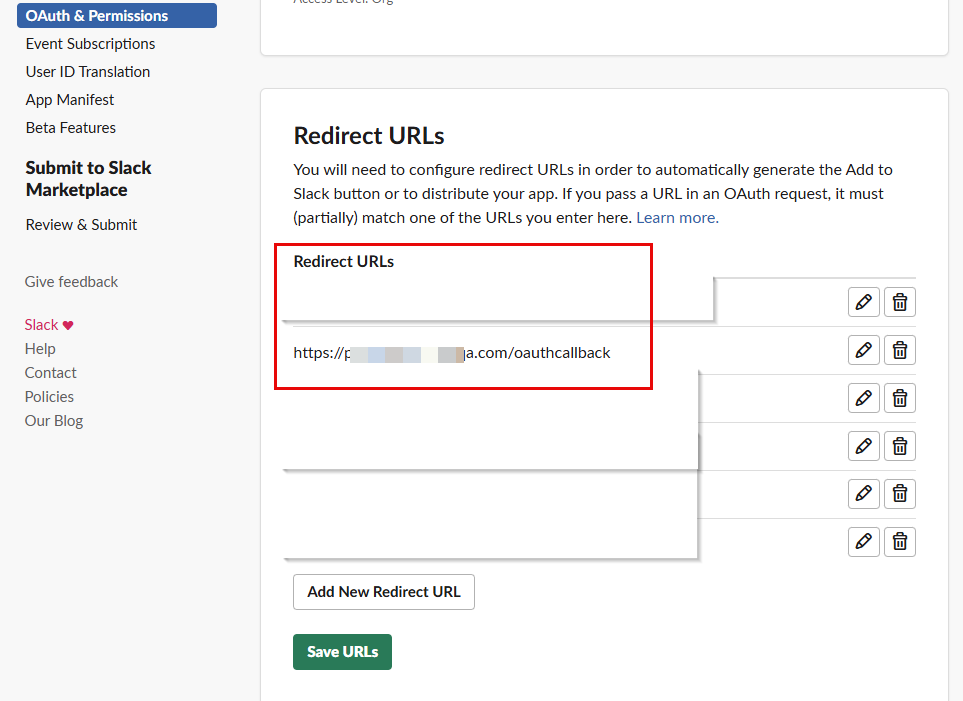
3In the Redirect URLs section, click Add New Redirect URL and add the redirect URLs in <POD URL>/oauthcallback format and save the URLs. For example, https://na1.dm-us.informaticacloud.com/oauthcallback as shown in the following image:
4Install the app using the Install App section.
Step 3. Enable token rotation
1Go to OAuth & Permissions.
2In the Advanced token security via token rotation section, click Opt In.