The October 2026 release of Business 360 Console includes the following important notices:
Preview initiated
Effective in the October 2026 release, the following functionalities are available for preview:
Configure privileges for custom user roles to access Reference 360 assets
You can configure privileges for custom user roles to control access to all reference data assets, individual assets, attributes, code values, and workflows.
REST API Explorer
You can now browse, test, and download Business 360 REST APIs directly from the REST API Explorer, a Swagger UI in the Business 360 Console.
Search enhancements
The search process includes the following changes:
Search within specific field group entries
When you search for records using multiple conditions on fields in the same field group or nested field group, the search evaluates the conditions within each entry, and returns a record only if a single entry matches all the conditions.
For example, a record contains home and office address entries in the Address field group. The home address has city New York and street Main Street. The office address has city Chicago and street Oak Avenue.
If you use the Search REST API to search for the record with the condition city = Chicago AND street = Main Street, the search doesn’t return the record because no single address entry matches both conditions.
Previously, the search returned the record if the conditions matched across different entries.
Find records that exceed the field group entry limit
The generate search index job indexes a maximum of 25,000 field group and nested field group entries in a record. If a record contains more than 25,000 entries, only the first 25,000 entries are indexed. A search returns results only for indexed data.
If a record exceeds the field group entry index limit, the Search REST API response includes the error code 100002, which you can use to identify the affected record. You can also pass the error code in your request to retrieve all records that exceed the index limit.
Note:
To apply these changes, reindex the records in your business entities. To reindex the records, run the Generate Search and Report Indexes or Match Keys job by using the MDMSearchIndex process.
Localized picklist field values
You can now manage reference data assets in multiple languages using the following capabilities:
Multilingual configuration
You can now have multilingual reference data in Reference 360. Configure the languages that you want to localize reference data into, then add values for each one. Enable name and description attributes to store values in multiple languages, and enter reference data set or code list attribute values for each language. When business users access applications in a localized language, picklist fields display values in that same language.
Search in localized languages
If picklist values are multilingual, you can now search for records with picklist values in any enabled language, regardless of your browser locale in business applications. Additionally, when you use a filtered search, business applications display picklist values based on your browser locale. However, when you sort records or use auto-suggest in business applications, MDM SaaS continues to use the default language configured for the field values.
Note:
To search for records with picklist values in localized languages from existing business entities, run the batch job to reindex records.
Enrichment and Validation Orchestrator includes the following features and enhancements:
Enrich and validate master records during batch processing
You can now configure objectives to run on master records when they are processed in batches.
Enhanced user interface for trigger settings
The triggers settings in the advanced settings of an objective now appear in a tabular layout instead of individual sections. The tabular layout arranges triggers, the option to enable or disable each trigger, the option to reject records with errors, and trigger conditions in adjacent columns.
Draft records
If you configure objectives to reject records, MDM SaaS still allows users to save the drafts with validation errors. As a result, they can continue to work on the drafts with validation errors until they're ready to submit them.
Configurations for the product experience agent
Users of business applications can now use the product experience agent to classify and enrich records with product data.
You can configure the following settings for the product experience agent:
▪ On request. Determines whether CLAIRE can run objectives on request when users prompt CLAIRE Copilot to enrich records. You can now specify whether objectives run automatically or on request. Automatic objectives run when records are created or updated. The existing objectives are automatic objectives by default.
▪ CLAIRE as a trigger. Determines whether CLAIRE can run an objective.
▪ CLAIRE-Based Enrichment plugin. Classifies records with product data. When users prompt CLAIRE Copilot to classify records, MDM SaaS runs the data quality objectives that use the CLAIRE-Based Enrichment plugin and classifies the records.
New triggers for objectives
You can now configure objectives with the following triggers:
▪ Bulk edit. Triggers objectives when users edit records in bulk.
▪ Merge job. Triggers objectives when match and merge jobs run to merge records.
▪ Recalculate trust scores job. Triggers objectives when recalculate trust scores jobs run. When you run the job for changed survivorship configurations, objectives now enrich and validate records.
▪ Reprocess master data job. Triggers objectives when reprocess master data jobs run. If you update enrichment and validation configurations after master records are created, you can reprocess the master records to apply the updated enrichment and validation configurations.
Product experience agent
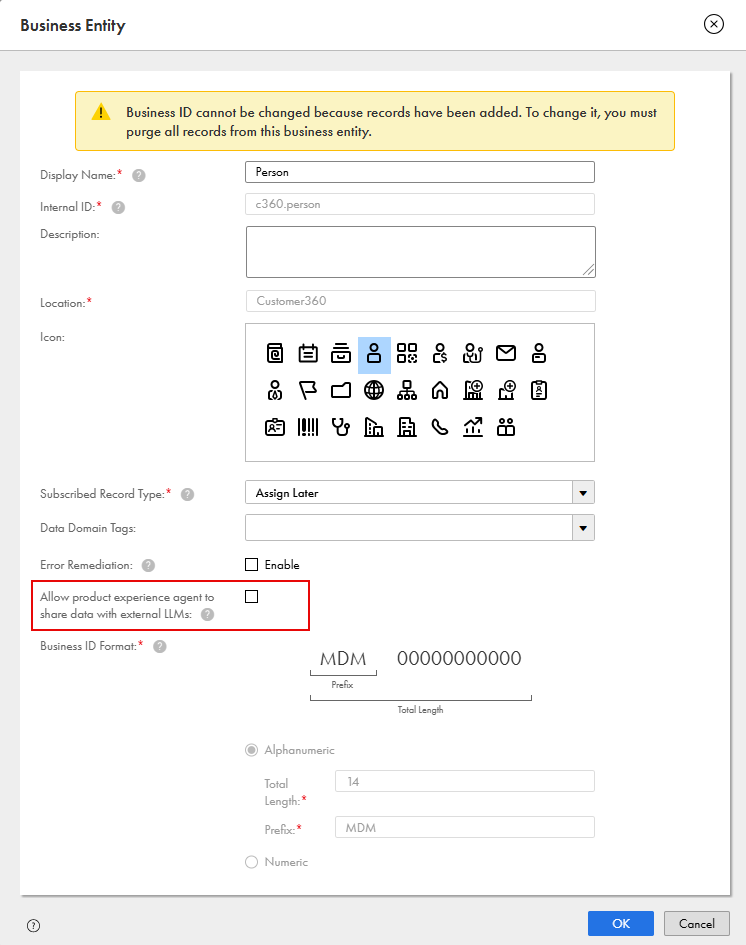
You can enable or disable the product experience agent for individual business entities. When users prompt the product experience agent to enrich and classify records in business applications, the agent shares the metadata and data with external LLMs. These external LLMs don't use them to train their models. The data residency and retention policies that apply to CLAIRE GPT also apply to the product experience agent. When you enable the product experience agent, you give MDM SaaS your consent to share the information.
The product experience agent is designed to enrich and classify only product data. Before you enable the agent for a business entity that doesn't represent product data, assess whether sharing the data of the business entity with external LLMs meets your organization's requirements.
The following image shows the properties of Person business entity with the option to allow the product experience agent to share data with external LLMs:
Preview functionality is supported for evaluation purposes but is unwarranted and is not supported in production environments or any environment that you plan to push to production. Informatica intends to include the preview functionality in an upcoming release for production use, but might choose not to in accordance with changing market or technical circumstances. For more information, contact Informatica Global Customer Support.
Upcoming changes
We want to let you know about the following upcoming changes:
Validation and cleansing response parameter
In the February 2027 release or later, Informatica requires you to include the groupId parameter in root field objects in the response that an Application Integration process returns for a validation or cleansing request.
To prepare for this change, update existing validation and cleansing processes to include the groupId parameter for root fields.
Informatica intends to include this functionality in February 2027 or later but might choose not to in accordance with changing market or technical circumstances.
Validation of output payloads from Application Integration processes
In the February 2027 release or later, Informatica requires that all existing Application Integration processes that you use in rule associations return valid payloads. If the processes return empty payloads, the associated rule associations will result in the Exception status instead of the Undecided status.
To prepare for this change, ensure that existing processes return a valid response to MDM SaaS.
Informatica intends to include this functionality in February 2027 or later but might choose not to in accordance with changing market or technical circumstances.
Preview lifted
Effective in the October 2026 release, the following functionalities are production ready:
Business events based on native workflows
You can use native workflows that you design in Business 360 Console to define business events for business entity records, relationships, and hierarchies. Configure these business events for create, update, and delete actions on data through business applications, and REST API. You can also configure business events for changes to all field types in a business entity, including dynamic fields.
When you configure business events for create and update actions on record data, you can choose to skip workflows for data that rule associations have successfully validated.
Stakeholders can view, act on, and add comments to related tasks in the task inbox of business applications. In the ticket manager, they can also view the tickets for workflows to which they're assigned. When a workflow is triggered, MDM SaaS automatically creates a ticket with details, such as task statuses and comments.
Disabling and enabling business events
You can disable business events that are based on native or external workflows. Disable business events to prioritize other business events or to save them for future use. You can enable disabled business events when you want to use them.
Apache NiFi 2.5.0 runtime engine for MDM SaaS
MDM SaaS uses the Apache NiFi version 2.5.0 runtime engine. No user action is required. The upgrade includes key updates to custom processors and AMQP NAR components.