Kafka Connector uses the Confluent library version 7.9.6 and the Kafka client library version 3.9.2.
Before you use Kafka Connector, complete the following prerequisite tasks:
•You must not enable multiple Hadoop distribution packages in your organization.
•To run a mapping in advanced mode, verify that the Secure Agent is associated with an advanced cluster configuration.
•To read data from or write data to a Kafka topic in Avro format without schema registry, you must configure the JVM Options and INFA_DEBUG property for the Secure Agent to enable Avro data format.
Configuring the Secure Agent to import Avro schema without schema registry
If you configure a mapping to read data from or write data to a Kafka topic in Avro format without schema registry, you must configure the JVM Options and INFA_DEBUG property for the Secure Agent to enable Avro data format.
To configure the Secure Agent and successfully import a Kafka topic in Avro format, perform the following steps:
1In Administrator, select Runtime Environments.
2Select the Secure Agent for which you want to configure from the list of available Secure Agents.
3In the upper-right corner, click Edit.
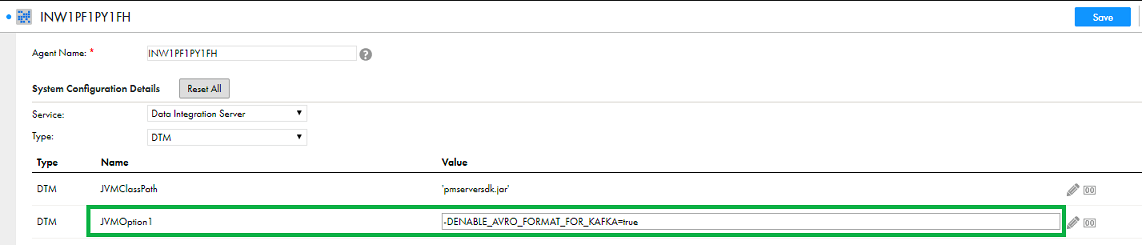
4In the System Configuration Details section, select the Type as DTM for the Data Integration Service.
5Edit the JVMOption1 and add the following value:
-DENABLE_AVRO_FORMAT_FOR_KAFKA=true
The following image shows the System Configuration Details section and the configured JVMOption1:
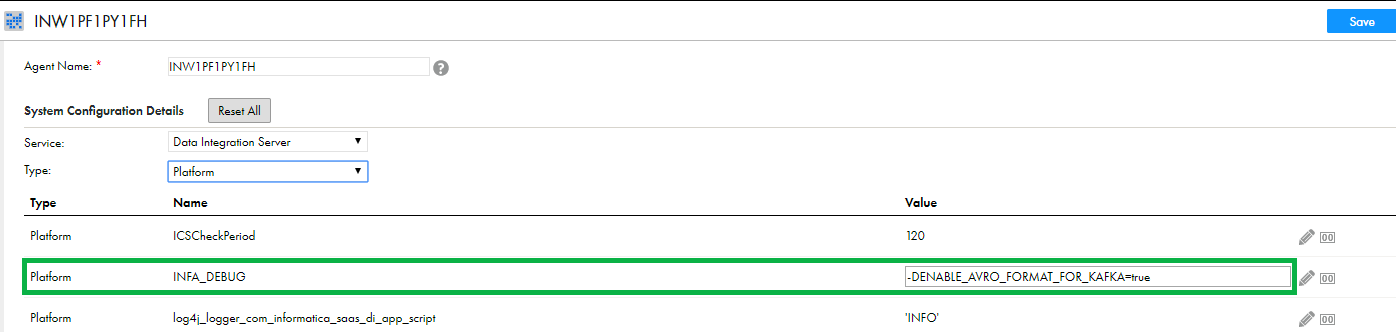
6Select the Type as Platform for the Data Integration Service.
7Edit the INFA_DEBUG property and add the following value:
-DENABLE_AVRO_FORMAT_FOR_KAFKA=true
The following image shows the System Configuration Details section and the configured INFA_DEBUG property: