To use SAP HANA and SAP HANA Cloud sources in database ingestion and replication tasks, read about the available CDC methods. Then prepare the source database and review the usage considerations that pertain to the load types and CDC methods you plan to use.
SAP HANA change capture methods
Database Ingestion and Replication provides the log-based and trigger-based change capture methods for SAP HANA sources. Choose the method that's best for your environment.
Note:
You can configure tasks with the log-based CDC method only in the latest configuration wizard.
The following table compares the two methods:
Log-based
Trigger-based
Available for SAP HANA on premises, single tenant sources.
Available for SAP HANA on premises and cloud sources.
Captures change data from SAP HANA transaction logs.
Uses triggers to to get before images and after images of DML changes for each source table.
Stages captured data in tables in an SAP HANA or Oracle cache database, which is separate from the source database, before writing the data to the target.
Writes entries for the DML changes, including sequence values, to PKLOG and shadow _CDC tables in the source database.
Source tables must be COLUMN type tables.
Source tables can be ROW or COLUMN type tables.
Requires use of a CDC staging group, which is available in the latest configuration wizard only.
Doesn't work with CDC staging groups.
Each CDC staging group requires a separate connection and cache database.
Multiple database ingestion and replication jobs can use the same connection to perform trigger-based CDC.
Requires that certain database user permissions be granted to read the transaction logs.
-
The Secure Agent must have access to the online and archived transaction logs on the source system.
-
The source database must run in log mode normal.
-
Log-based change data capture for SAP HANA sources
For change data capture (CDC), Database Ingestion and Replication can use the SAP HANA transaction log. It also requires a database cache, separate from the source database, to form full rows for processing update and delete operations.
Note:
You can configure database ingestion and replication tasks for SAP HANA Log-based CDC only if the CDC staging feature and SAP HANA Log-based CDC are enabled for your organization. Contact Informatica Global Customer Support to ensure that your organization has access to these features.
For a DML change, the transaction log contains only the columns that changed and not the full row and primary key. Instead of the primary key, the log contains an identifier for each change along with the identifier of the row's last change. However, for update and delete operations, Database Ingestion and Replication requires the last full row prior to the current change to identify the corresponding change data in the transaction log. To fulfill this requirement, Database Ingestion and Replication assembles the last full row in a cache database. Then, when an update or delete occurs, it queries the cache to generate the full row.
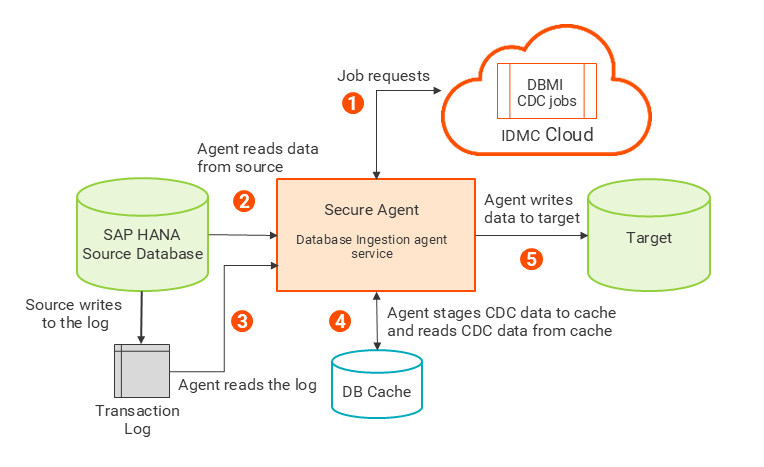
The following image shows the high-level architecture of SAP HANA Log-based change capture:
1The Secure Agent receives a CDC job request.
2The Secure Agent performs an initial load of data from the source to the database cache.
3After the initial load completes, the Secure Agent starts reading change data from the transaction log.
4The Secure Agent uses the data from the transaction log and the data in the ROWCACHE table in the cache to generate full rows for the DML changes and then inserts the full rows back into the ROWCACHE table.
5The Secure Agent writes the full rows to the target.
SAP HANA source preparation
To use SAP HANA and SAP HANA Cloud sources in database ingestion and replication tasks, first prepare the source database and review the usage considerations that pertain to the load types and CDC methods you plan to use.
General tasks
•The SAP HANA Database Ingestion connector uses JDBC to connect to the SAP HANA and SAP HANA Cloud database to read data and metadata and to test connection properties. You must download the SAP HANA JDBC driver file, ngdbc.jar, and copy it to a specific subdirectory of the Secure Agent installation directory on the machine where the Secure Agent runs.
1Download the SAP HANA JDBC driver jar file to the Linux or Windows machine where the Secure Agent runs. Rename the file to ngdbc.jar.
Verify that you download the most recent version of the file. If you encounter any issues with downloading the file, contact SAP Customer Support.
2Create the following directory under the Secure Agent:
•Create a Database Ingestion and Replication user. Connect to the source database as a user with admin authority and execute the following statement:
CREATE USER dbmi_user password "<password>" NO FORCE_FIRST_PASSWORD_CHANGE;
This statement creates a user in the database with the default permissions, which permit basic data dictionary views to be read and the required CDC objects to be created in the user's own schema.
•To deploy and run a database ingestion and replication task that includes an SAP HANA or SAP HANA Cloud source, the source connection must specify a Database Ingestion and Replication user (dbmi_user) who has the privileges to read metadata and other information from the following system views:
- SYS.M_DATABASE - Used to fetch the database version.
- SYS.M_CS_PARTITIONS - Used to identify if a table is partitioned. (Not applicable for SAP HANA Cloud)
- SYS.SCHEMAS - Used to fetch the list of schemas for a database.
- SYS.TABLES - Used to fetch a list of table names for a schema.
- SYS.TABLE_COLUMNS - Used to fetch column metadata for a table.
- SYS.INDEXES - Used to fetch index information for a table.
- SYS.INDEX_COLUMNS - Used to fetch index information for a table.
•For SAP HANA Cloud sources, the connection requires an SAP HANA JDBC custom connection property setting for encryption. Enter the following properties in the Advanced Connection Properties field in the SAP HANA Database Ingestion connection properties:
encrypt=true&validateCertificate=false
For initial loads
•For initial load jobs, execute one of the following grant statements to read data from source tables:
GRANT SELECT ON SCHEMA schema_user TO dbmi_user;
This statement grants SELECT access to all tables in the schema.
- or -
GRANT SELECT ON database.table_name TO dbmi_user;
This statement grants SELECT access on a specific source table. Repeat this grant for each source table from which you want to read data.
For trigger-based CDC
•For incremental load jobs that use trigger-based CDC, grant the following privileges:
- For triggers to write rows to the PKLOG and shadow _CDC tables of the dbmi_user, grant INSERT access on the dbmi_user's schema to the user that owns the schema of the source tables (schema_user):
GRANT INSERT ON SCHEMA dbmi_user TO schema_user;
- To capture change data from source tables in the schema_user's schema by using triggers, execute one of the following statements:
GRANT TRIGGER ON SCHEMA schema_user TO dbmi_user;
This statement grants trigger access to all tables in the schema.
- or -
GRANT TRIGGER ON database.table_name TO dbmi_user;
This statement grants trigger access to a specific source table. Use this statement when you want to capture data from just a few selected tables. Repeat the grant for each source table of CDC interest.
For log-based CDC
•Ensure that the source database is accessible from the virtual machine (VM) where the Secure Agent is running.
•For incremental load or combined initial and incremental load jobs, if the Secure Agent and SAP HANA database are installed on different machines, ensure that the SAP HANA database online and archive logs are mounted on the Secure Agent machine.
The database user responsible for generating the online and archive logs must have write permissions on the mount point. The user of the Secure Agent on which the Database Ingestion agent service starts requires read permissions on the mount point to access the online and archive logs.
•Ensure that the database ingestion and replication user has read access to the SAP HANA system monitoring view SYS.M_SYSTEM_OVERVIEW so jobs can fetch required system overview information such as the SAP HANA database version.
•Enable log normal mode on the source database. For instructions, see the SAP HANA documentation here.
To validate that the database is in log mode normal, issue the following command:
SELECT value FROM M_INIFILE_CONTENTS WHERE file_name = 'global.ini' AND SECTION = 'persistence' AND KEY = 'log_mode'
The command should return "normal" as the log mode.
•Ensure that the source database user that is specified in the SAP HANA Database Ingestion connection has read access to the following objects:
- Redo log files
- M_LOG_SEGMENTS system table in source database
•Create an SAP HANA or Oracle cache database that is separate from the source database.
Ensure that archive logging is disabled for the cache database as it's not required for this database and would only increase overhead on the database.
Also, create the ROWCACHE and TRANSACTIONS tables in the cache database. When you configure a database ingestion and replication task, you can download or execute a script that creates these tables and indexes from the CDC Script field.
•If plan to use Log-based CDC to capture change data from encrypted log files, check that the encryption root keys file that contains the keys needed to decrypt the source logs exists on the Secure Agent machine. Also, verify that the backup password for accessing the key file exists. If you need assistance, contact your database administrator.
Usage considerations
To use SAP HANA and SAP HANA Cloud sources in database ingestion and replication tasks, first prepare the source database and review the usage considerations that pertain to the load types and CDC methods you plan to use.
General usage considerations
•Database Ingestion and Replication supports SAP HANA and SAP HANA Cloud sources on Red Hat Linux or SUSE Linux for jobs that use any load type and either the Log-based or Trigger-based capture type.
•Database ingestion and replication incremental load and combined initial and incremental load jobs support table names up to 120 characters in length.
•Schema drift options are not supported for incremental load or combined load jobs with SAP HANA or SAP HANA Cloud sources.
•Database Ingestion and Replication does not require primary keys on the SAP HANA source tables for initial load or incremental load jobs.
•Database Ingestion and Replication does not support the following source data types, even though they're mapped to default column data types on the target:
- ARRAY
- BINTEXT
- BLOB
- CLOB
- NCLOB
- ST_GEOMETRY
- ST_POINT
- TEXT
Database Ingestion and Replication jobs propagate nulls for columns that have these data types.
Note:
The ALPHANUM, BINTEXT, CHAR and CLOB data types are not available in SAP HANA Cloud.
For information about the default mappings of SAP HANA data types to target data types, see Default data-type mappings.
•Deployment of a database ingestion and replication task that has an SAP HANA source and Microsoft Azure Synapse Analytics target might fail if a source table contains a multiple-column primary key of a long length. In this case, reduce the length of the primary key and then deploy the task again.
•If you use a combined initial and incremental load job for either trigger-based CDC or log-based CDC, the following applies:
- Job-level resynchronization of combined load jobs with SAP HANA CDC sources is not supported. Table-level resynchronization is supported.
- For table-level synchronization of SAP HANA CDC sources in combined load jobs, the default option is Resync (refresh). This option drops the table and re-creates the source schema at the point of resynchronization. However, after the resynchronization, if an Add Column schema drift change occurs, data for the newly added column isn't captured.
•If you use a Secure Agent group with multiple agents and the active agent goes down unexpectedly, database ingestion and replication jobs can automatically switch over to another available agent in the Secure Agent group. The automatic switchover occurs after the 15 minute heartbeat interval elapses. For database ingestion and replication jobs that have an SAP HANA source, automatic switchovers are subject to following limitations:
- Jobs cannot have persistent storage enabled.
- Jobs cannot use the the trigger-based CDC method.
- Jobs that have Kafka targets must store checkpoint information in the Kafka header. For any jobs that existed before the July 2025 release, automatic switchovers can't occur because checkpoint information is stored in the checkpoint file in the Secure Agent.
•A CDC staging task that has a SAP HANA source does not track changes in the tables after an associated apply job is undeployed or a table is removed from an apply job. If you initiate a new incremental load task for the removed table using the earliest available point for that table, data loss might occur. When an apply job is undeployed, manually clean up the ROWCACHE and TRANSACTION tables if the tables are not included in any other apply jobs.
To clean yp the tables, perform the following steps:
1Connect to the DBCache database.
2Validate the current schema. Ensure that the current schema contains the DBCache tables.
SELECT CURRENT_SCHEMA "current schema" FROM DUMMY;
3Note the count of records that are to be deleted from the ROWCACHE table:
SELECT COUNT(*) COUNT_RECORDS_TO_BE_DELETED FROM ROWCACHE WHERE SCHEMA_NAME = '<schema_name>' AND TABLE_NAME = '<table_name>';
4Delete all records for the specified source and schema table from the ROWCACHE table. Ensure that autocommit is disabled to allow rollback if the delete count is incorrect.
DELETE FROM ROWCACHE WHERE SCHEMA_NAME = '<schema_name>' AND TABLE_NAME = '<table_name>';
Commit the changes if the count matches.
5Note the count of records that are to be deleted from the TRANSACTIONS table:
SELECT COUNT(*) COUNT_RECORDS_TO_BE_DELETED FROM TRANSACTIONS WHERE INITIAL_LOAD_SCHEMA_NAME = '<schema_name>' AND INITIAL_LOAD_TABLE_NAME LIKE '<TABLE_NAME>_%';
6Delete all records for specified source and schema table from the TRANSACTIONS table. Ensure that autocommit is disabled to allow rollback if the delete count is incorrect.
DELETE FROM TRANSACTIONS WHERE INITIAL_LOAD_SCHEMA_NAME = '<schema_name>' AND INITIAL_LOAD_TABLE_NAME LIKE '<table_name>_%';
Commit the changes if the count matches.
Trigger-based CDC usage considerations
•For incremental load and combined load jobs that use trigger-based CDC, Database Ingestion and Replication requires the following tables in the source database:
- PKLOG log table. Contains metadata about captured DML changes, such as the change type and timestamp, transaction ID, schema name, and table name.
- PROCESSED log table. Contains the maximum sequence number (SCN) for the most recent change data capture cycle.
- Shadow <schema>.<tablename>_CDC tables. Contains before images of updates and after images of inserts, updates, and deletes captured from the source tables, with metadata such as the transaction ID and timestamp. A shadow table must exist for each source table from which changes are captured.
Also, Database Ingestion and Replication uses AFTER DELETE, AFTER INSERT, and AFTER UPDATE triggers to get before images and after images of DML changes for each source table and to write entries for the changes to the PKLOG and shadow _CDC tables. Database Ingestion and Replication also writes SAP HANA sequence values to the PKLOG and shadow _CDC tables for each insert, update, and delete row processed. The sequence values link the rows of the shadow _CDC table to the rows of the PKLOG table during CDC processing.
When you deploy a task, Database Ingestion and Replication validates the existence of the PKLOG, PROCESSED, and shadow _CDC tables, the triggers, and the sequences. The deploy operation fails if these items do not exist.
•From the Source page in the task wizard, you can download or execute a CDC script that creates the PKLOG, PROCESSED, and shadow _CDC tables, the triggers, and the sequences. If you specified a Trigger Prefix value in the SAP HANA Database Ingestion connection properties, the names of the generated triggers begin with prefix_.
By default, the triggers capture the application's system user. If you want to capture the transaction user instead, download the CDC script and replace all occurrences of 'APPLICATIONUSER' with 'XS_APPLICATIONUSER' in the script. For example, you could make this substitution in the AFTER DELETE triggers so that you can identify and filter out deletes associated with an archiving process.
•In incremental load jobs, only source table columns that are included in the shadow _CDC tables are part of the source schema definition. When a new column is added to the source table and is not present in the shadow _CDC tables, the newly added column is ignored.
•If you remove or rename an existing source column, modify the triggers and the corresponding shadow _CDC table accordingly. Otherwise, the job will fail.
• During the execution of an incremental load job that uses trigger-based CDC, some housekeeping takes place to delete outdated records from the PKLOG and shadow _CDC tables to maintain the size of the tables. To enable automatic housekeeping of the PKLOG table and shadow _CDC tables, specify a value greater than 0 in the Log Clear field in the SAP HANA Database Ingestion connection properties. The default value is 14 days, and the maximum value is 366. A value of 0 deactivates housekeeping.
Housekeeping takes place while an incremental load job is running. If multiple jobs are running against different tables, each job performs housekeeping against the PKLOG table and against the shadow _CDC tables that are defined for that job only. If you remove a source table from the job, no purging for the corresponding shadow _CDC table occurs.
Log-based CDC usage considerations
Review the following guidelines before performing log-based CDC:
•Ensure that the database cache is accessible from the VM where the Secure Agent is installed. To optimize the performance of Secure Agent read and write operations on the database cache, locate the database cache near the Secure Agent .
•To use Log-based CDC for a database ingestion and replication job, you must configure a CDC staging group. The CDC Staging Task for the staging group can connect to only one cache database.
•Create an SAP HANA Database Ingestion connection that sets the capture type to Log Based and sets database cache properties. For each apply task that uses the connection, CDC staging is automatically enabled. After you select or create a staging group for the first task in the group, all subsequent apply tasks that use the same connection will be added the same group. You can edit the group but you can't create a new one.
•To optimize the performance of read operations on the transaction log files, locate the Secure Agent on which the CDC Staging Task runs close to the source database.
•SAP HANA Log-based CDC can capture change data from encrypted online redo logs and archive logs. The logs must have been encrypted using the AES-256 CBC (Cipher Block Chaining) algorithm.
Note:
To enable Log-based capture, with or without encrypted logs, for your organization, contact Informatica Global Customer Support.
To capture change data from encrypted logs, first check that the encryption root keys file that contains the keys needed for decrypting the source encrypted logs is available on the Secure Agent system. In a Secure Agent group, the key file must exist on each Secure Agent machine in the group under the same file name. Also, check that the backup password for accessing the key file exists. If you need assistance with these administrative tasks, ask your database administrator.
To enable Log-based CDC processing of encrypted logs for database ingestion and replication jobs, you must set both the Key Backup Password and Key Backup Data Path properties in the SAP HANA Database Ingestion connection that the jobs will use. If you set only one of these properties, deployment of your jobs will fail. If you leave both properties blank, Database Ingestion and Replication assumes that the logs are not encrypted. You can't use the same connection to process both encrypted logs and unencrypted logs.
Note:
If you turn off encryption while CDC processing is in progress, or if CDC processing encounters an older log that isn’t encrypted, Database Ingestion and Replication can detect whether the log is encrypted and then enable or disable the decryption logic as needed.
•Large data loads in SAP HANA can cause fixed-size online log segments to fill up rapidly and switch to the next segment. In this case, any data that Log-based CDC has not yet read might be overwritten. To prevent data loss, Database Ingestion and Replication detects these overwrites and automatically switches to the archived logs to capture any overwritten data. This behavior ensures continuous data capture.
•The source database can't use multi-node storage, where data is distributed across multiple nodes to form a single database.
•Schema drift DDL changes aren't supported.
•The source tables must be COLUMN type tables.
•In the SAP HANA transaction logs, each change in a table is represented by a containerId. Each containerId represents a partition of the table. When Database Ingestion and Replication reads the transaction logs, it uses the containerId to determine which table a change belongs to. Any ALTER PARTITION, dynamic partitioning, or TRUNCATE TABLE operation can change the containerIds and result in job failures or data loss.
•Log-based CDC might replicate some values from SMALLDECIMAL columns incorrectly.
•If you undeploy the apply jobs and the CDC Staging Task and want to use the same database cache later, you’ll need to first clean up the cache by deleting the ROWCACHE and TRANSACTIONS tables.
•Ensure that the transaction logs are retained long enough to be available for troubleshooting any parsing failures or data loss. Ideally, use a retention time of at least 3 weeks.
•Database ingestion and replication jobs that use SAP HANA Log-based CDC fail if the ROWCACHE table in the cache database specifies a blockID that isn’t in the online or archive logs. The blockid identifies a specific point in the logs from which to start reading data. Usually, when the blockid can’t be found, the archive log that included it has been moved or purged based on the retention policy.
To recover from this failure without data loss, restore the purged achive logs. Ensure that the blockid in the ROWCACHE table is present in the restored logs, and then resume the job.
If the purged archive logs cannot be restored, complete the following steps to recover from the failure:
1Find the oldest blockid in the archive logs directory. The oldest blockid is at a fixed location within the log path. For example, in the following log path, the oldest blockid is shown bold: