The October 2026 release includes the following important notices:
Dropped support
Effective in the October 2026 release, Informatica drops support for the classic experience of the Source Records page and merge and unmerge tasks in the workflow inbox.
Previously, you could toggle between the classic and the new experiences. The new experience is now the only option for the Source Records page and the workflow inbox.
Preview initiated
Effective in the October 2026 release, the following functionalities are available for preview:
Search within field group entries
When you search for records using multiple filters on fields in the same field group or nested field group, the search evaluates the conditions within each entry, and returns a record only if a single entry matches all the conditions.
For example, a record contains home and office address entries in the Address field group. The home address has city New York and street Main Street. The office address has city Chicago and street Oak Avenue.
A filtered search with city Chicago and street Main Street returns no record because no single address entry matches both conditions.
Previously, the search returned the record if the conditions matched across different entries.
Multilingual picklist values
When you access business applications in a localized language through your browser locale, picklist field values appear in the same language. You can now search for records with picklist values in any enabled language, regardless of your browser locale. When you use a filtered search, the filters display picklist values based on your browser locale. When you sort records or use auto-suggest, MDM SaaS continues to use the default language configured for the field values.
From the Edit in Table page, you can resolve conflicts and clone records.
- When other users update the same fields of a record before you submit your drafts, you can resolve the conflicts by keeping your updates or updates of other users.
- You can clone records to start with draft copies instead of creating new records from scratch. You can clone up to 10 records at a time. The draft copy contains the values of root fields and field groups from the original record.
Draft records
When you create or edit a record, the changes are now automatically saved as a draft before you submit or send the record for approval. If another user updates the same record, you can synchronize your draft with their updates or resolve conflicts. You can manage all your drafts on the My Drafts page, where you can search for specific drafts, open them for editing, or discard them.
Task inbox
You can view, act on, assign, and comment on the tasks assigned to you in the task inbox of business applications. You can assign, act on, or comment on tasks individually or on multiple tasks at once. You can also track the status of your updates in the ticket manager. A ticket is created automatically when a workflow is triggered, and shows workflow milestones, statuses of all the tasks in a workflow, and the comments as reviewers complete their tasks.
For example, a ticket for a product onboarding workflow lists all the tasks, such as validation of product name, brand name, and description, and approval or rejection of the product. The ticket is closed after the product is approved or rejected.
CLAIRE Copilot
You can use the product experience agent in CLAIRE Copilot to enrich records with PDF that contains product data. The agent can also enrich and classify records that contain product data by running data quality objectives. The product experience agent applies the enrichment and classification results to a draft of the current record. You can also view a data completion report that shows the number of enriched fields and objectives applied.
CLAIRE recommendations
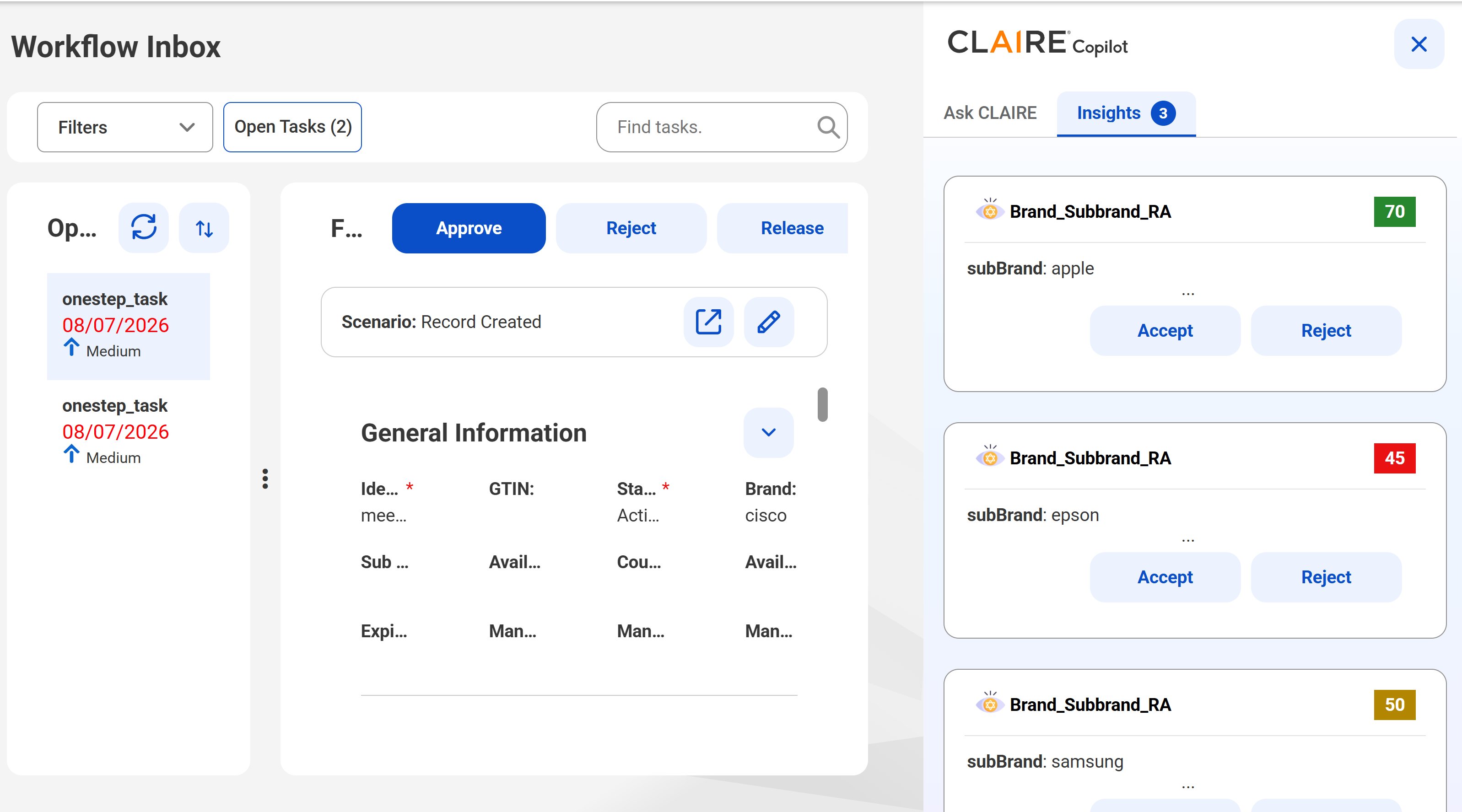
When you claim an approval task, you can now view the CLAIRE recommendations for data enrichment in the Insights panel. You can accept or reject those recommendations. MDM SaaS saves the accepted values to the record after your final approval.
The following image shows the Insights tab of the CLAIRE Copilot panel in the workflow inbox:
Preview functionality is supported for evaluation purposes but is unwarranted and is not supported in production environments or any environment that you plan to push to production. Informatica intends to include the preview functionality in an upcoming release for production use, but might choose not to in accordance with changing market or technical circumstances. For more information, contact Informatica Global Customer Support.