Type | Name | Description | Sample Value | Default Value |
|---|---|---|---|---|
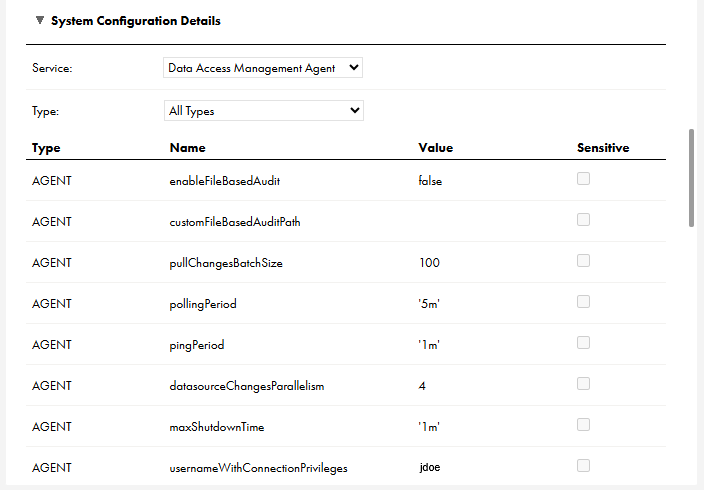
AGENT | enableFileBasedAudit | Set to true to generate audit logs. Leave as false to prevent audit log generation. | true | false |
AGENT | customFileBasedAuditPath | You can specify a directory path to which audit logs are written. The default path is the path in which you installed the Secure Agent. | log/audit/ | not set |
AGENT | usernameWithConnectionPrivileges | You must specify a user name from the tenant that has the read Connection privilege. This user name is used to retrieve the connection configuration and credentials in the runtime service required by the agent. | jdoe Note: The Data Access Management Agent and Proxy services will not start without valid values for the usernameWithConnectionPrivileges and userWithConnectionPrivileges properties. | not set |
AGENT | pullChangesBatchSize | The maximum number of updates in a batch to process. | 50 | 100 |
AGENT | pollingPeriod | The period for polling for new updates. | 1h | 5m |
AGENT | pingPeriod | How often to ping the runtime service to indicate that the agent is still up and consuming updates. | 45s | 1m |
AGENT | plugin.databricks.default.useIsAccountGroupMember plugin.databricks.<connection-id>.useIsAccountGroupMember | Grants data access based on group membership. plugin.databricks.default.useIsAccountGroupMember applies to all connections of type Databricks. plugin.databricks.<connection-id>.useIsAccountGroupMember only applies to the connection specified. This overrides the default. | true Note: You must set this to true if plugin.databricks.default.useIsMember is set to false. Both can be true. | false |
AGENT | plugin.databricks.default.useIsMember plugin.databricks.<connection-id>.useIsMember | Grants data access based on local workspace group membership. plugin.databricks.default.useIsMember applies to all connections of type Databricks. plugin.databricks.<connection-id>.useIsMember only applies to the connection specified. This overrides the default. | false Note: You must set this to true if plugin.databricks.default.useIsAccountGroupMember is set to false. Both can be true. | true |
AGENT | plugin.redshift.default.namespace plugin.redshift.<connection-id>.namespace | If your organization uses an identity provider (IdP), this allows the Secure Agent to map the IDMC user groups in the data access policies into the IdP-based roles created in a namespace in Amazon Redshift. plugin.redshift.default.namespace applies to all connections of type Amazon Redshift. plugin.redshift.<connection-id>.namespace only applies to the connection specified. This overrides the default. | my_namespace | not set |
AGENT | datasourceChangesParallelism | The maximum number of data source updates to process in parallel. | 3 | 4 |
AGENT | maxShutdownTime | How long to wait for a graceful shutdown to complete before invoking a forced shutdown. | 45s | 1m |