The OpenAPI specification, previously called Swagger specification, is a format for describing REST API endpoints.
Application Integration supports OpenAPI specification version 3.0.1. You can view the OpenAPI specification of the payload of a process that you create in Process Designer.
The OpenAPI 3.0.1 specification includes seven standard HTTP application failure fault status codes. Application Integration adds these fault status codes automatically when it generates the specification. API gateways and consumer clients can use the codes to parse, validate, and handle process error responses.
The following table describes the status codes:
Status code
Description
400
Bad Request: The request could not be processed due to invalid or malformed data in the input payload.
403
Forbidden: The requesting user doesn't have sufficient permissions to invoke this process.
404
Not Found: The requested service can't be found.
413
Payload Too Large: The request failed because the payload exceeds the maximum allowed size limit.
429
Too Many Requests: The process activity or message-rate limit was exceeded.
500
Internal Server Error: The request failed due to an unexpected server-side error.
503
Service Unavailable: The engine is not running, the process is inactive, or the request queue is full.
The OpenAPI JSON specification of a process contains process payload information such as input, output, descriptions, and process objects. The OpenAPI specification specifies the standard OpenAPI property requirements of version, info, servers, paths, and components.
For more information about the response status codes that Application Integration supports, see HTTP response status codes.
Accessing the OpenAPI JSON specification of a process
You can view the generated OpenAPI 3.0.1 JSON specification file for a process from the Explore page in Application Integration.
1On the Explore page, navigate to the process for which you want to view the OpenAPI specification.
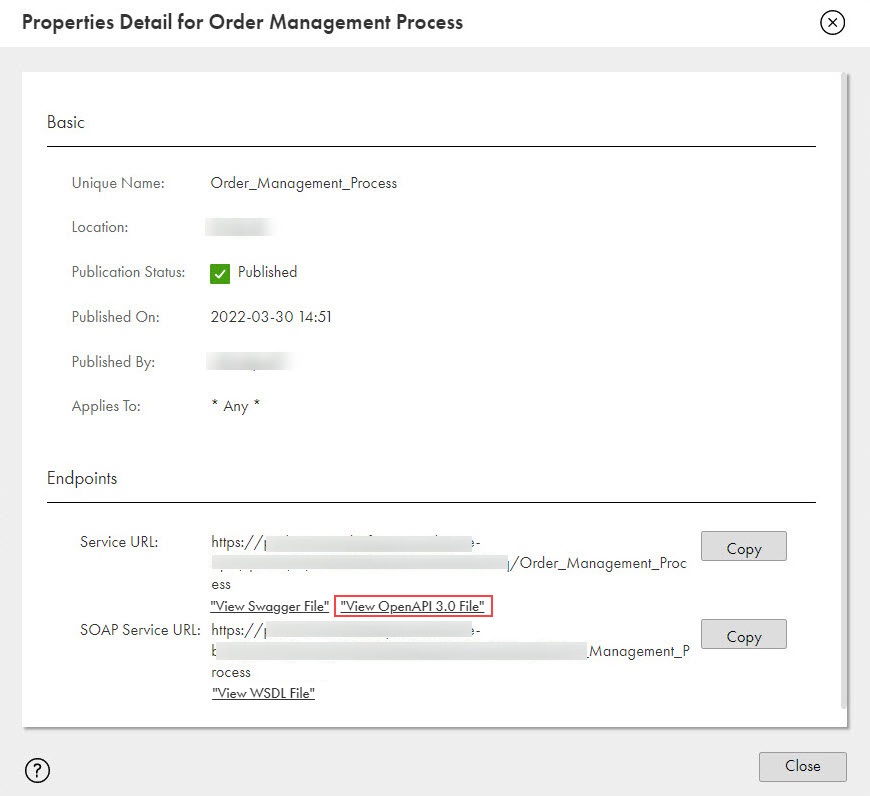
2On the Actions menu, click Properties Detail to view the generated OpenAPI file.
The Properties Detail dialog box appears.
The following image shows the link to access the OpenAPI 3.0.1 file:
3Click View OpenAPI 3.0 File to view the associated OpenAPI file.
The OpenAPI 3.0.1 specification opens on a new tab.
Note:
Although the UI link is labeled View OpenAPI 3.0 File, the underlying generated specification file strictly complies with OpenAPI 3.0.1 and includes "openapi": "3.0.1" in the header definition.
The OpenAPI 3.0.1 specification is more descriptive than Swagger 2.0 and allows you to create complex documents.
OpenAPI 3.0.1 is an updated version of the OpenAPI 3.0 standard. Because OpenAPI 3.0.1 maintains full compatibility with OpenAPI 3.0, any API tool built for OpenAPI 3.0 can process an OpenAPI 3.0.1 file without any issues.
The OpenAPI 3.0.1 specification for the processes shows the HTTP response status code, step name, and the HTTP response header name and type that you configured in the End step or the Milestone step. However, if a process contains a Receive step, the HTTP response status code remains 200 OK irrespective of the configuration.