The process is triggered when a user sends an email to a specified email address. The email’s subject and body are passed to the TicketSearchAgent process. Upon completion, a prompt is generated to assess the intent of the email. The Gemini Agent Dispatcher process then determines and executes the subsequent steps based on the identified intent.
If the email is too short or unclear to determine intent, the process follows an alternate path where the clarity check fails. In such cases, the system sends an email back to the user explaining the ambiguity and requests a more detailed description of the issue.
Additionally, the process includes error handling managed by the Generic Error Handler process to ensure robust handling of unexpected issues.
1To publish the following processes, click Actions in the row that contains the process and select Publish.
aGeneric Error Handler
bGet Embeddings
cGemini Agent Dispatcher
dFeedbackAgent
eEvaluationAgent
fSummarizerAgent
gTicketSearchAgent
hUpsert to Pinecone Index
iSearch in Pinecone
jCreate Jira Ticket
kQueryAgent
lFeatureRequestAgent
mConfidenceLevelHandlerAgent
2Open the Query Pinecone process.
3On the Temp Fields tab of the Start step, enter value for the Tmp_Top_K field and set Tmp_Retry to 0. The Tmp_Top_K field specifies the TopK value for Pinecone, which is the number of vectors retrieved.
4Save and publish the process.
5Open the PlanningAgent process.
6On the Temp Fields tab of the Start step, enter values for the following fields:
- Tmp_Model_Version. Model version to be used in all LLM calls.
- Tmp_Support_Company_Name. Name of the company using the agent.
- Tmp_Assignee_Email. Email address of the person assigned to the Zendesk ticket.
- Tmp_Output_Dimensionality. Defines the precision of data stored in Pinecone based on the vector dimensions.
- Tmp_Embedding_Model. Model used for embedding.
- Tmp_Jira_Pinecone_Index_Host. Host address of the Pinecone index used to identify similar Jira tickets.
- Tmp_Jira_Project_Key. Key of the Jira project where tickets are created.
- Tmp_RAG_Article_Cutoff. Minimum Pinecone similarity score required for entries to be included in the RAG (Retrieval-Augmented Generation) process.
- Tmp_Jira_Cutoff. Minimum Pinecone similarity score needed for entries to be considered as similar Jira tickets.
- Tmp_Similar_Pinecone_Vector_Number. Number of similar Pinecone entries sent to the agent.
- Tmp_RAG_Pinecone_Index_Host. Host address of the Pinecone index used for RAG.
- Tmp_Retry. Set to 0 to reset the counter for failed external service calls.
- Tmp_NoClarityRecipients. Email recipients who receive notifications when the user’s email is unclear and the agent cannot respond.
7Save and publish the process.
Additional information
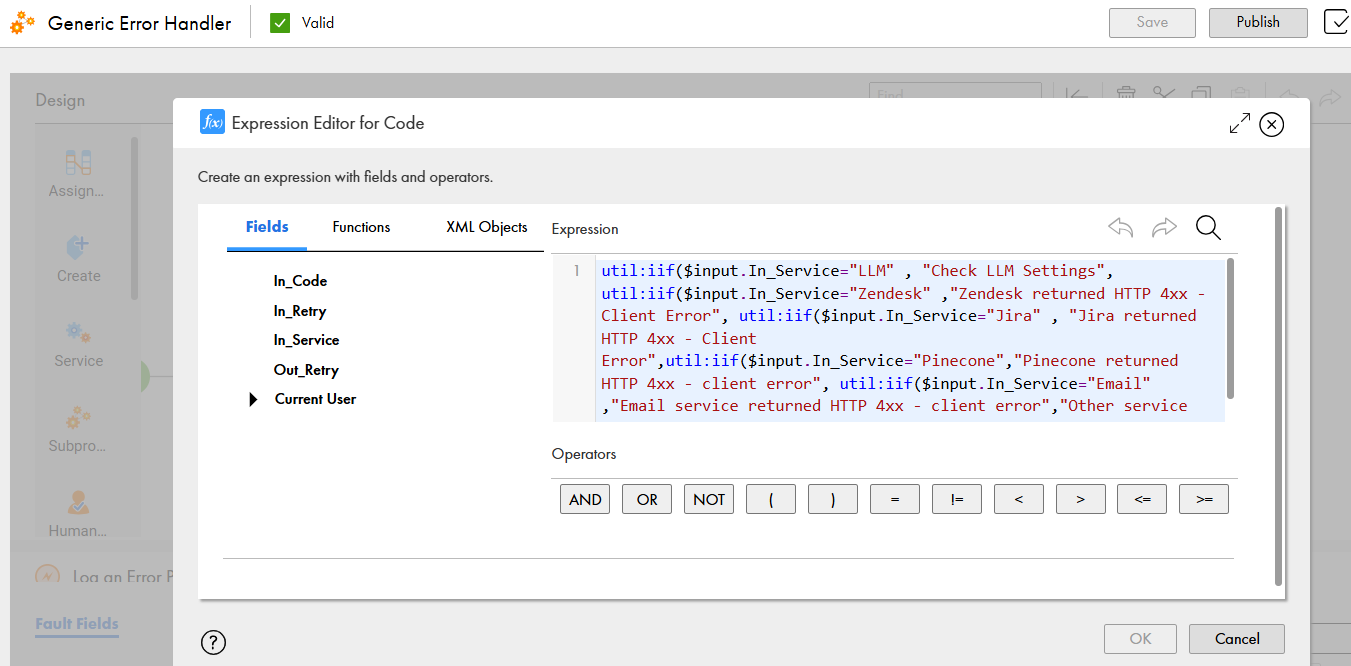
•To enhance the recipe’s functionality with calls to additional external services, users can utilize the Generic Error Handler process to catch faults and retry failed calls. To fully leverage the Generic Error Handler's capabilities, the user must update the formula that determines the Code field value in the Log an Error step. Specifically, the formula must include the value of the input field In_Service to clearly indicate which service returned the error code, similar to how all service names are referenced in the existing formula, along with the appropriate error message as shown in the following image:
•The PlanningAgent prompt must be Base64-encoded due to XML elements present in the prompt. Otherwise, parsing issues would occur. If the user wants to enhance the agent’s capabilities by adding new agents or additional paths for the planner, they must first decode the prompt into plaintext, make the desired modifications, and then re-encode it in Base64.
•To add more inputs for subagents other than the PlanningAgent, these inputs must be added to the Attributes_PO process object. This process object is part of the AgentPlanner_PO process object, which is passed as input to the Dispatcher action within the Agent Dispatcher Connector service connector and to all related subagents.