The October 2026 release includes changes in behavior for the following connectors.
Kafka Connector
A mapping that writes to a Schema Registry topic completes successfully with a Warning status if the registry rejects records with an incorrect schema. This Warning status applies even when the registry rejects all of the records in the mapping.
Previously, the mapping failed with an Error status.
Microsoft Fabric Lakehouse Connector
When Lakehouse schema is enabled and you specify a schema in the connection that differs from the schema in the target path, the schema specified in the connection takes precedence. When you create a new target or run existing mappings, if the schema in the target path does not match the schema in the connection, Microsoft Fabric Lakehouse Connector creates or writes to the target table in the schema specified in the connection.
Previously, the schema specified in the target path took precedence over the schema specified in the connection.
Open Table Connector
This release includes the following changes in behavior for Open Table Connector:
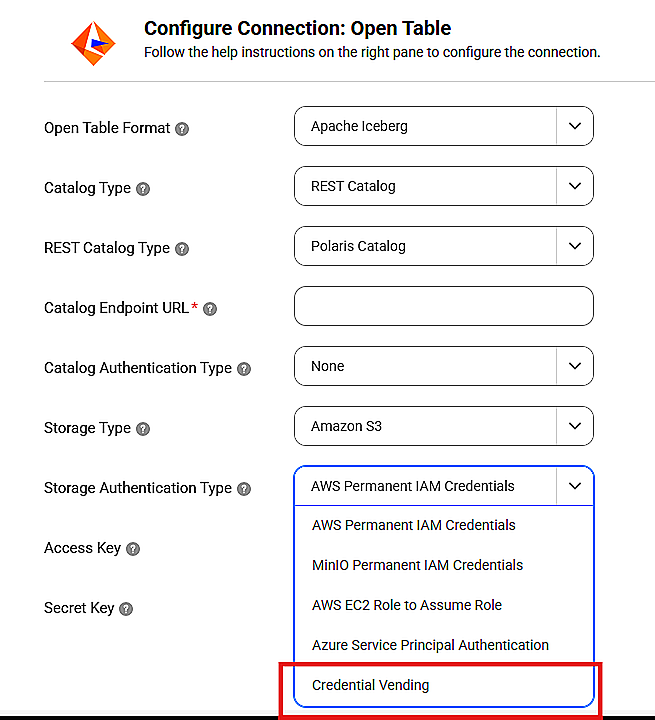
•When you configure an Open Table connection with a REST catalog, you can enable credential vending from the list of storage authentication types.
Previously, credential vending was a separate connection property on the UI.
•The advanced property Iceberg Spark Properties for Source and Lookup transformations is renamed to Iceberg Advanced Properties. However, there is no impact on its functionality.
SAP OData V4 Connector
When you configure the InfaAgent.NonProxyHost property in the proxy.ini file, you can bypass the proxy server and connect directly to the listed hosts using SAP OData V4 Connector.
If your existing SAP OData V4 connection uses a proxy.ini file configured with the InfaAgent.NonProxyHost property, the connection honors the property and bypasses the proxy server.
Previously, SAP OData V4 Connector didn't honor the InfaAgent.NonProxyHost property.