You can create a connection for connectors that are installed in IDMC. You can create a connection on the Connections page in Administrator or when you create a source, target, or lookup object in a mapping or task in Data Integration.
When you configure a connection, you specify properties for the connection. Connection properties enable an agent to connect to data sources.
1Configure the following connection details:
Property
Description
Connection Name
Name of the connection.
Each connection name must be unique within the organization. Connection names can contain alphanumeric characters, spaces, and the following special characters: _ . + -
Maximum length is 100 characters. Connection names are not case sensitive.
Description
Description of the connection.
Maximum length is 255 characters.
2If your organization use an external secrets manager to store sensitive connection credentials, perform the following steps:
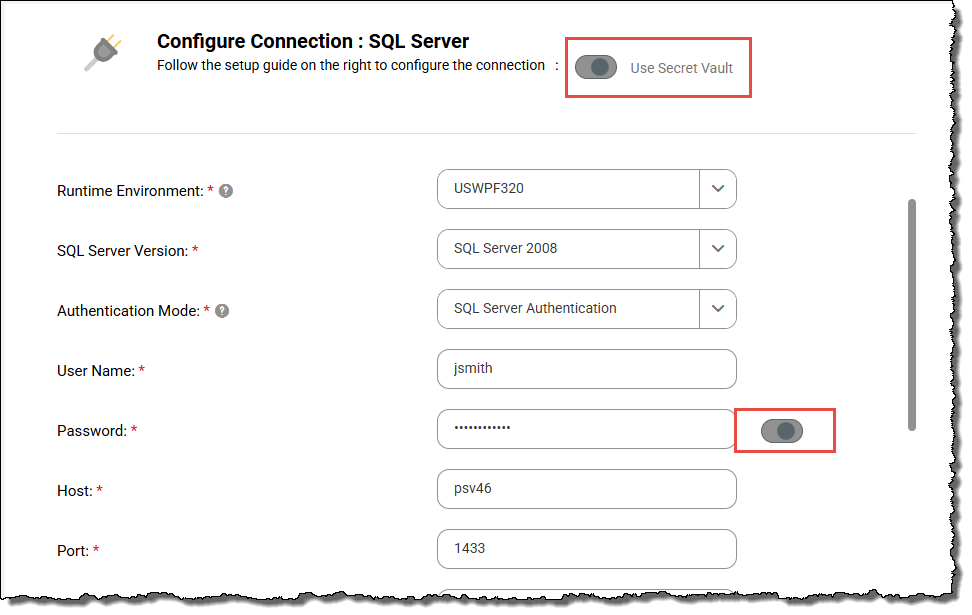
aIn the Connection Properties area, select Use Secret Vault.
bEnable the slider next to each property that you store in the secrets manager, and then enter the secret name, including the path, in the corresponding field. If the secret is a JSON object, you'll also need to include the secret key.
For example, you configure a relational connection and you store the database password in HashiCorp Vault. The secret name is secret/data/MyCredentials, and the secret key is MyPassword. To retrieve the password from HashiCorp Vault, select Use Secret Vault, enable the slider next to the Password field, and enter secret/data/MyCredentials:MyPassword in the Password field.
Basic Authentication is offered as an authentication method for some connections. For optimal security, you should choose another method because Basic Authentication is the simplest and least secure authentication method.
3Select the runtime environment to be used with the connection.
If you use an external secrets manager, all Secure Agents within the runtime environment must be installed on a local machine or VM and must be able to access the secrets manager. Additionally, the SecretManagerApp service must be running on each agent.
4Configure the connection-specific properties.
For example, if you configure a flat file connection, enter the directory where the files are stored, the date format for date fields in the files, and the code page of the system that hosts the files.
5To test the connection, click Test Connection.
6Click Save.
Connection property format
To configure a connection property to retrieve its value from a secrets manager, first enable the slider next to the property. Then enter the secret name, including the path, in the corresponding field. If the secret is a JSON object, you'll also need to include the secret key.
The following table shows the value to enter based on the format of the secret:
If you use AWS Secrets Manager, you can also enter the secret in the following format:*
<secret ARN>:<key>
Simple value, for example:
--name "MyPassword" --value "Hello123"
<secret name>
If you use AWS Secrets Manager, you can also enter the full ARN of the secret.*
* If you use AWS Secrets Manager and the account that hosts the Secure Agent differs from the account that hosts the secrets, you must enter the secret using the full ARN.
Example: Connection property format for AWS Secrets Manager
You want to configure a connection to retrieve a password from AWS Secrets Manager.
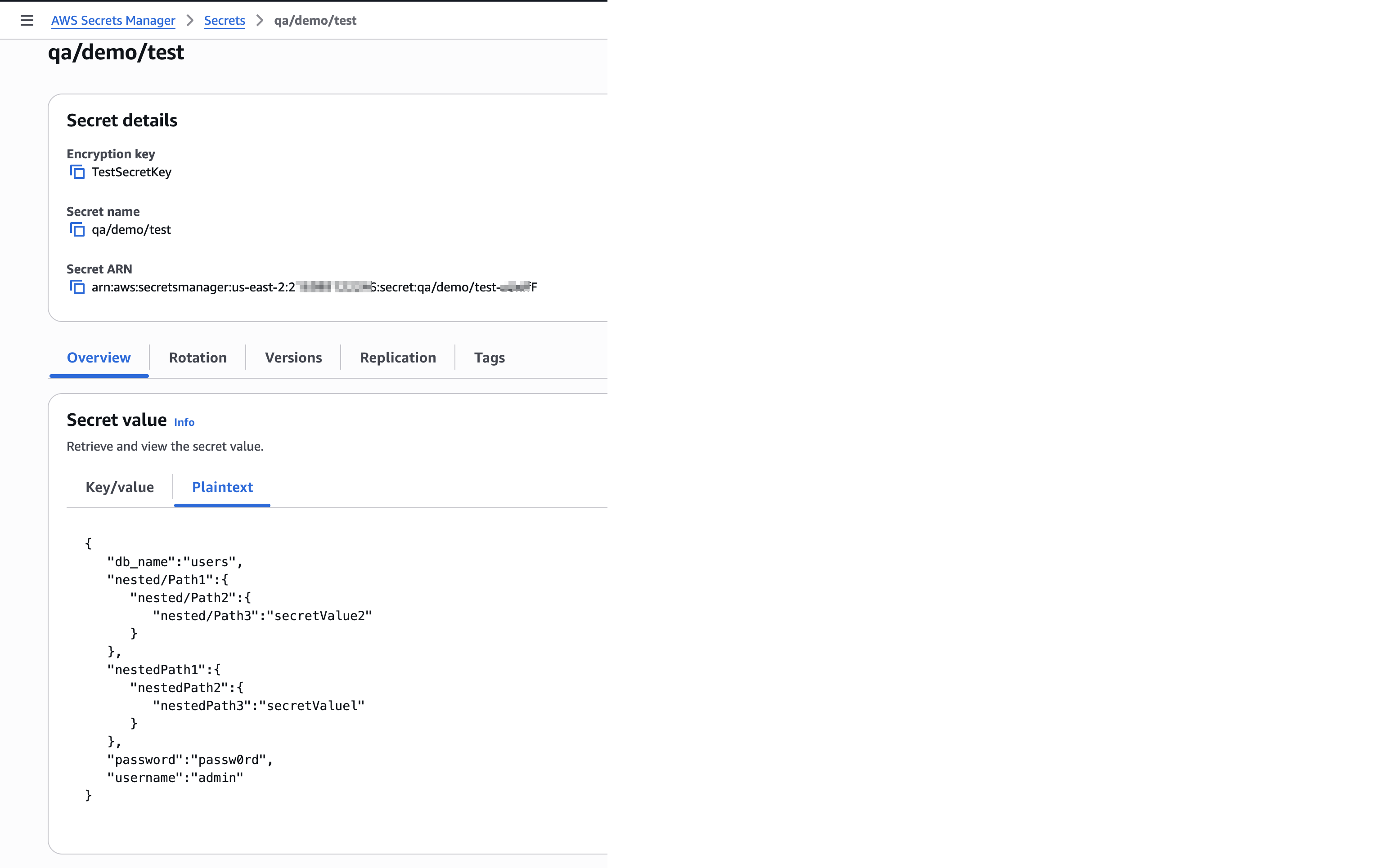
The following image shows the secret:
The secret name is qa/demo/test, the secret ARN is arn:aws:secretsmanager:us-east-2:2*********6:secret:qa/demo/test-zUxff*****F, and the key is password.
Enter either of the following values for the Password connection property: