1Click New > Components > Intelligent Structure Model, and then click Create.
2On the Intelligent Structure Model page, enter a name for the intelligent structure model.
The name can contain alphanumeric characters and underscores.
3Navigate to the project and folder where you want to save the model, or use the default location.
You can change the name or location after you save the intelligent structure model using the Explore page.
4Under AI-powered Model, select Custom AI Engine.
5In Custom AI Connection, select an existing Large Language Model connection, or click New Connection to create a new Large Language Model connection.
For more information about creating a Large Language Model connection, see Connect to Large Language Model.
6Based on the type of input, first choose whether to base the model on a file sampling or on the entire file. Select the file, and then click Discover Structure.
After you click Discover Structure, Intelligent Structure Discovery deciphers the data in the input and discovers the patterns expressed in the data. The following image shows an example of discovered structure on the Visual Model tab:
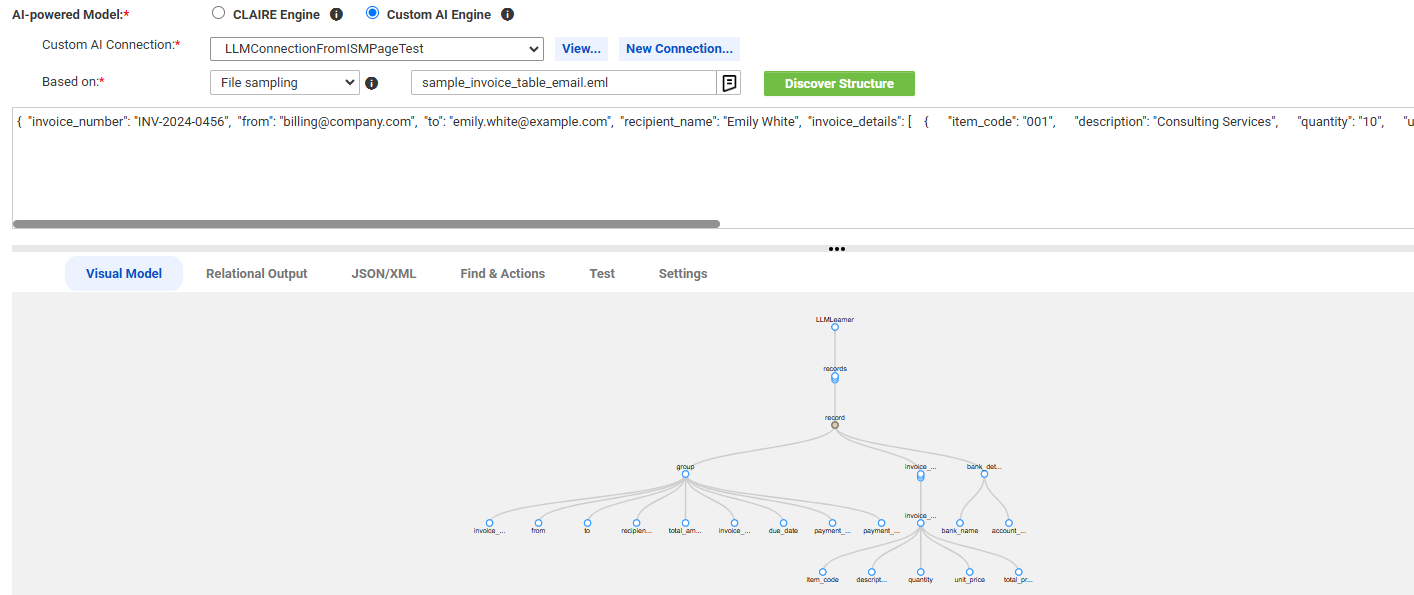
Intelligent Structure Discovery creates nodes with unique names. If Intelligent Structure Discovery discovers instances of the same type of data, it adds a number suffix to the node names. For example, if the input contains timestamps in two tables, Intelligent Structure Discovery names them timestamp1 and timestamp2.
7You can refine the structure so that when you use the model in production, the output meets your requirements.
Note:
When you process image-based PDF files using the custom AI engine, the output might be inconsistent depending on the large language model used.
For more information, see Refining intelligent structure models.
8Click Save.
Intelligent Structure Discovery generates an intelligent structure model and saves the model in the selected location.