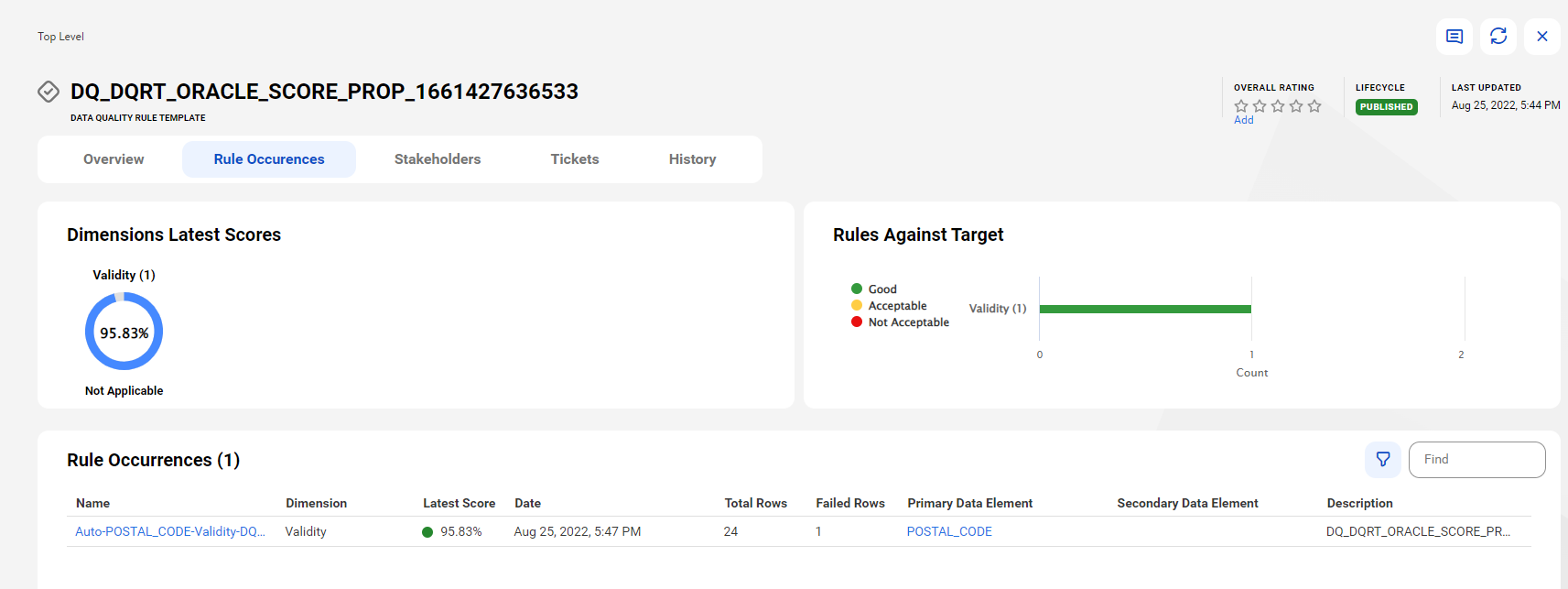
Rule Occurrences tab of a data quality rule template
On the Rule Occurrences tab of a data quality rule template, view the rule occurrences that you create manually or generate from the template.
View rule occurrences
A rule template is the business representation of a data quality rule specification. You can use a data quality rule template to create a data quality rule. A data quality rule occurrence is the business representation of a data quality rule that is run on data elements.
The following image shows the Rule Occurrences tab of a data quality rule template:
Preview valid or failed rows
On the Rule Occurrences tab, you can preview valid and failed rows for a rule occurrence associated with a rule template. By default, the system retrieves data from a maximum of 1,000 valid and failed rows.
To preview valid and failed rows, the following prerequisites apply:
•In Administrator, your organization administrator enables the Preview Data feature privilege for your user role.
•To perform drill down and to view the Preview of Successful Rows and Preview of Unsuccessful Rows in a Data Governance and Catalog scorecard, you require the following privileges for the Data Profiling service in Administrator:
- Drill Down
- Query - Create
- Query - Submit
- Data Profiling Results - View
- Sensitive Data - View
•In Metadata Command Center, your administrator enables the Data Quality option for the catalog source.
•Your administrator has connected Data Governance and Catalog with a data quality application.
•You have run the data quality rule at least once and data quality scores are available.
•The primary data element is associated with the rule occurrence and is not of a hierarchical type.
•The rule occurrence is associated with a rule template.
To preview the valid or failed rows of a rule occurrence, go to the Rule Occurrences tab on a rule template and open the Action menu for the rule occurrence for which you want to preview the valid or failed rows. From the Action menu, select Preview of Valid Rows or Preview of Failed Rows.
Note:
When you preview valid rows, you always see live results. When you preview failed rows, the results depend on the Data QualityCache Result field of the catalog source in Metadata Command Center. If your administrator selects Agent Cache, the first preview of failed rows caches the results in the runtime environment for seven days by default. Later previews appear faster. If your administrator selects No Cache, the preview of failed rows shows live results, which can take up to one hour to generate.