When you configure the Oracle SQL Loader catalog source, you define the settings for the metadata extraction capability and other optional capabilities.
The metadata extraction capability extracts source metadata from external source systems. You can also configure other capabilities that the catalog source includes.
You can save the catalog source configuration at any point after you enter the connection information. After you save the catalog source, you can choose to run the catalog source job. To run the job once, click Run. To run metadata extraction and other capabilities on a recurring schedule, configure schedules on the Schedule tab.
Configure metadata extraction
When you configure the Oracle SQL Loader catalog source, you choose a runtime environment and enter configuration parameters for metadata extraction.
1In the Connection and Runtime area, choose a serverless runtime environment or the Secure Agent group where you want to run catalog source jobs.
Note:
Serverless runtime environment options are available if the catalog source works with a serverless runtime environment.
2Choose to retain, delete, or deprecate objects that are deleted from the source system in the catalog with the Metadata Change Option.
- Retain. Retains objects that are deleted from the source system in the catalog. If you update or add a filter, the catalog retains objects extracted from the previous job and extracts additional objects that match the current filter. Objects deleted from the source system are not deleted from the catalog. Enrichments added on deleted objects and relationships are retained.
- Delete. Deletes metadata from the catalog based on objects deleted from the source system and changes you make to the filter. Enrichments added on deleted objects and relationships are also permanently lost. Objects renamed in the source system are removed and recreated in the catalog.
- Deprecate. When objects are deleted from the source system, the catalog changes the lifecycle of the imported objects to Obsolete. The lifecycle of objects also changes to Obsolete when you add exclusion filters or reduce the scope so that objects extracted in earlier jobs are no longer included. For example, the first job includes the sales schema. The second job also includes the sales schema, but excludes the sales.transactions table. In this case, the second job marks the sales.transactions object as Obsolete, even though the first job includes it. This does not impact enrichments applied to deprecated objects and relationships. Objects renamed in the source system are removed and recreated in the catalog. When you run the catalog source job again for other capabilities such as data classification, relationship discovery, or glossary association, the job doesn't consider obsolete objects. Obsolete objects remain in the catalog until they are purged when you run a Purge Obsolete Objects job on the Explore page.
Note:
You can also change the configured metadata change option when you run a catalog source.
3In the Configuration Parameters area, enter values for the following properties:
Property
Description
Control File Directory Path
Required. Path to the control file directory on the Secure Agent machine.
For example: /root/Control_files/ControlfileX.ctl
Control files are text files that contain descriptions of the data location, data format, and target tables.
Loader File Directory Path
Path to the loader file directory on the Secure Agent machine.
For example: /root/loaderDir/loader.in.ldr
Loader files are text files that contain instructions about how to locate, parse, interpret, and load data.
Default Schema
The Oracle database schema that you want to use to process the statements.
Data File Current Directory Path
Path to the directory on the Secure Agent machine from which the SQL Loader script runs. Creates the input file path when an absolute path isn't provided.
For example: /root/folder1/folder2/
Specifies the location of the <source>.csv file. If you enter a value, the catalog source job uses the information to resolve file references during connection assignment.
Default is '/'.
4Configure additional capabilities for the catalog source by clicking on the tabs.
Configure lineage discovery
Enable the lineage discovery capability and use CLAIRE to build complete lineage by recommending endpoint catalog source objects to assign to reference catalog source connections.
1Click the Lineage Discovery tab.
2Select Enable Lineage Discovery.
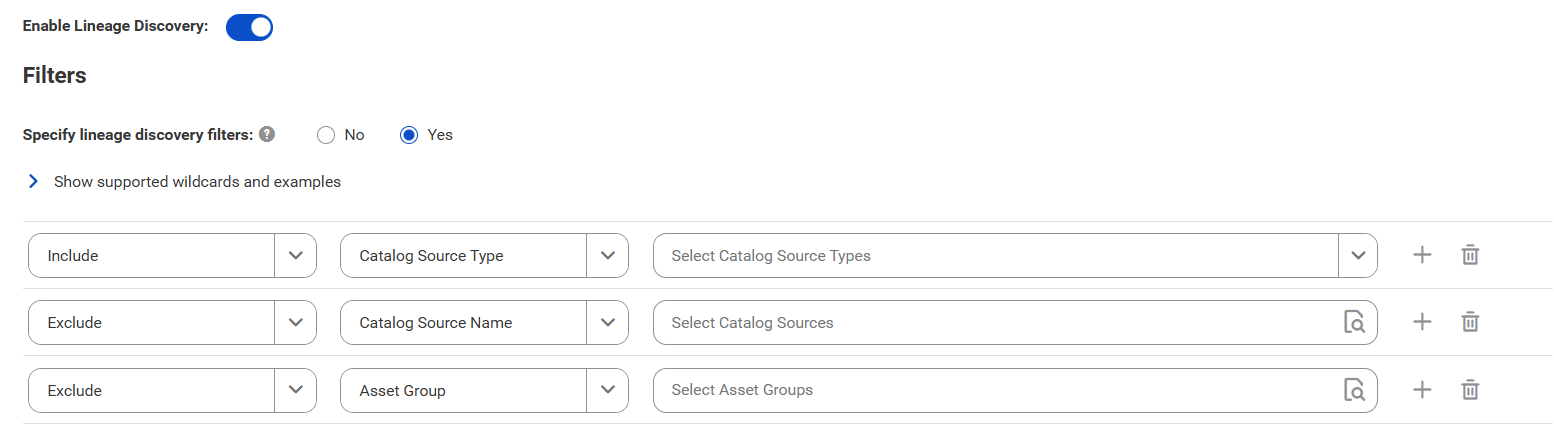
3In the Filters area, define one or more filter conditions to apply for lineage discovery.
To define filters, you can choose to select catalog source types, asset groups, or enter a catalog source name or search from a list of catalog sources.
aSelect Yes to view filter options.
bFrom the Include/Exclude list, choose to include or exclude catalog sources for lineage discovery based on the filter parameters.
cFrom the filter type list, select catalog source type, catalog source name, or asset group.
dIn the filter value field, select the required catalog source types, or click the Search button and select catalog sources or asset groups.
Filters can contain the asterisk wildcard to represent multiple characters or empty text.
The filter options appear.
Examples:
▪ To include or exclude all Oracle catalog sources, select Catalog Source Type as the filter type and select Oracle in the filter value field.
▪ To include or exclude the 'Oracle_Retail' catalog source, select Catalog Source Name as the filter type and search for the catalog source or enter Oracle_Retail in the filter value field.
▪ To include or exclude all catalog sources with names that start with 'Oracle', select Catalog Source Name as the filter type and search for the catalog source or enter Oracle* in the filter value field.
▪ To include or exclude all catalog sources with names that end with 'Retail', select Catalog Source Name as the filter type and search for the catalog source or enter *Retail in the filter value field.
▪ To include or exclude all catalog sources with names that contain 'Ret', select Catalog Source Name as the filter type and search for the catalog source or enter *Ret* in the filter value field.
▪ To include or exclude all catalog sources that are part of the 'Financial Group' asset group, select Asset Group as the filter type and search Financial Group in the filter value field.
Note:
You can't add more than one include or exclude filter for the same filter type.
eOptionally, to define an additional filter with an AND condition, click the Add icon.
For more information about lineage discovery, see Lineage discovery.