Relationship views are available for technical assets in the catalog source. You can connect assets to each other using different types of relationships.
A relationship between assets shows how the assets relate to one another. When data from a source system is ingested into the catalog, Data Governance and Catalog can automatically create relationships among the technical assets of that source system.
For more information about viewing relationships, see Relationships in the Data Governance and Catalog help.
View relationships at catalog source level
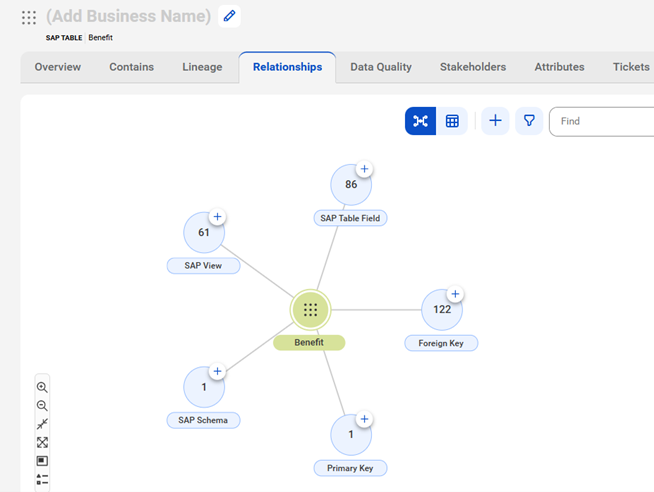
The Relationships tab of an asset page displays the relationships between the selected asset and other business and technical assets in Data Governance and Catalog.
The SAP SuccessFactors catalog source reads metadata from the input data model and creates reference assets in the model. You can view the relationship with reference objects without performing connection assignment. After connection assignment, you can view the relationship between the actual objects extracted by the SAP SuccessFactors catalog source.
To view relationships at the catalog source level, search for and open an SAP SuccessFactors catalog source, click the Relationships tab and expand the catalog source.
The following image shows the relationship between the Benefit table and the SAP Table Field, Foreign Key, PrimaryKey, SAP Schema and SAP View: