In May 2026, we've rolled out the following enhancements as part of the April 2026 release:
•You can now extract metadata from workbooks connected to Salesforce Data 360 objects, such as Data Model Objects (DMO), Data Lake Objects (DLO), and Calculated Insight Objects (CIO).
•You can perform connection assignment to view lineage between a Salesforce Data 360 source system and a Tableau source system.
- You can use OAuth Machine-to-Machine authentication to run data profiling and data quality jobs.
- When you extract metadata from Databricks Unity Catalog, you can use the Extract Tags property to specify whether you want to extract tags assigned to the objects you extract.
- You can now extract metadata from the following Databricks Unity Catalog objects:
▪ Volume
▪ Function
▪ Dashboard
- You can add metadata extraction filters based on volumes and dashboard paths.
You can configure Microsoft Azure Synapse Analytics Parameters to extract Microsoft Azure Synapse Analytics notebooks with a Microsoft Azure Synapse Analytics connection in the Microsoft Azure Data Factory catalog source.
You can configure glossary association and data classification capabilities on the following catalog sources:
•Oracle Business Intelligence
•TIBCO Spotfire
For more information about catalog sources, see the corresponding catalog source help.
Profiling enhancements
This release includes the following profiling enhancements:
Amazon Redshift
You can use the Redshift IAM Authentication via AssumeRole authentication type to connect to Amazon Redshift source systems and run a data profiling job.
Apache Hive
You can run data profiling and data quality jobs on metadata extracted from any schema regardless of the schema name that you specified in the connection properties.
Google BigQuery
This release includes the following enhancements:
- You can apply profiling filters based on external tables and stored procedures.
- When you choose All Rows or Limit N Rows as the sampling type, you can run data profiles on external tables.
Salesforce
This release includes the following enhancements:
- You can run data profiling and data quality jobs using the Salesforce Data 360 connection on the following objects extracted from Salesforce Data 360 applications:
▪ Data Lake Object
▪ Data Model Object
▪ Calculated Insights
- When you apply data profiling filters, you can select object types based on the Salesforce application that you extract metadata from.
SAP Datasphere
You can run data profiling and data quality jobs on the following objects:
- Views
- Analytical Modules
Snowflake
This release includes the following enhancements:
- You can run profiling jobs on Snowflake Hybrid tables and views.
- You can run data profiling and data quality jobs on metadata extracted from any database or schema regardless of the database or schema name that you specified in the connection properties.
Microsoft Azure SQL Server
You can use the Service Principal authentication to connect to Microsoft Azure SQL Server source systems and run data profiling jobs.
Microsoft Fabric Data Lakehouse
You can run data profiling and data quality jobs on metadata extracted from any database or schema regardless of the database or schema name that you specified in the connection properties.
For more information about catalog sources, see the corresponding catalog source help.
Authenticate with an external secrets manager
You can now configure AWS Secrets Manager and Azure Key Vault authentication tools when you configure the following catalog sources:
•MySQL
•SAP HANA Database
•Teradata Database
You can use secrets manager authentication when you run data profiling and data quality jobs and to preview failed rows with and without cache.
For more information about how to configure Secrets Manager in Administrator, see Organization Administration.
Incremental metadata extraction
You can now run incremental metadata extraction jobs on the following catalog sources:
•Amazon Athena
•Strategy Cloud
A full metadata extraction extracts all objects from the source to the catalog. An incremental metadata extraction considers only the changed and new objects since the last successful catalog source job run. Incremental metadata extraction doesn’t remove deleted objects from the catalog and doesn’t extract metadata of code-based objects.
For more information about catalog sources, see the corresponding catalog source help.
REST API enhancements
You can use the catalog source management APIs to run incremental metadata extraction jobs.
This release includes the following workflow enhancements:
Define workflow events based on conditions
You can configure workflows tailored to your organization's specific requirements, enabling different approval processes. For example, a highly sensitive glossary or related to GDPR demands a stringent multi-step approval, whereas finance and HR processes follow their own distinct approval workflows.
You can add conditions for workflows used in tickets for approval based on asset hierarchies, relationships, attributes, stakeholder roles, and asset groups. You can select asset types and add conditions in Metadata Command Center. Data Governance and Catalog evaluates workflow events by prioritizing the first matching condition and then starts the appropriate workflow.
You can reorder existing workflow events to ensure that high-priority events are processed first. You can move a workflow event up, down, to the top, or to the bottom of the list of workflow events, based on your business requirement.
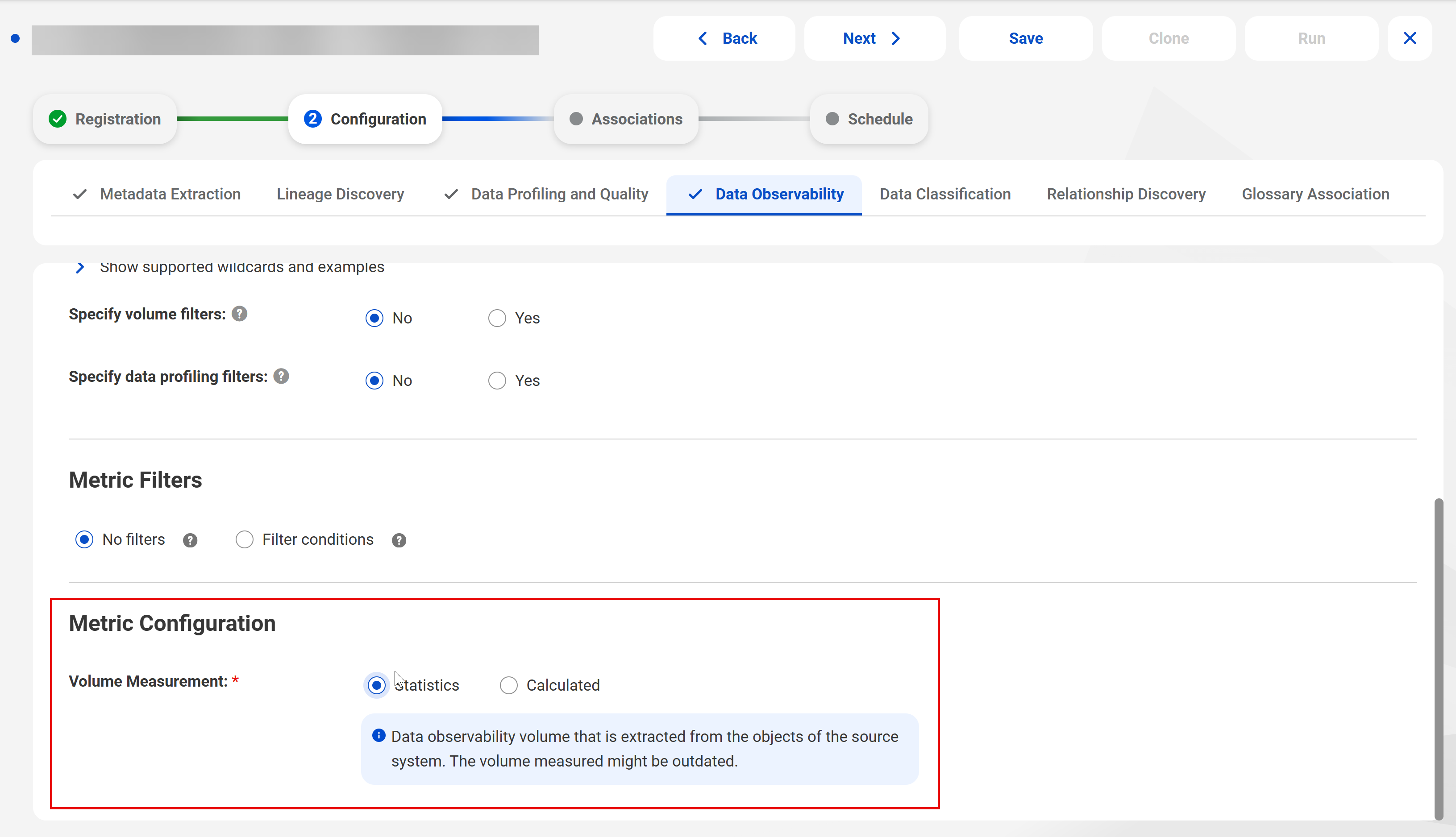
When you run a data observability job on a catalog source in Metadata Command Center, you can use a statistical volume measurement based on the earlier collection of the metadata, or you can measure the current volume when you run the job. For catalog sources that provide the data observability, you can choose Statistic or Calculated to configure how the data observability job measures metadata volume.
The following image shows a catalog source with data observability enabled: