The October 2026 release of Business 360 Console includes the following new features and enhancements.
Mapping fields
In modernization projects, you can now use an interactive user interface to review and map objects between the MDM Hub and MDM SaaS. You no longer need to generate mapping files to manually map fields.
You can continue to edit or modify manual mapping files for existing modernization projects that aren't completed.
The modernization projects now include the following enhancements:
•You can create a consolidated summary of modernization progress across selected modernization projects. The summary shows key metrics on a read-only page, such as the number of objects modernized, in progress, pending, and excluded from modernization.
•You can now archive modernization projects to accommodate more active projects. However, archived projects are read-only and you can't move them to the active state again.
When master records belong to multiple populations, you can now specify the population parameter in the Search Match API version 2 to search within a specific population. For example, if your customer data includes the Chinese, Japanese, and US populations, specify Chinese as the population parameter to return master records that match the Chinese population.
To search by population, the master records must have population names:
•For master records created after the April 2026 release, MDM SaaS automatically assigns population names to master records based on the populations of their source records.
•For records created before the April 2026 release, use the Migrate API to add population names to master records.
After you assign populations to master records, run the Generate Search Indexes or Match Keys job to generate match keys based on the assigned population.
To enhance search accuracy, MDM SaaS now returns more relevant results. When you search for records, you might notice changes in your search results. For example, a search for a record with the first name Benjamin also returns records with the first names Ben and Benny.
Reset organization
You can reset your organization to its default, newly provisioned state. A reset permanently deletes all data, assets, configurations, jobs, and job schedules in MDM SaaS. Consider a reset when configurations or extensive customizations make a development or QA organization difficult to manage, and starting over is simpler than fixing it. To enable reset for your organization, contact Informatica Global Customer Support.
When you run an ingress job, you can update individual fields in a target record instead of replacing the entire record. The update applies only to the fields in the source system that are mapped to the target fields. Other fields remain unchanged. You can also control how the update handles empty values in mapped fields. When a mapped field is empty in the source system, you can overwrite the target value with null or leave it unchanged.
Note:
This functionality is available only after you migrate your rule associations to use Enrichment and Validation Orchestrator in organizations created before the October 2025 release.
You can now create folders within a dynamic pool to group dynamic fields by topic or purpose. You can add dynamic fields to folders at any level and drag them to rearrange their order. When you design your custom page layout, you can add these folders to the fields component on the page.
For more information about dynamic pools, see Dynamic pools.
Default values
You can now configure default values for all business entity fields. When users create a record, MDM SaaS automatically populates the fields with their default values, which users can choose to edit. When you ingress, import records, or create records through REST APIs, fields without values are updated with their default values.
For more information about default values, see Default values.
Enrichment and Validation Orchestrator
Enrichment and Validation Orchestrator includes the following new features and enhancements:
Error messages in Application Integration-based plugins
The Application Integration-based plugins for validation and cleansing can now return error messages for the fields that fail validation. If you configure the rule associations to show these messages, those fields display the error messages. As a result, you can now show specific reasons for validation failures instead of a generic message.
Non-anonymous process authentication
If you enable a data enhancement rule to use a process with non-anonymous access, your organization can now use the session ID authentication type in addition to the JWT authentication type.
Empty field handling
You can now choose to run objectives on empty fields in lenient mode or controlled mode.
In the lenient mode, an objective runs when sibling fields at different levels, such as root fields and field groups, are updated. You can map business entity fields to input fields that mirror the field structure of a business entity. When input fields of an objective are empty and their sibling fields change, the objective can run on empty fields even if those fields belong to different levels.
In the controlled mode, an objective runs only when sibling fields at the same level, such as a single field group or a nested field group, are updated. Use controlled mode when you want control over which fields an objective can run on when its input fields are empty.
REST API
Business 360 REST API includes the following new resource:
Hierarchy API
Use the hierarchy REST API to create, update, delete, and filter hierarchies. You can add, retrieve, and delete parent and child records. You can move records within a hierarchy or across hierarchies. You can also retrieve the exact location of a specific record in a hierarchy by returning all paths from the parent record to the child record. Additionally, you can find a list of hierarchies that a record is part of based on its business ID.
For more information about the REST APIs to manage hierarchies, see Hierarchy API.
Business events based on native workflows
You can design native workflows in Business 360 Console for business events related to business entity records, relationships, and hierarchies. Stakeholders can view, act on, and add comments to related tasks in the task inbox of business applications. They can also track the status of their workflows in the ticket manager.
Native workflows
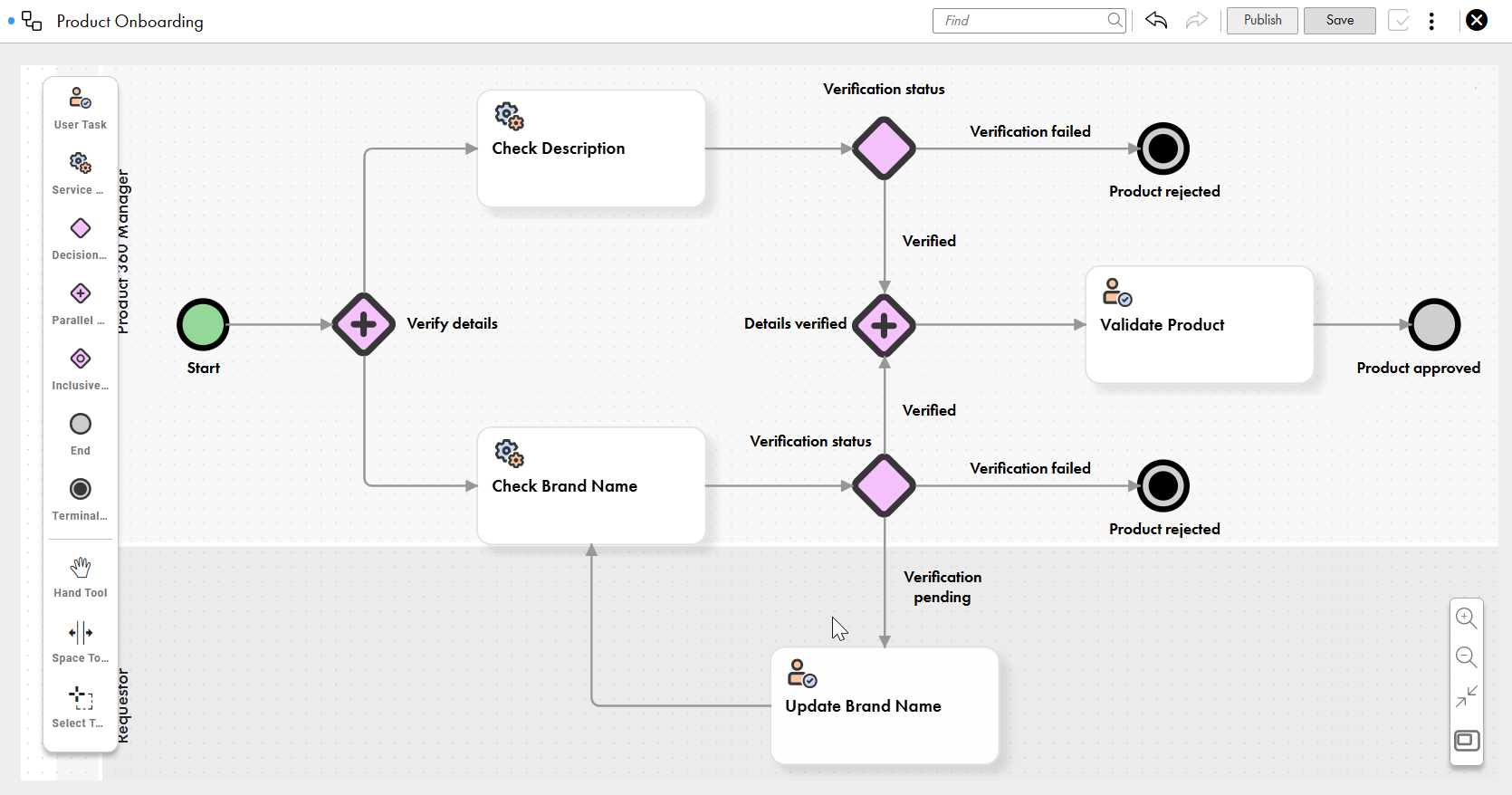
You can design native workflows from templates or create them from scratch in Business 360 Console.
The workflow canvas includes the following key components:
- User task. Orchestrates human intervention. Assign user tasks to relevant users, user roles, and user groups who can act on and resolve them.
- Service task. Automates tasks, such as running Application Integration processes, retrieving rule association statuses, or reading business entity field values. Use service tasks to automatically route workflows without human intervention.
- Decision gateway. Routes workflows in one direction based on task outcomes.
- Inclusive gateway. Routes workflows in one or more directions based on task outcomes.
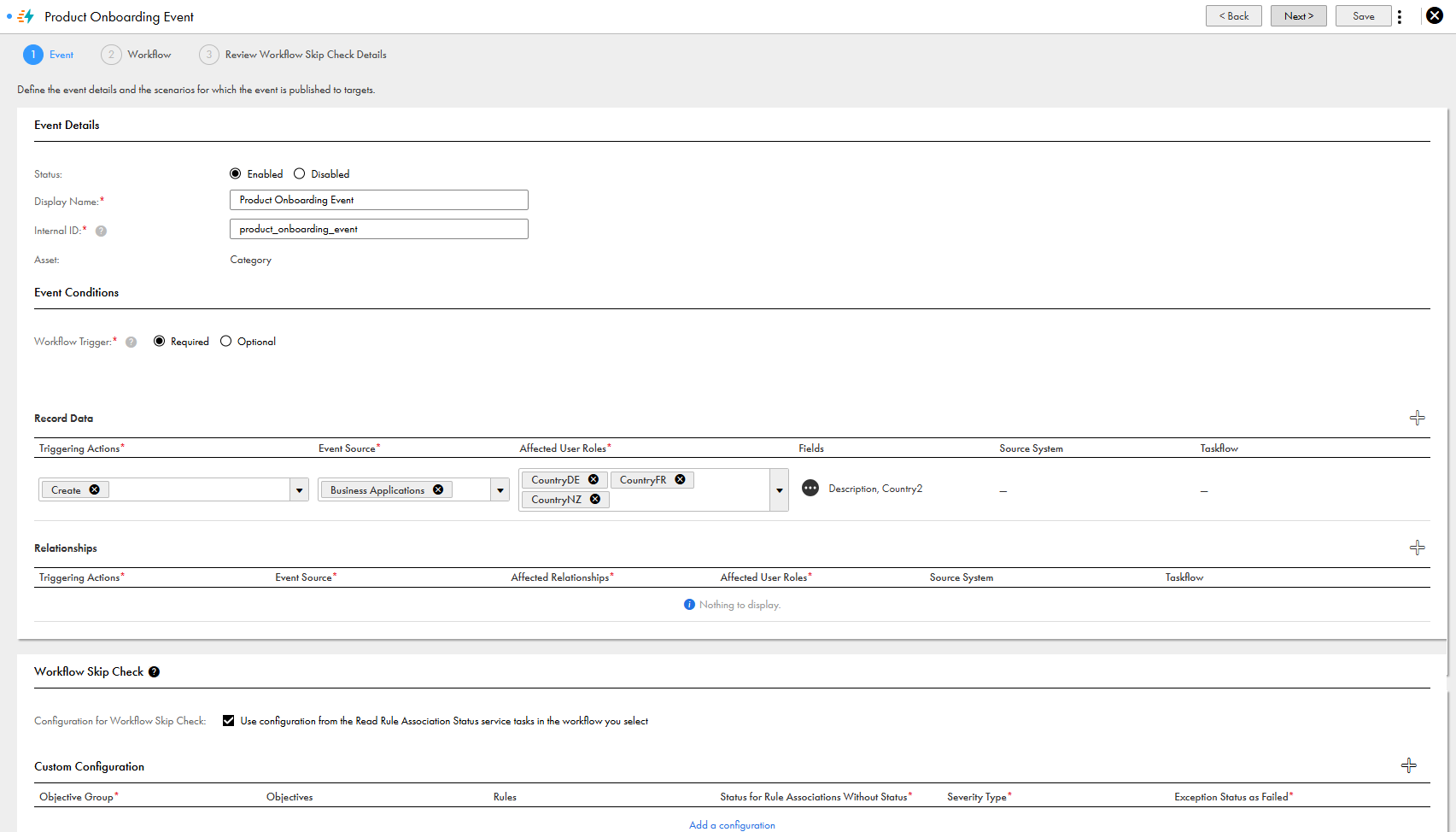
You can define business events in Business 360 Console to trigger native workflows on record, relationship, or hierarchy changes, such as create, update, delete, manual merge, unmerge, and resolve potential matches.
You can also configure business events to skip workflows for record data that passes validation against objectives that you specify.
The following image shows a sample business event that uses the product onboarding workflow:
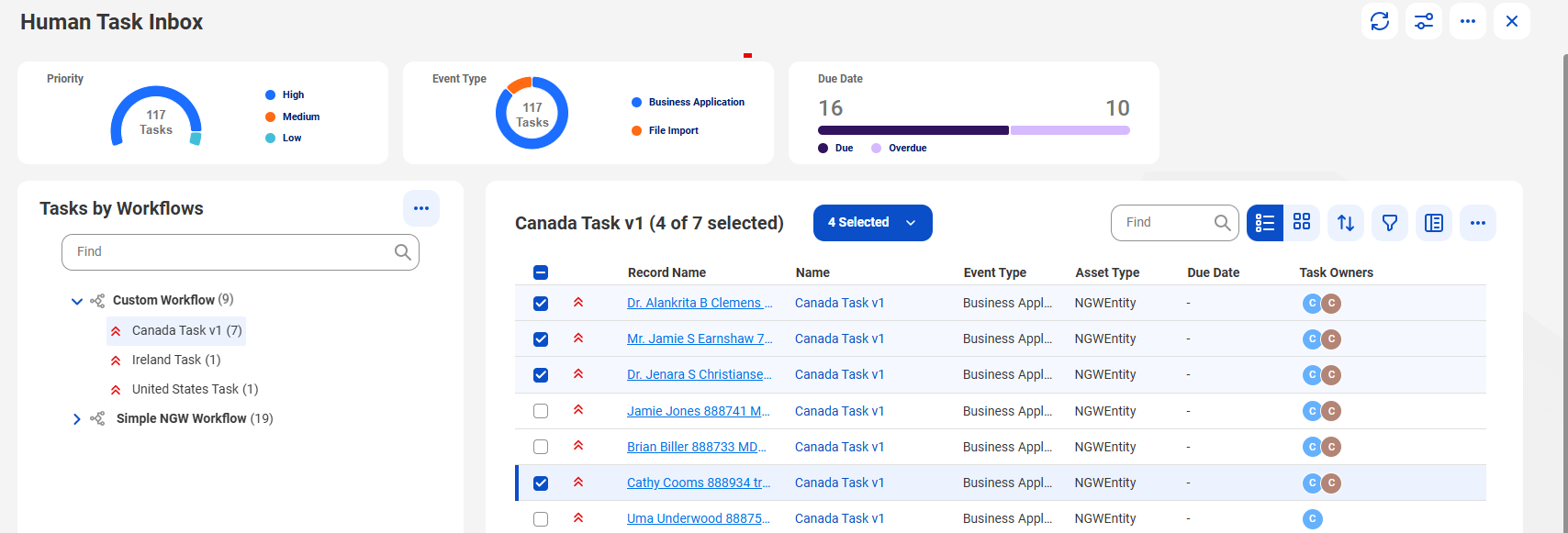
The task inbox is a new component for viewing tasks created by native workflows.
You can perform the following actions in the task inbox:
- Claim, act on, and comment on tasks individually.
- Group tasks by workflows, and claim, act on, and comment on multiple tasks at once.
- Assign or reassign individual or multiple tasks to users, user roles, or user groups.
- View a process flow that shows the status and position of each task in the workflow.
- Filter, sort, and search for tasks based on task details.
The following image shows the task inbox:
Ticket manager
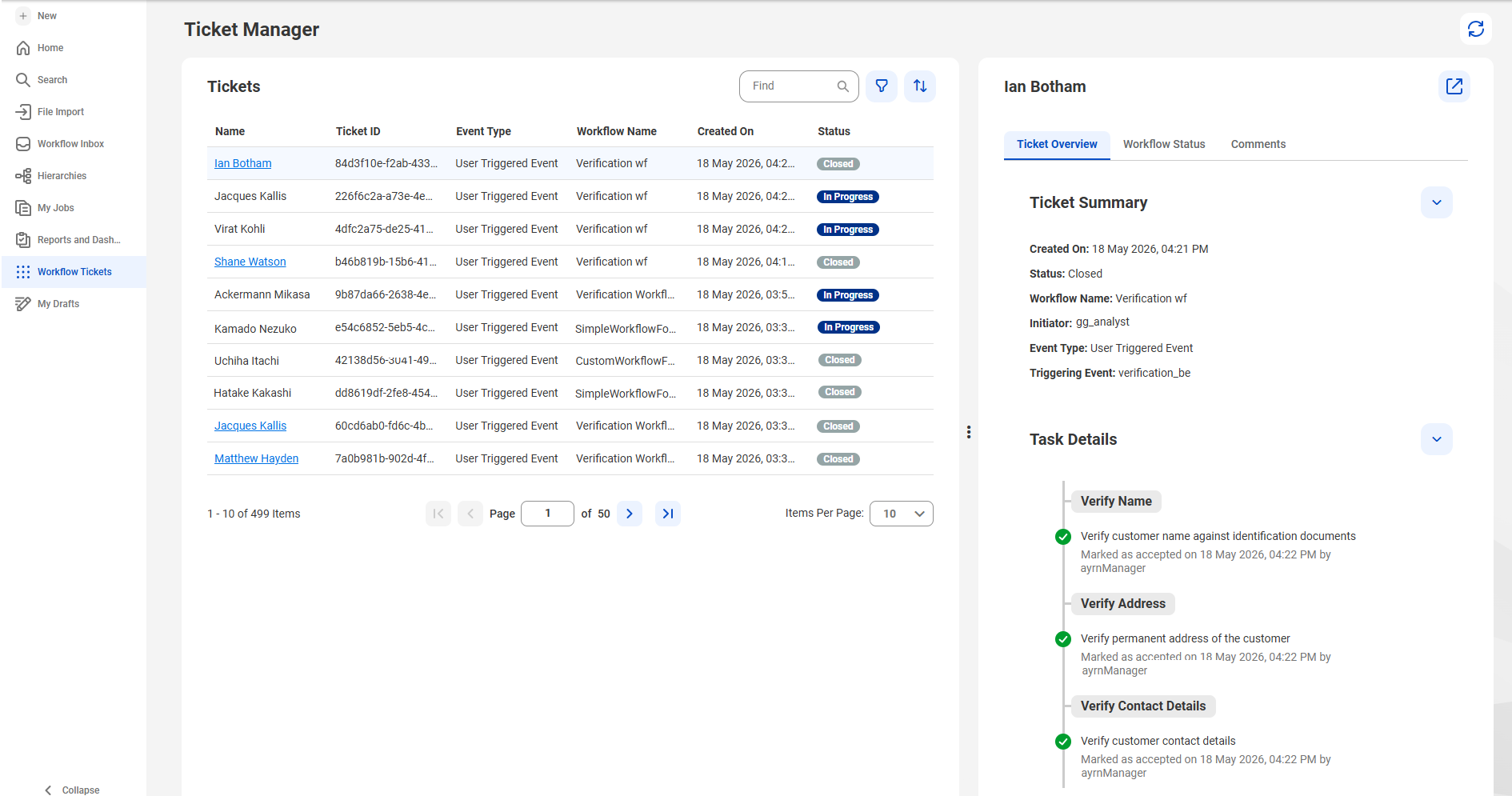
Users can track the status of their updates in the ticket manager. A ticket is created automatically when a workflow is triggered, and show workflow milestones, statuses of all the tasks in a workflow, and the comments as reviewers complete their tasks.
For example, a ticket for a product onboarding workflow lists all the tasks, such as validation of product name, brand name, and description, and approval or rejection of the product. The ticket is closed after the product is approved or rejected.
The following image shows the ticket manager:
Note:
These features are being made generally available in phases. If they aren't available in your organization, contact Informatica Global Customer Support.
Disabling and enabling business events
You can disable business events that are based on native or external workflows. Disable business events to prioritize other business events or to save them for future use. You can enable disabled business events when you want to use them.