Secure Agent Services > Data Access Management Proxy service > Data Access Management Proxy service properties
  

Data Access Management Proxy service properties

To set up the Data Access Management Proxy service for the first time, specify a user name from the tenant that has the "read Connection" privilege and the "read Secure Agent Group and Secure Agent" privilege. The Secure Agent uses this user name to retrieve the required connection configuration and credentials in the runtime service.
Note:
If your organization enables permissions on the connection, the user referenced as the userWithConnectionPrivileges requires the same permissions.
To change or optimize the behavior of the Data Access Management Proxy service, configure its properties in the System Configuration Details section when you edit a Secure Agent.
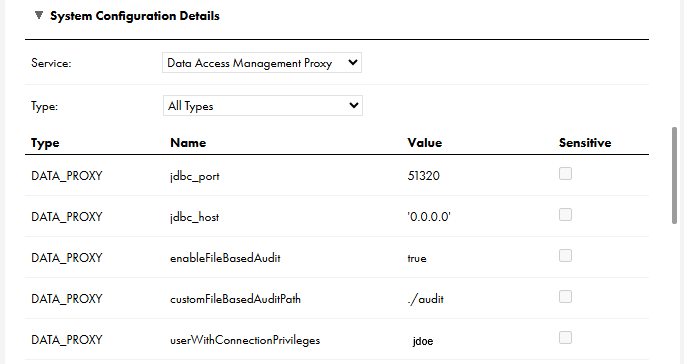
The following image shows the Data Access Management Proxy service properties:
The image shows the Data Access Management Proxy service properties. When you view or edit a Secure Agent and select the Data Access Management Proxy, the Data Access Management Proxy properties appear in the System Configuration Details area. In this image, the service type is set to "All Types," and several JDBC, file, and user properties display.
You can configure the following system properties of the Data Access Management Proxy service in the System Configuration Details section:
Type
Name
Description
Sample Value
Default Value
DATA_PROXY
enableFileBasedAudit
Set to true to generate audit logs. Leave as false to prevent audit log generation.
true
false
DATA_PROXY
customFileBasedAuditPath
You can specify a directory where the Secure Agent writes audit logs. The default path is the path in which you installed the Secure Agent.
log/audit/
not set
DATA_PROXY
userWithConnectionPrivileges
For the proxy to be accessible, specify a user name from the tenant that has the "read Connection" privilege. The Secure Agent uses this user name to retrieve the required connection configuration and credentials in the runtime service.
jdoe
Note:
The Data Access Management Proxy service will not start without a valid value for the userWithConnectionPrivileges property.
not set
DATA_PROXY
jdbc_port
Port exposed by the proxy for querying the proxy.
3306
51320
DATA_PROXY
jdbc_host
The network interface this connector binds to as an IP address or a hostname. If null or 0.0.0.0, then bind to all interfaces.
127.0.0.1
0.0.0.0