The AI Agent Runtime service is the Secure Agent service that runs AI agents.
You can change the behavior of the AI Agent Runtime service by configuring some of its service properties. For example, you might want to change the Python external library directory or the level of detail written to log files.
You can change service properties when you edit the Secure Agent in Administrator. For more information about configuring Secure Agent service properties, see "Configuring Secure Agent service properties" in the Administrator help.
AI Agent Runtime service properties
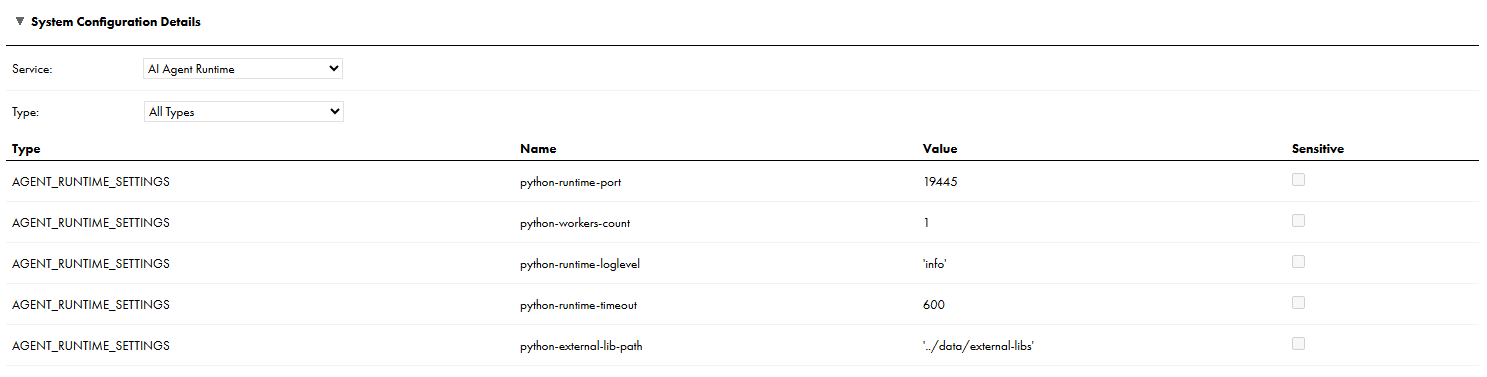
To change or optimize behavior of the AI Agent Runtime service, configure the AI Agent Runtime service properties. Configure the properties in the System Configuration Details area when you edit a Secure Agent.
The following image shows the AI Agent Runtime service properties:
You can configure the following AI Agent Runtime service properties:
Type
Name
Description
AGENT_RUNTIME_SETTINGS
python-runtime-port
Access port number for the AI agent endpoint. Default is 19445.
AGENT_RUNTIME_SETTINGS
python-workers-count
Number of worker processes for the Python runtime. Default is 1.
AGENT_RUNTIME_SETTINGS
python-runtime-loglevel
Level of detail that the AI Agent Runtime service writes to log files.
The following values are valid:
- 'info'. Includes fatal errors, warning messages, and informational messages.
- 'debug'. Includes fatal errors, warning messages, informational messages, and more detailed messages to help you with debugging.
Default is 'info'.
AGENT_RUNTIME_SETTINGS
python-runtime-timeout
Maximum duration, in seconds, for which the worker process waits before timing out. Default is 600.
AGENT_RUNTIME_SETTINGS
python-external-lib-path
External library path for any additional Python libraries you need to install for your AI agents.
You can enter multiple paths. Separate each path using a colon (:). For example:
Some Secure Agent services, like Process Server and the AI Agent Runtime service, might need to be restarted after they are upgraded. You can configure a restart schedule for these services after a minor upgrade like a monthly upgrade or a patch release.
Configure the restart schedule on the General tab of the Settings page in Administrator. When you configure a restart schedule, you select the day of the week and time in which to restart the services. For example, you might schedule the restarts for Sundays at 00:00 GMT.
If you configure a restart schedule, the AI Agent Runtime service restarts according to the schedule or seven days after the upgrade, whichever occurs first. If you don’t configure a restart schedule, the AI Agent Runtime service restarts as soon as the Secure Agent is upgraded.
For more information about configuring a restart schedule after an upgrade, see "Configuring a restart schedule" in the Administrator help.