1Open the agent flow in the agent flow canvas.
2Validate and save the agent flow.
If any errors are found, fix them. You can't deploy an invalid agent flow.
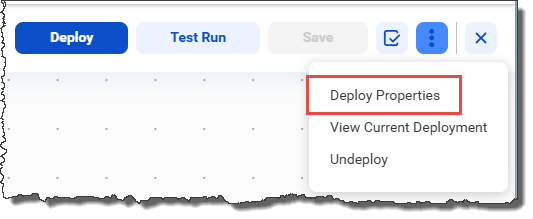
3If you've previously deployed the agent flow, but you want to change the deployment properties before you re-deploy, select Deploy Properties from the kebab menu in the upper right corner, configure the properties, and click OK.
The following image shows the Deploy Properties option:
4Click Deploy at the top of the canvas.
- - If this is the first time you're deploying the agent flow, the Deploy dialog box appears. Enter the deployment properties and click Deploy.
- - If you've previously deployed the agent flow, a warning appears alerting you that the current deployment will be replaced. To continue with the deployment, click OK.