AI agents that can act on users’ behalf are growing in popularity, but to be effective, they need to read data from and perform actions on your live data systems. Model Context Protocol (MCP) is an open protocol that solves this problem by providing a standardized way for large language models (LLMs) to interact with tools, such as data systems and processes. You can leverage MCP to expose the AI agents that you create in AI Agent Engineering as tools that make your other AI agents more accurate and contextual.
Preview Notice:
Effective in the April 2026 release, AI Agent Engineering is available for preview.
Preview functionality is supported for evaluation purposes but is unwarranted and is not supported in production environments or any environment that you plan to push to production. Informatica intends to include the preview functionality in an upcoming release for production use, but might choose not to in accordance with changing market or technical circumstances. Note that if you are working on a preview POD, all data is excluded from SOC 2 compliance coverage. For more information, contact Informatica Global Customer Support.
Say you want to enable your AI agent to interact with an AI agent that was created and deployed using AI Agent Engineering. You can use MCP to bridge the gap from the agent's REST API endpoint to your AI agent. While MCP can connect to a variety of data systems, this article focuses on REST APIs.
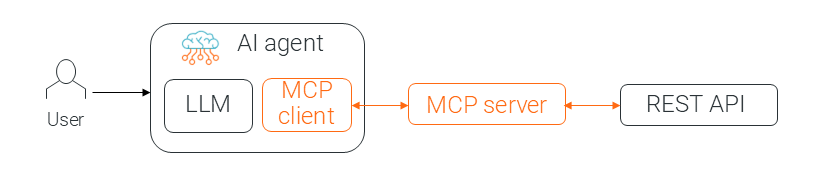
MCP connects AI agents to REST API systems with a client-server architecture. An MCP server defines how agents can interact with a specific REST API, and an MCP client creates a 1:1 connection from an agent to an MCP server. To use MCP to connect a REST API endpoint to an agent, you first create an MCP server and then add a reference to the server in your agent’s MCP client. The following image shows the MCP components in a simplified architecture:
When users of the AI agent ask it to perform a task related to the API, the agent uses the client to talk to the server. The server’s response comes back to the agent, which then uses its LLM and the new information to write a natural language response to the user.
Let’s walk through the process of creating an MCP server for this use case in more detail.