You can view the dependencies for an asset. You might want to view asset dependencies before performing certain operations on an asset.
For example, you can't delete an asset if another asset depends on the asset. You must first delete the dependent assets and then delete the asset.
Perform the following steps to find the dependent assets of an asset:
1On the Explore page, click Actions in the row that contains the asset.
2Select Show Dependencies.
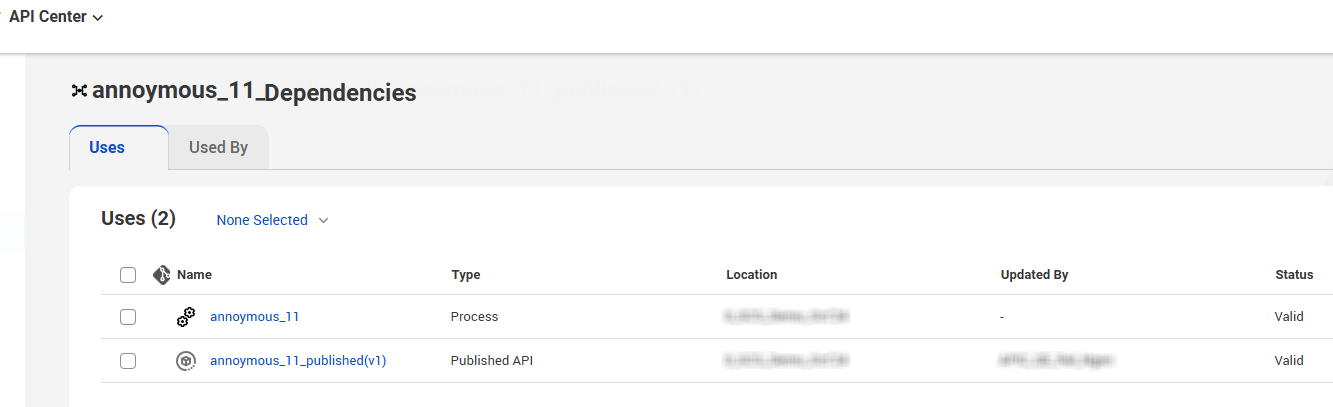
The Dependencies page opens showing the Uses tab by default.
The following table explains the available tabs on the Dependencies page:
Tabs
Description
Uses
Lists the assets that the selected asset uses. For example, a managed API is dependent on its parent assets, the published API, and API design.
Used By
Lists the assets that use the selected asset. For example, a policy might be used by a managed API.
The following image shows the Dependencies page for a managed API with the Uses tab open:
To drill down to the lowest level dependency, you can continue to view dependencies for each asset that appears on the Dependencies page. At the top of the Dependencies page, a breadcrumb shows the chain of dependencies.
The published APIs and managed APIs automatically inherit their location from the source asset.
For APIs created from a designed API design, API Center creates the published APIs and managed APIs in the same location as the original API design. Similarly, if you create a published API that does not originate from a design API, API Center uses the location of the source process to determine where to save the published and managed APIs.