File events
View and track file events on the Events page. A file event shows the status of a file. Informatica Intelligent Cloud Services creates a file event for every file that you exchange with the portal provider.
The Events page displays detailed processing information for every file that your company exchanges with the portal provider.
Clicking an EDI file event downloads the file that created the event. Clicking the information icon next to an EDI file event opens the event page, with additional details about the event.
The following image shows a sample Events page:
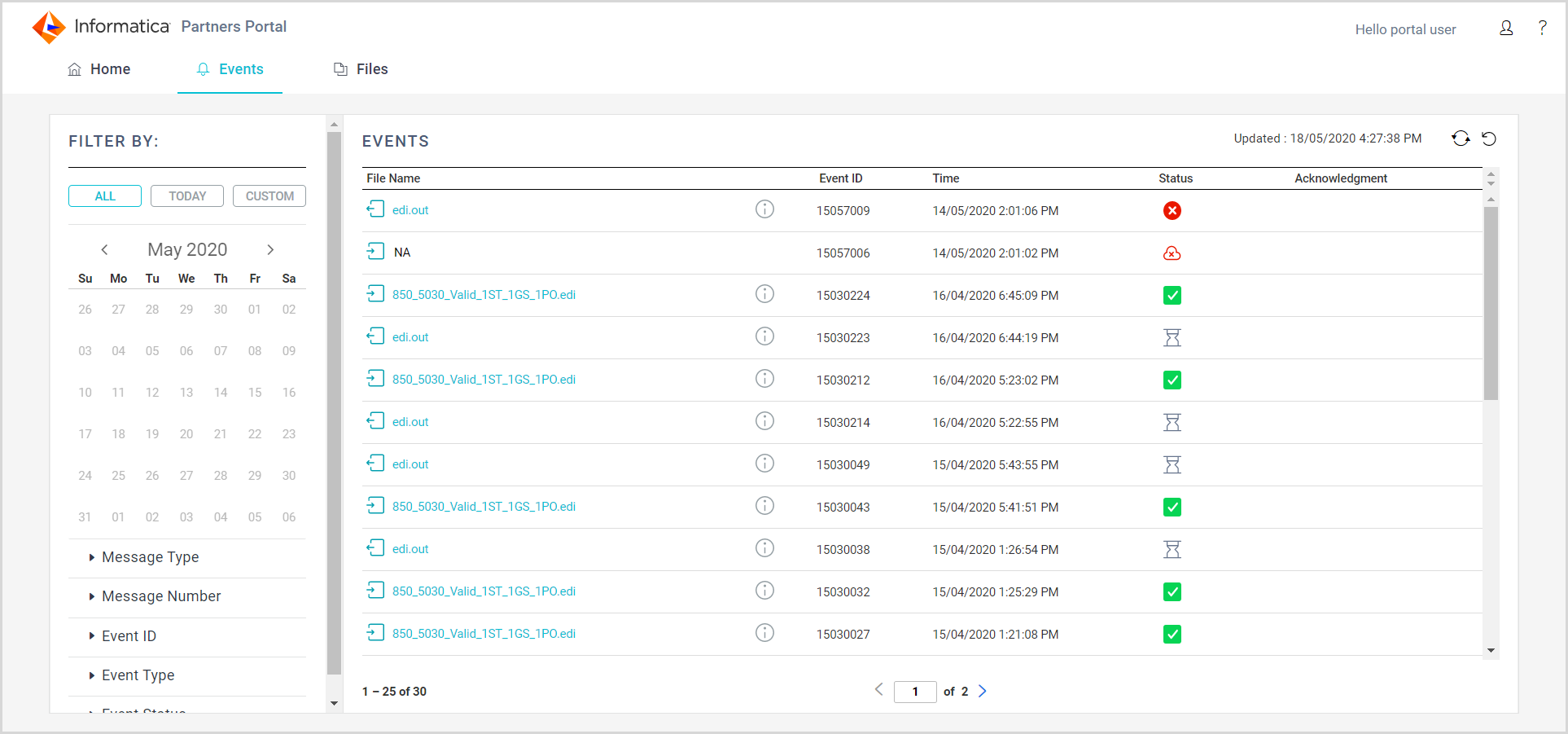
The Events page displays the following properties for each file event:
Property | Description |
|---|
File Name | Name and type of file, inbound or outbound. Click the file name to view the file details. |
Event ID | Identifier for the event associated with the file. |
Time | Date and time that the event occurred. |
Status | Status of the event. An event can be in one of the following statuses: - - Complete. File processing completed successfully.
- - Error. An error occurred during processing.
- - Warning. The event generated a warning.
- - Reprocessed. The event was reprocessed and another event was generated to reflect the new process.
- - System error. A system error that is unrelated to file processing occurred.
- - Waiting for Acknowledgment. Receipt of the message has not been acknowledged.
- - Transferring files. Files are transferring.
- - Discarded. The event status was manually changed to discarded. Discarded events are read-only and cannot be handled any further.
- - Processing. The file is currently being processed.
|
Acknowledgement | Applies to EDI messages. Acknowledgement type. Can be one of the following types: You can view the acknowledgment file by clicking the link. |
Information on the
Events page can become out of date. To update the information on the page, click the refresh icon

. To restore the default view, click the restore defaults icon

.
Filtering the events page
Use the filters on the left side of the Events page to find specific file events. By default, the Events page shows information for the current day.
You can apply the following filters:
Filter | Description |
|---|
Date | Select to view all events or a range of up to seven days. |
Message Type | Select any message type that you exchange with your partner. |
Message Number | Enter a search string. |
Event ID | Enter a search string. |
Event Type | Select an event type. |
Event Status | Select a status. |
To remove filters, click Restore Defaults at the top right of the page.
Viewing message details for a specific event
To view details about a specific event, click the information icon next to the event. When you drill down on an EDI file event, you see further details about the messages in the file.
The message details page displays the following properties for each event:
Property | Description |
|---|
Message Type | Type of message. |
Message Number | Unique identifier for the message. |
Number of Rows | Number of rows in the message. |
Group Control Number | Control number for the functional group. |
Message Control Number | Control number for the transaction. |
Event ID | Unique identifier for the event associated with processing the EDI group. |
Status | Status of the event. An event can be in one of the following statuses: - - Complete. File processing completed successfully.
- - Error. An error occurred during processing.
- - Warning. The event generated a warning.
- - Reprocessed. The event was reprocessed and another event was generated to reflect the new process.
- - System error. A system error that is unrelated to file processing occurred.
- - Waiting for Acknowledgment. Receipt of the message has not been acknowledged.
- - Transferring files. Files are transferring.
- - Discarded. The event status was manually changed to discarded. Discarded events are read-only and cannot be handled any further.
- - Processing. The file is being processed.
|
Message File | XML file for the message. Click the file icon to view the file. |
Acknowledgment | Applies to EDI messages. Acknowledgement type for inbound messages. Can be one of the following types: |