Relating records through a non-hierarchical relationship
You can configure rule associations to relate records through a non-hierarchical relationship when a record is created or updated.
To relate records automatically through a non-hierarchical relationship, use a plugin, such as Application Integration-Based Enrichment, to return the business IDs of the related records in its output payload. Ensure that the plugin returns valid business IDs of records that exist in MDM SaaS. Then configure a rule association that maps the output field to a non-hierarchical relationship type.
When a record is created or updated, the rule association runs, and the plugin returns the business IDs of the related records. MDM SaaS then automatically relates the records through the non-hierarchical relationship type.
Note:
Configure the associated objective only for master records. You can relate only master records, not source records.
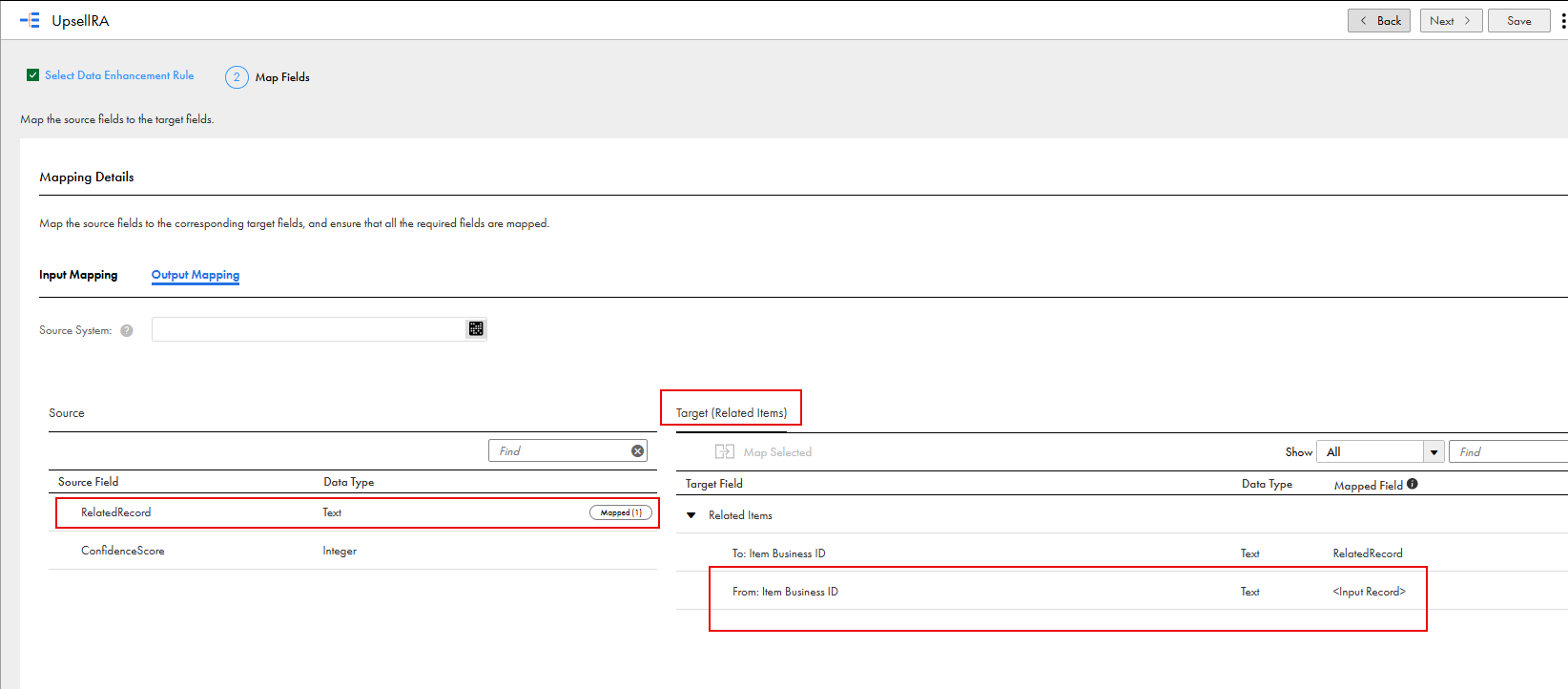
The following image shows how the source field maps to the target field of the Related Items relationship in a rule association:
For example, you define a non-hierarchical relationship that relates an item record to another item record to support upselling use cases. You configure a rule association with a data enhancement rule that uses the Application Integration-Based Enrichment plugin to find a related item to recommend. The plugin returns the business ID of that item record. When an iPhone item record is created or updated, the rule association relates the iPhone record to an AirPods record through the non-hierarchical relationship, Accessories.