You can import securities data from various market data providers into Securities 360 to enrich master records with industry-standard securities reference data.
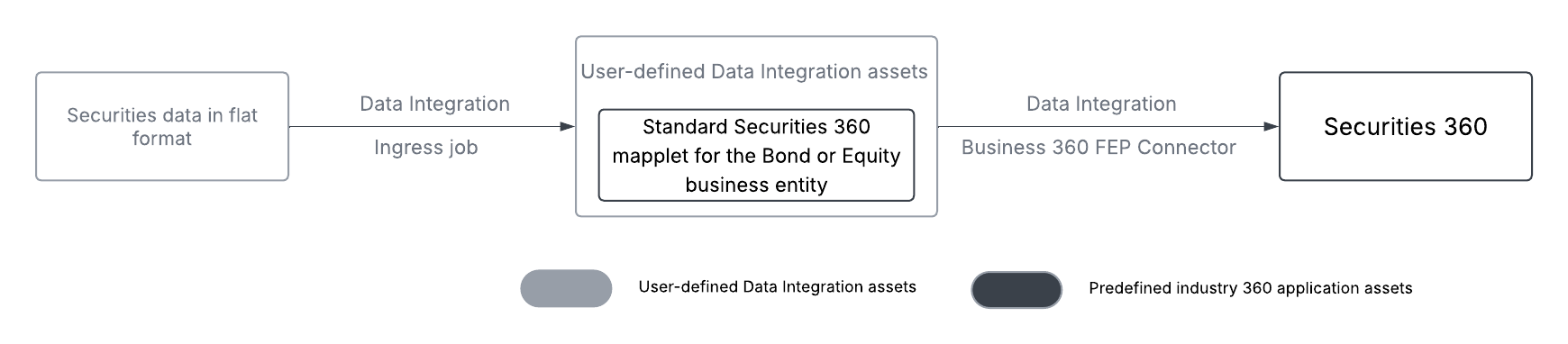
You can import securities data from external sources to your local server. For example, you can use FTP or SFTP servers to transfer the source files to your local server. After you import the source file, create the prerequisite assets and objects, such as source and target connections, taskflows, mapping tasks, and mappings, to ingress data. When you create a mapping, use the mapplets that are predefined Data Integration assets. The predefined mapplets automatically handle data type processing and format conversions for date, integer, decimal, and boolean data types. You can use Business 360 FEP Connector to write the transformed data into Securities 360.
The predefined Data Integration assets include the following mapplets:
•Preprocess utility mapplet. A mapplet for the preprocess utility to parse and normalize multidimensional data into a tabular format.
•Standard Securities 360 mapplet for the Bond business entity. A mapplet that you can use to transform source file containing flat data into data model attributes of the Bond business entity.
•Standard Securities 360 mapplet for the Equity business entity. A mapplet that you can use to transform source file containing flat data into data model attributes of the Equity business entity.
You can integrate data from both flat and multidimensional data sources into Securities 360. For example, flat data can be CSV files containing end-of-day stock prices, and multidimensional data can be Bloomberg data grids with price, volume, and yield across multiple instruments and dates.
The following image shows the data flow from a flat data source into Securities 360:
The following image shows the data flow from a data source, such as Bloomberg Data License, containing multi-dimensional data in global data format into Securities 360:
For more information about the predefined mapplets, see Mapplets.