To effectively utilize data access policies in Access Policy transformations, use the following best practices.
•Data Integration treats both date and timestamp data types as timestamps. Create a data filter rule or a cell-level de-identification with two distinct criteria in Data Access Management. In one criterion, use the date data type. In the other criterion, use the timestamp data type with the same values as the first criterion. This second criterion is for the Access Policy transformation.
To learn more ZZZZZZZZZZ
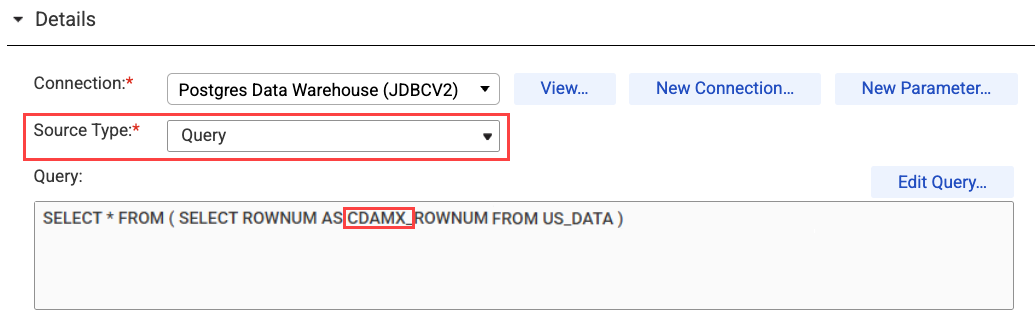
•When your data source includes additional columns that are not defined in the table, start the name of appended columns with "cdamx_". If you need to pass additional columns through an Access Policy transformation, you can select "Query" from the Source Type menu and start the name of the additional columns with "cdamx_".
The following image shows the Source Type menu on the Source tab:
For example, to add the row number to the table, you can write a query to select all columns as they appear in the catalog and append the row number column as "cdamx_rownum."
•In order to provide flexibility for a variety of use cases, the Access Policy transformation creates a new field called access_policy_filter that indicates whether a row is affected by data filter policies. In most use cases, you can filter these rows and the access_policy_filter field from the output.
The access_policy_filter field displays FAILURE_FIELD when Data Access Management is unable to apply a data protection. The field is redacted with null. This can occur when a field's value does not meet the criteria specified in a data protection's regular expression syntax. For example, a data protection might consistently randomize a five-digit postal code. If a field contains more than five digits, the access_policy_filter field displays FAILURE_FIELD and the field is redacted with null.
Complete the following tasks when defining Access Policy transformations that include data access policies:
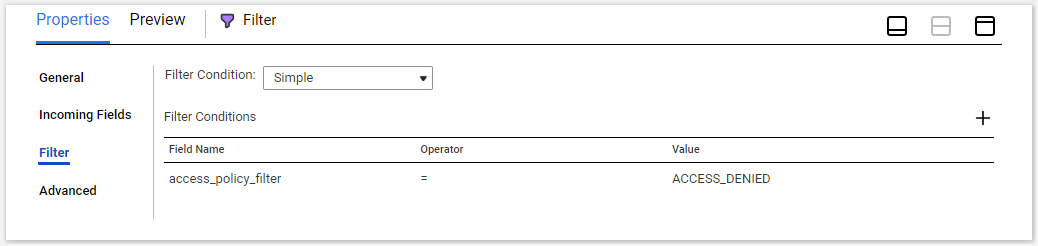
•Add a Filter transformation between the Access Policy transformation and the Target.
- On the Incoming Fields tab, include all fields.
- On the Filter tab, add a simple filter condition for the field name access_policy_filter with a value of ACCESS_DENIED.
The following image shows the Filter tab:
•Select the Target transformation in your mapping.
- On the Incoming Fields tab, exclude the access_policy_filter field.
The following image shows the Incoming Fields tab for the Target transformation:
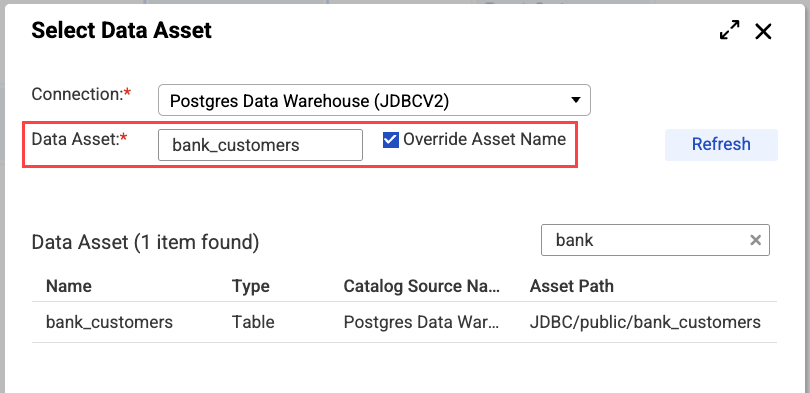
•When setting Source Type to Query, manually set the Asset parameter.
- If you select "Query" from the Source Type menu, you must select "Override Asset Name," search for, and select the data asset.
The following image shows the Select Data Asset window: