You can use the discovery agent to search and discover assets in your catalog with CLAIRE GPT.
After extracting metadata from the required source systems into Data Governance and Catalog, you can use CLAIRE GPT to search for business and technical assets, view relationships between assets, view the stakeholders that are responsible for the assets, and so on.
Note:
When you use data discovery to find assets in the catalog, critical data elements appear first in the response.
Open large search results in Data Governance and Catalog
For broader discovery prompts that return large result sets, the conversation canvas in CLAIRE GPTdisplays a sampled list of 25 ranked assets for immediate exploration and quick context. To view more assets from your search results list without losing context, click Open in Data Governance and Catalog. As you seamlessly transition from your CLAIRE GPT conversation to the full catalog view in Data Governance and Catalog, you can perform bulk curation, reporting, or further data governance activities without losing context.
When you navigate from the search result set in CLAIRE GPT to Data Governance and Catalog, you may notice differences in asset ordering and ranking. CLAIRE GPT evaluates intent and ranks its 25 displayed assets using data quality scores, conversation history, and glossary relationships. CLAIRE GPT translates your conversational prompt into a Domain-Specific Language (DSL) query. On the other hand, Data Governance and Catalog runs the translated search query objectively against the catalog index and displays assets that match the literal interpretation of the query, without knowledge of the conversation context. For further conversational reasoning or AI analysis on the full data set, export the results from the catalog and upload the file back into CLAIRE GPT for targeted follow-up analysis.
Prerequisites
Before you perform data discovery tasks in CLAIRE GPT for Data Governance and Catalog, ensure that you perform the following tasks:
•Enable the Data Governance and Catalog service for the runtime environment that your organization uses. For more information, see Runtime Environments in the Administrator help.
•Verify that you extracted metadata from the required source systems into the catalog. For more information, see Asset Discovery in the Data Governance and Catalog help.
For information about how to set up CLAIRE GPT for users in your organization, see Administer CLAIRE GPT.
Sample conversation
Let's take a look at a sample conversation to help you get started on your Data Governance and Catalog data discovery journey in CLAIRE GPT.
You’re a data analyst, and you want to segment customers based on different customer attributes. Your organization catalogs its customer data in Data Governance and Catalog. You want to look at customer data sets in the catalog to identify information that you can use in your analysis.
To achieve the goal, perform the following steps:
1Log in to CLAIRE GPT.
2Start a conversation to help you identify the data set which is most suitable to perform customer segmentation.
Enter the following prompt:
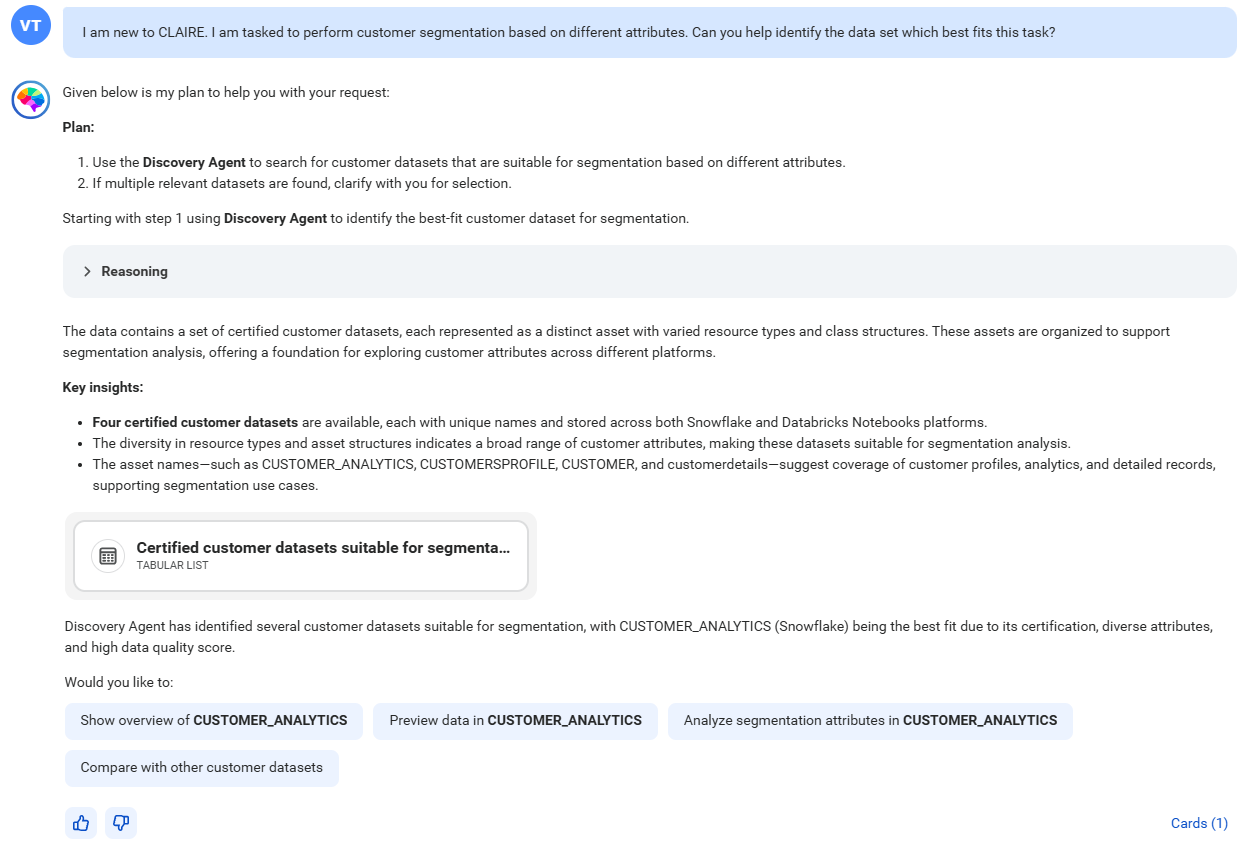
I am new to CLAIRE. I am tasked to perform customer segmentation based on different attributes. Can you help identify the data set which best fits this task?
The following image shows the response displaying a set of certified customer data sets that can be used for customer segmentation:
Using the data discovery skill, the discovery agent has found four certified data sets that can be used to segment customers.
To view the data sets, click the card named Certified customer datasets suitable for segmentation analysis.
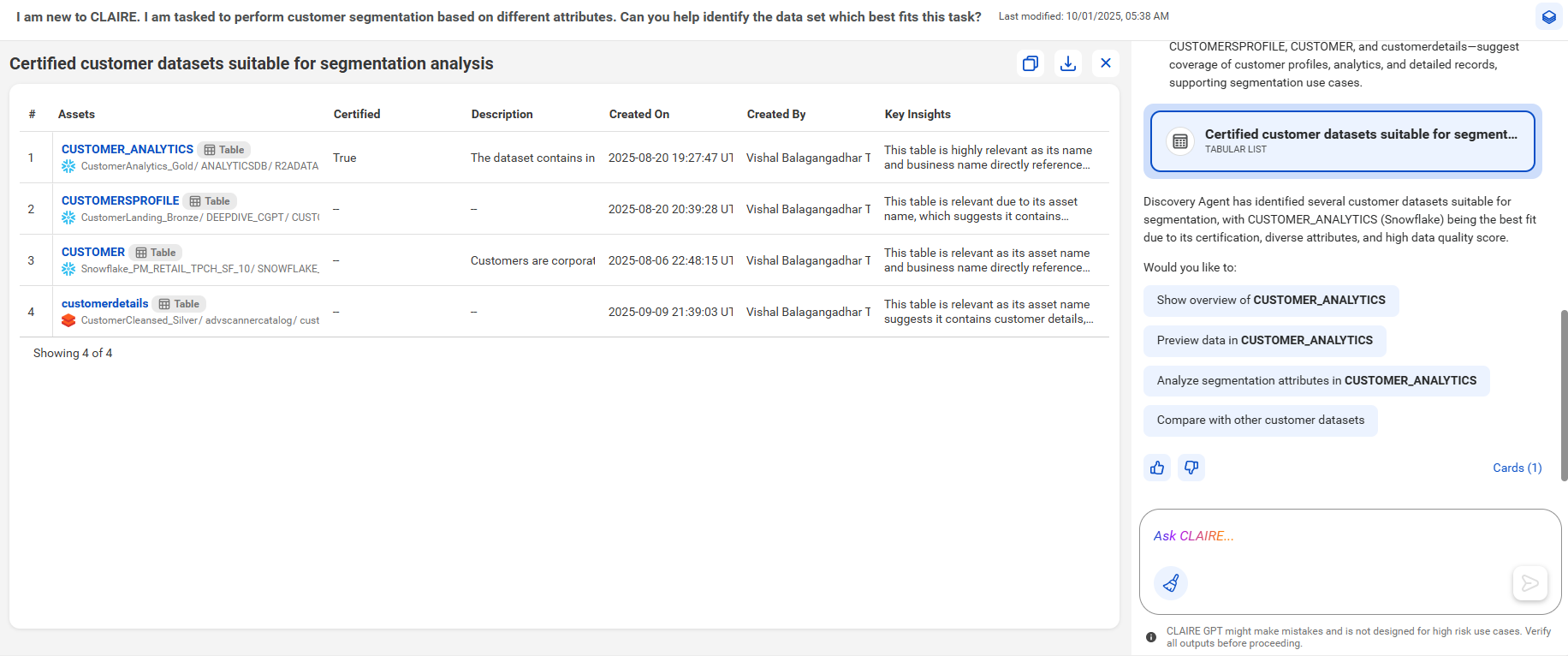
The following image shows the canvas with a tabular view of the customer data sets suitable for segmentation analysis:
The response provides a summary stating that the CUSTOMER_ANALYTICS table is the most suitable data set due to its certification, diverse attributes, and high data quality score. You can continue to analyze the CUSTOMER_ANALYTICS data set. Click the asset name to open it in Data Governance and Catalog.
The discovery agent has helped you identify the best customer data set to perform customer segmentation.