Authorization
Authorization controls what a user can do on a Hadoop cluster. For example, a user must be authorized to submit jobs to the Hadoop cluster.
You can use the following systems to manage authorization for Big Data Management:
- HDFS permissions
- By default, Hadoop uses HDFS permissions to determine what a user can do to a file or directory on HDFS.
- User impersonation
- User impersonation allows different users to run mappings on a Hadoop cluster that uses Kerberos authentication or connect to big data sources and targets that use Kerberos authentication.
- Apache Ranger
- Ranger is a security plug-in that is used to authenticate users of a Hadoop cluster. Ranger manages access to files, folders, databases, tables, and columns. When a user performs an action, Ranger verifies that the user meets the policy requirements and has the correct permissions on HDFS.
- Apache Sentry
- Sentry is a security plug-in that is used to enforce role-based authorization for data and metadata on a Hadoop cluster. Sentry can secure data and metadata at the table and column level. For example, Sentry can restrict access to columns that contain sensitive data and prevent unauthorized users from accessing the data.
- HDFS Transparent Encryption
- Hadoop implements transparent data encryption in HDFS directories.
- Fine-Grained SQL Authorization
- SQL standards-based authorization enables database administrators to impose row-level authorization on Hive tables and views. A more fine-grained level of SQL standards-based authorization enables administrators to impose row and column level authorization. You can configure a Hive connection to observe row and column level SQL standards-based authorization.
HDFS Permissions
HDFS permissions determine what a user can do to files and directories stored in HDFS. To access a file or directory, a user must have permission or belong to a group that has permission.
HDFS permissions are similar to permissions for UNIX or Linux systems. For example, a user requires the r permission to read a file and the w permission to write a file.
When a user or application attempts to perform an action, HDFS checks if the user has permission or belongs to a group with permission to perform that action on a specific file or directory.
For more information about HDFS permissions, see the Apache Hadoop documentation or the documentation for your Hadoop distribution.
Big Data Management supports HDFS permissions without additional configuration.
User Impersonation
User impersonation allows different users to run mappings in a Hadoop cluster that uses Kerberos authentication or connect to big data sources and targets that use Kerberos authentication.
The Data Integration Service uses its credentials to impersonate the user accounts designated in the Hadoop connection to connect to the Hadoop cluster or to start the Blaze engine.
When the Data Integration Service impersonates a user account to submit a mapping, the mapping can only access Hadoop resources that the impersonated user has permissions on. Without user impersonation, the Data Integration Service uses its credentials to submit a mapping to the Hadoop cluster. Restricted Hadoop resources might be accessible.
When the Data Integration service impersonates a user account to start the Blaze engine, the Blaze engine has the privileges and permissions of the user account used to start it.
Blaze Engine Security
Secure the Blaze engine with a designated user account for the Blaze engine.
The Blaze engine runs on the Hadoop cluster as a service. Informatica recommends that you create a user account on the cluster for the Blaze engine. A designated user account isolates the Blaze engine from other services on the cluster. You can grant the Blaze user the minimum required privileges and permissions that Blaze requires to run. If you do not use a designated user for Blaze, the Data Integration Service user starts the Blaze engine on the Hadoop cluster.
For more information about configuring properties to run mappings with the Blaze engine on a Kerberos-enabled cluster, see the Informatica 10.1.1 Update 2 Security Guide.
SQL Standards-Based Authorization on Hive Source Rows and Columns
SQL standards-based authorization enables database administrators to impose row-level authorization on Hive tables and views. A more fine-grained level of SQL standards-based authorization enables administrators to impose row and column level authorization when you read data from a Hive source. You can configure a Hive connection to observe row and column level SQL standards-based authorization.
When you select the option to observe fine-grained SQL authentication in a Hive source, the mapping observes row and column-level restrictions on data access in the source. If you do not select the option, the Blaze run-time engine ignores the restrictions, and results include restricted data.
Configuring Hive Connection for Sources that Use Fine-Grained SQL Authorization
You can configure a Hive database connection to observe fine-grained SQL authorization on source tables.
1. Create a Hive connection, or edit an existing Hive connection.
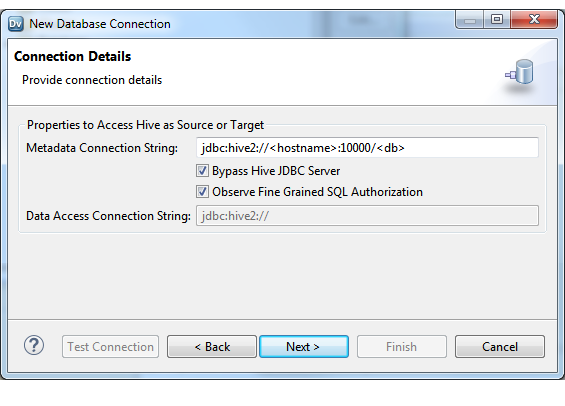
2. Select the Observe Fine Grained SQL Authorization option.
The following image shows the Connection Details configuration dialog box in the Developer tool:
Note: You can also configure the Observe Fine Grained SQL Authorization option for a Hive connection in the Administrator tool. See the Informatica 10.1.1 Administration Guide.
3. Click Next, and then OK.
With the Observe Fine Grained SQL Authorization option, the mapping observes row and column-level restrictions on data access in the source.