User Impersonation
To run mappings on the Blaze, Spark or Hive run-time engines, you must create a proxy user for the user who will impersonate other users.
You can use the Ambari configuration manager to configure impersonation properties on Hadoop distributions that use Ambari. If you do not use Apache Ambari, you must configure the impersonation properties in core-site.xml on the Hadoop cluster and restart Hadoop services and the cluster.
Configure the following user impersonation properties:
- hadoop.proxyuser.<impersonation_user>.groups
Allows impersonation from any group.
Note: The user name that you specify in this property depends on whether the cluster uses Kerberos authentication.
When the cluster uses Kerberos, use the following example to help configure the property:
<property>
<name>hadoop.proxyuser.<SPN_user>.groups</name>
<value><user_name></value>
<description>Allows impersonation from any group.</description>
</property>
where <SPN_user> is the Service Principal Name that corresponds to the keytab file that the cluster uses to authenticate the client.
When the cluster does not use Kerberos, use the following example to help configure the property:
<property>
<name>hadoop.proxyuser.<domain_starter_user>.groups</name>
<value><user_name></value>
<description>Allows impersonation from any group.</description>
</property>
where <domain_starter_user> is the user account that is used to start the Informatica domain. This is the same as the Informatica administrator user name.
- hadoop.proxyuser.<impersonation_user>.hosts
Allows impersonation from any host.
Note: The user name that you specify in this property depends on whether the cluster uses Kerberos authentication.
When the cluster uses Kerberos, use the following example to help configure the property:
<property>
<name>hadoop.proxyuser.<SPN_user>.hosts</name>
<value><user_name></value>
<description>Allows impersonation from any group.</description>
</property>
where <SPN_user> is the Service Principal Name that corresponds to the keytab file that the cluster uses to authenticate the client.
When the cluster does not use Kerberos, use the following example to help configure the property:
<property>
<name>hadoop.proxyuser.<domain_starter_user>.hosts</name>
<value><user_name></value>
<description>Allows impersonation from any group.</description>
</property>
where <domain_starter_user> is the user account that is used to start the Informatica domain. This is the same as the Informatica administrator user name.
Using Apache Ambari to Configure User Impersonation
To enable user impersonation, use Apache Ambari to add or update the hadoop.proxyuser.<impersonation_user>.groups and hadoop.proxyuser.<impersonation_user>.hosts properties. If the properties are already added, you must change the value for the properties to * (asterisk).
1. Start Apache Ambari.
2. Click HDFS service > Configs > Advanced.
3. Navigate to the custom core-site section.
4. Add or update the user impersonation properties.
- - To add a property, click Add Property and enter the name of the property as the key and the value as * (asterisk).
- - To update a property, set the property value to * (asterisk).
5. Save and restart the Hadoop services and the Hadoop cluster.
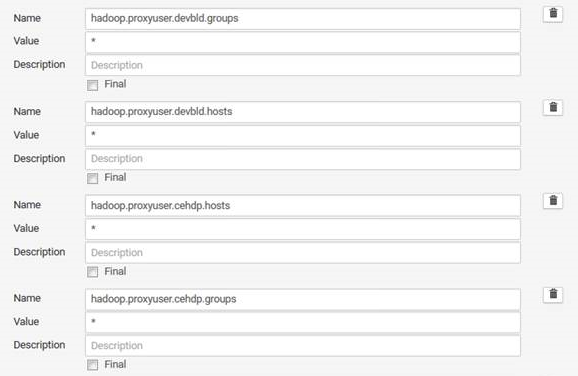
The following image shows the proxy users devbld and cdchp configured in the Apache Ambari console.