Hadoop Integration
The Informatica domain can connect to clusters that run different Hadoop distributions. Hadoop is an open-source software framework that enables distributed processing of large data sets across clusters of machines. You might also need to use third-party software clients to set up and manage your Hadoop cluster.
The domain can connect to the supported data source in the Hadoop environment, such as HDFS, HBase, or Hive, and push job processing to the Hadoop cluster. To enable high performance access to files across the cluster, you can connect to an HDFS source. You can also connect to a Hive source, which is a data warehouse that connects to HDFS.
It can also connect to NoSQL databases such as HBase, which is a database comprising key-value pairs on Hadoop that performs operations in real-time. The Data Integration Service can push mapping jobs to the Spark or Blaze engine, and it can push profile jobs to the Blaze engine in the Hadoop environment.
Data Engineering Integration supports more than one version of some Hadoop distributions. By default, the cluster configuration wizard populates the latest supported version.
Hadoop Utilities
Data Engineering Integration uses third-party Hadoop utilities such as Sqoop to process data efficiently.
Sqoop is a Hadoop command line program to process data between relational databases and HDFS through MapReduce programs. You can use Sqoop to import and export data. When you use Sqoop, you do not need to install the relational database client and software on any node in the Hadoop cluster.
To use Sqoop, you must configure Sqoop properties in a JDBC connection and run the mapping in the Hadoop environment. You can configure Sqoop connectivity for relational data objects, customized data objects, and logical data objects that are based on a JDBC-compliant database. For example, you can configure Sqoop connectivity for the following databases:
- •Aurora
- •Greenplum
- •IBM DB2
- •IBM DB2 for z/OS
- •Microsoft SQL Server
- •Netezza
- •Oracle
- •Teradata
- •Vertica
The Model Repository Service uses JDBC to import metadata. The Data Integration Service runs the mapping in the Hadoop run-time environment and pushes the job processing to Sqoop. Sqoop then creates map-reduce jobs in the Hadoop cluster, which perform the import and export job in parallel.
Specialized Sqoop Connectors
When you run mappings through Sqoop, you can use the following specialized connectors:
- OraOop
You can use OraOop with Sqoop to optimize performance when you read data from or write data to Oracle. OraOop is a specialized Sqoop plug-in for Oracle that uses native protocols to connect to the Oracle database.
You can configure OraOop when you run Sqoop mappings on the Spark engine.
- Teradata Connector for Hadoop (TDCH) Specialized Connectors for Sqoop
You can use the following TDCH specialized connectors for Sqoop to read data from or write data to Teradata:
- - Cloudera Connector Powered by Teradata
- - Hortonworks Connector for Teradata (powered by the Teradata Connector for Hadoop)
- - MapR Connector for Teradata
These connectors are specialized Sqoop plug-ins that Cloudera, Hortonworks, and MapR provide for Teradata. They use native protocols to connect to the Teradata database.
Informatica supports Cloudera Connector Powered by Teradata and Hortonworks Connector for Teradata on the Blaze and Spark engines. When you run Sqoop mappings on the Blaze engine, you must configure these connectors. When you run Sqoop mappings on the Spark engine, the Data Integration Service invokes these connectors by default.
Informatica supports MapR Connector for Teradata on the Spark engine. When you run Sqoop mappings on the Spark engine, the Data Integration Service invokes the connector by default.
Note: For information about running native Teradata mappings with Sqoop, see the Informatica PowerExchange for Teradata Parallel Transporter API User Guide.
High Availability
High availability refers to the uninterrupted availability of Hadoop cluster components.
You can use high availability for the following services and security systems in the Hadoop environment on Cloudera CDH, Hortonworks HDP, and MapR Hadoop distributions:
- •Apache Ranger
- •Apache Ranger KMS
- •Apache Sentry
- •Cloudera Navigator Encrypt
- •HBase
- •Hive Metastore
- •HiveServer2
- •Name node
- •Resource Manager
Run-time Process on the Blaze Engine
To run a mapping on the Informatica Blaze engine, the Data Integration Service submits jobs to the Blaze engine executor. The Blaze engine executor is a software component that enables communication between the Data Integration Service and the Blaze engine components on the Hadoop cluster.
The following Blaze engine components appear on the Hadoop cluster:
- •Grid Manager. Manages tasks for batch processing.
- •Orchestrator. Schedules and processes parallel data processing tasks on a cluster.
- •Blaze Job Monitor. Monitors Blaze engine jobs on a cluster.
- •DTM Process Manager. Manages the DTM Processes.
- •DTM Processes. An operating system process started to run DTM instances.
- •Data Exchange Framework. Shuffles data between different processes that process the data on cluster nodes.
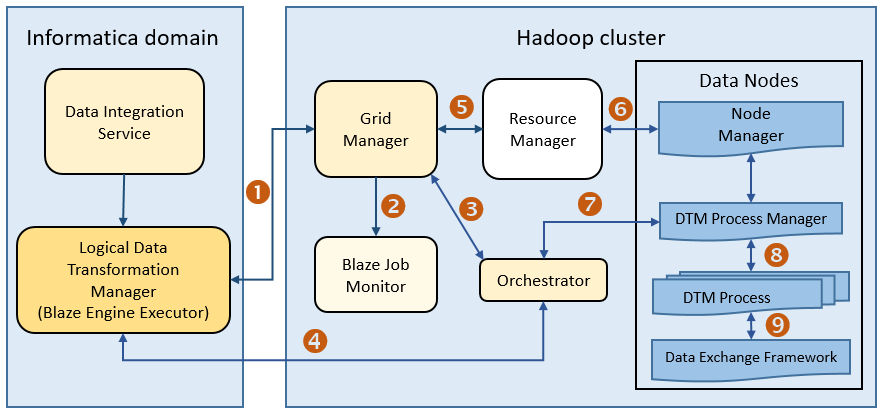
The following image shows how a Hadoop cluster processes jobs sent from the Blaze engine executor:
The following events occur when the Data Integration Service submits jobs to the Blaze engine executor:
- 1. The Blaze Engine Executor communicates with the Grid Manager to initialize Blaze engine components on the Hadoop cluster, and it queries the Grid Manager for an available Orchestrator.
- 2. The Grid Manager starts the Blaze Job Monitor.
- 3. The Grid Manager starts the Orchestrator and sends Orchestrator information back to the LDTM.
- 4. The LDTM communicates with the Orchestrator.
- 5. The Grid Manager communicates with the Resource Manager for available resources for the Orchestrator.
- 6. The Resource Manager handles resource allocation on the data nodes through the Node Manager.
- 7. The Orchestrator sends the tasks to the DTM Processes through the DTM Process Manger.
- 8. The DTM Process Manager continually communicates with the DTM Processes.
- 9. The DTM Processes continually communicate with the Data Exchange Framework to send and receive data across processing units that run on the cluster nodes.
Manage Blaze Engines
The Blaze engine remains running after a mapping run. To save resources, you can set a property to stop Blaze engine infrastructure after a specified time period.
Save resources by shutting down Blaze engine infrastructure after a specified time period.
Set the infagrid.blaze.service.idle.timeout property or the infagrid.orchestrator.svc.sunset.time property. You can use the infacmd isp createConnection command, or set the property in the Blaze Advanced properties in the Hadoop connection in the Administrator tool or the Developer tool.
Configure the following Blaze advanced properties in the Hadoop connection:
- infagrid.blaze.service.idle.timeout
- Optional: The number of minutes that the Blaze engine remains idle before releasing the resources that the Blaze engine uses.
- The value must be an integer. Default is 60.
- infagrid.orchestrator.svc.sunset.time
- Optional: Maximum lifetime for an Orchestrator service, in hours.
- You can disable sunset by setting the property to 0 or a negative value. If you disable sunset, the Orchestrator never shuts down during a mapping run.
- The value must be an integer. Default is 24 hours.
Note: Set the value to less than the Kerberos user ticket maximum renewal time. This Kerberos policy property is usually named like "Maximum lifetime for user ticket renewal."
Run-time Process on the Spark Engine
The Data Integration Service can use the Spark engine on a Hadoop cluster to run Model repository mappings.
To run a mapping on the Spark engine, the Data Integration Service sends a mapping application to the Spark executor. The Spark executor submits the job to the Hadoop cluster to run.
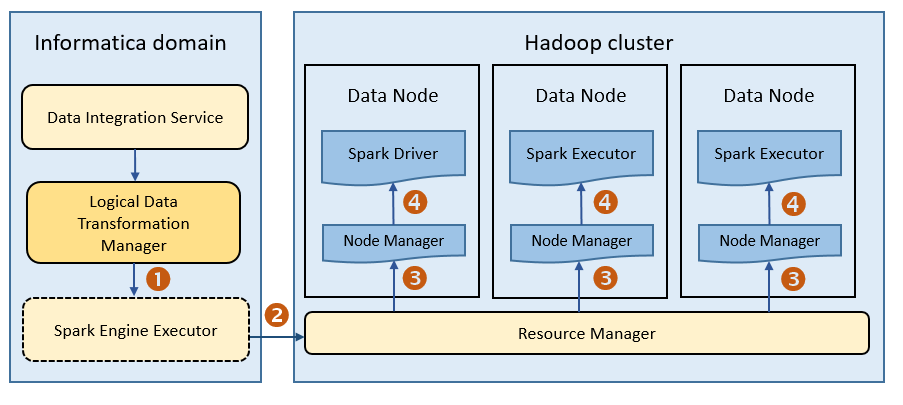
The following image shows how a Hadoop cluster processes jobs sent from the Spark executor:
The following events occur when Data Integration Service runs a mapping on the Spark engine:
- 1. The Logical Data Transformation Manager translates the mapping into a Scala program, packages it as an application, and sends it to the Spark executor.
- 2. The Spark executor submits the application to the Resource Manager in the Hadoop cluster and requests resources to run the application.
- 3. The Resource Manager identifies the Node Managers that can provide resources, and it assigns jobs to the data nodes.
- 4. Driver and Executor processes are launched in data nodes where the Spark application runs.