REST Operations Hub Service
The REST Operations Hub Service is an application service in the Informatica domain that exposes Informatica product functionality to external clients through REST APIs.
The REST Operations Hub Service receives requests from REST service clients and passes them to the respective Informatica Service. The Informatica Service processes the requests and sends a response to the REST Operations Hub. The REST Operations Hub sends the response back to the REST service client.
The REST Operations Hub Service is not highly available to the external clients.
To protect data that is transmitted between a REST Operations Hub Service and REST client, secure the connection between the REST Operations Hub Service and REST client. To do this, enable the Transport Layer Security for the REST Operations Hub Service.
The REST Operations Hub supports REST APIs for retrieving mapping execution statistics.
By default, the REST Operations Hub supports a total number of five rolling logs each 50 MB in size.
REST Operations Hub Service Properties
To configure the REST Operations Hub Service properties, select the service in the Domain Navigator and click the Properties view. You can change the properties while the service is running, but you must recycle the service for the changed properties to take effect.
General Properties
In the general properties, configure the primary and back-up nodes for the REST Operations Hub Service.
The following table describes the general properties for the service:
Property | Description |
|---|
Name | Name of the service. You cannot change the name of the REST Operations Hub Service. |
Description | Description of the service. The description cannot exceed 765 characters. |
Node | Node on which the service runs. |
Logging Properties
The following table describes the log level properties:
Property | Description |
|---|
Log Level | Configure the Log Level property to set the logging level. The following values are valid: - - Fatal. Writes FATAL messages to the log. FATAL messages include nonrecoverable system failures that cause the service to shut down or become unavailable.
- - Error. Writes FATAL and ERROR code messages to the log. ERROR messages include connection failures, failures to save or retrieve metadata, service errors.
- - Warning. Writes FATAL, WARNING, and ERROR messages to the log. WARNING errors include recoverable system failures or warnings.
- - Info. Writes FATAL, INFO, WARNING, and ERROR messages to the log. INFO messages include system and service change messages.
- - Trace. Write FATAL, TRACE, INFO, WARNING, and ERROR code messages to the log. TRACE messages log user request failures.
- - Debug. Write FATAL, DEBUG, TRACE, INFO, WARNING, and ERROR messages to the log. DEBUG messages are user request logs.
|
Custom Properties
Configure custom properties that are unique to specific environments.
You might need to apply custom properties in special cases. When you define a custom property, enter the property name and an initial value. Define custom properties only at the request of Informatica Global Customer Support.
Use the prefix RPS: to set the reverse proxy server or ROH: to set the REST Operations Hub custom property name. For example, add RPS:<custom_property> for name when you add a new custom property.
REST Operations Hub Service Process Properties
To configure the REST Operations Hub Service process properties, select the service in the Domain Navigator and click the Processes view. You can change the properties while the service is running, but you must restart the service process for the changed properties to take effect.
Execution Statistics REST URL
Use the execution statistics URL to get a list of monitoring REST APIs. With the monitoring REST APIs, you can get mapping execution statistics and the input and output parameters for each REST API.
You can use the following execution statistics URL:
<Rest operations hub service host>:<Rest operations hub service port>/rest operations hub/services/v1/mapping service/$metadata
Security Properties
When you set the HTTP protocol type for the REST Operations Hub Service to HTTPS or both, you enable the Transport Layer Security (TLS) protocol for the service. Depending on the HTTP protocol type of the service, you define the HTTP port, the HTTPS port, or both ports for the service process.
The following table describes the REST Operations Hub Service security properties:
Property | Description |
|---|
HTTP Port | Unique HTTP port number for the REST Operations Hub Service process when the service uses the HTTP protocol. Default is 6555. |
HTTPS Port | Port number that the REST Operations Hub Service runs on when you enable the Transport Layer Security (TLS) protocol. Use a different port number than the HTTP port number. |
Enable Transport Layer Security | Select to enable a secure connection between the REST Operations Hub Service and REST client. |
Keystore File | Directory where the keystore file that contains the digital certificates is stored. |
Keystore Password | Plain-text password for the keystore file. If this property is not set, the REST Operations Hub Service uses the default password. |
SSL Protocol | A blank field enables the highest version of TLS available. The version of TLS enabled depends on the value. If you enter a value, earlier versions of TLS might be enabled. The behavior is based on the Java version for your environment. For more information, see the documentation for your Java version. |
REST Operations Hub Advanced Properties
Configure the advanced properties related to the REST Operations Hub Service.
The following table describes the advanced properties:
Property | Description |
|---|
Maximum Heap Size | Amount of RAM allocated to the JAVA Virtual Machine (JVM) that runs the REST Operations Hub Service. Use this property to increase the performance. Append one of the following letters to the value to specify the units: - - b for bytes
- - k for kilobytes
- - m for megabytes
- - g for gigabytes
Default is 512 megabytes. Note: Consider increasing the heap size when the REST Operations Hub needs to process large amounts of data. |
JVM Command Line Options | Java Virtual Machine (JVM) command line options to run Java-based programs. When you configure the JVM options, you must set the Java SDK classpath, Java SDK minimum memory, and Java SDK maximum memory properties. |
Reverse Proxy Server for Load Balancing
The REST Operations Hub manages the life cycle of the reverse proxy server process that performs the load balancing, and routes the API requests to the target Data Integration Service process nodes.
The REST Operations Hub is grid enabled. You can use the REST Operations Hub for the execution statistics API requests. The reverse proxy server routes the Data Integration Service API requests and performs the load balancing to route requests across nodes in a grid that belongs to the Data Integration Service. The reverse proxy server uses an Nginx server to route requests to the target Data Integration Service.
The REST API request on the reverse proxy server port has a maximum timeout of one hour. You can view the following reverse proxy server logs under <Informatica installation directory>/logs/node name>/services/Rest operations hub/:
- •Reverse Proxy Server access.
- •Reverse Proxy Server error.
By default, the reverse proxy server supports rolling logs of 50MB each. You can set the custom size for rollover by adding a custom property.
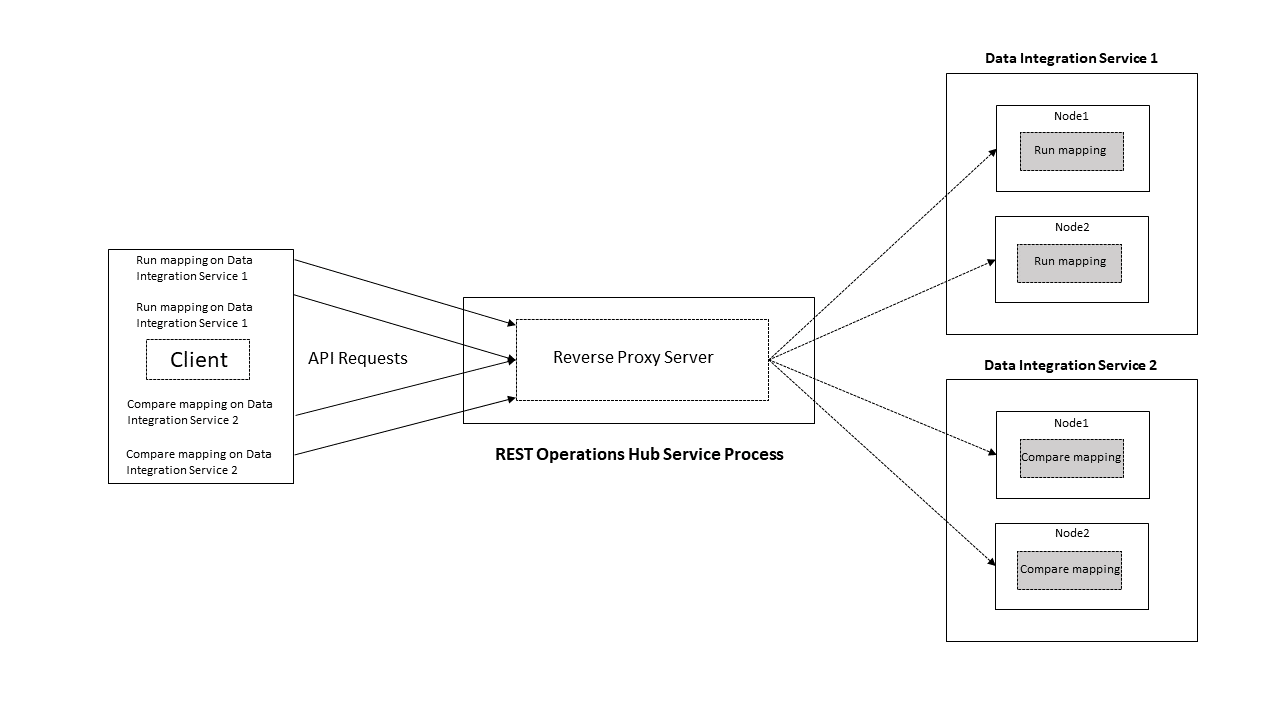
The following image shows the reverse proxy server performing the load balancing for API requests across two nodes on the Data Integration Service:
The reverse proxy server manages the Data Integration Service API requests from a client and routes them to the nodes in a grid that belongs to the Data Integration Service:
- •Directory for Data Integration Service node process logs. Default is
. The reverse proxy server routes the mapping run request to the Data Integration Service 1 and performs the load balancing across free Node 1 and Node 2.
- •The reverse proxy server routes the compare mapping request to the Data Integration Service 2 and performs the load balancing across free Node 1 and Node 2.
Reverse Proxy Server API Documentation Properties
When you set the HTTP protocol type for the REST Operations Hub Service to HTTPS or both, you enable the Transport Layer Security (TLS) protocol for the service. Depending on the HTTP protocol type of the service, you define the HTTP URL, the HTTPS URL, or both for the service process.
The following table describes the Reverse Proxy Server API Documentation properties:
Property | Description |
|---|
HTTP URL | HTTP URL for the REST Operations Hub Service process when the service uses the HTTP protocol. |
HTTPS URL | HTTPS URL for the REST Operations Hub Service process when the service uses the HTTPS protocol. |
Reverse Proxy Server Properties
Lists the REST Operations Hub Process properties related to reverse proxy server.
The following table describes the REST Operations Hub Process properties related to the reverse proxy server:
Property | Description |
|---|
URL to Check Reverse Proxy Server Status | URL that shows the status of reverse proxy server. Available options: |
Enable Reverse Proxy Server | Indicates whether you want to enable the reverse proxy server. |
Protocol Type | Lists the available protocol types for URL. Available options: - - HTTP
- - HTTPS
- - Both. Includes both HTTP and HTTPS.
|
HTTP Port | HTTP port on which reverse proxy server listens. |
HTTPS Port | HTTPS port on which reverse proxy server listens. |
SSL Certificate for the Reverse Proxy Server | Indicates an absolute path to a PEM certificate file to enable the HTTPS mode of the reverse proxy server. |
SSL Certificate Key for the Reverse Proxy Server | Indicates an absolute path to a PEM secret key file to enable the HTTPS mode of the reverse proxy server. |
Password File for the Reverse Proxy Server | Indicates an absolute path to a file containing password for the secret key file to enable the HTTPS mode of the reverse proxy server. Note: The certificate password is saved as plain text and must be accessible on domain server. |
Verify Incoming Clients | Indicates whether to verify the client that connects to the reverse proxy server. |
SSL Certificate for the Incoming Client | Indicates an absolute path to a PEM file containing trusted CA certificates to authenticate the client. |
SSL Certificate for the Proxied HTTPS Server | Indicates an absolute path to a PEM file to authenticate the reverse proxy server to a proxied HTTPS server. |
SSL Certificate Key for the HTTPS Server | Indicates an absolute path to a PEM secret key file to authenticate the reverse proxy server to a proxied HTTPS server. |
Password File for the Proxied Server | Indicates an absolute path to a file containing password for the secret key file to authenticate the reverse proxy server to a proxied HTTPS server. Note: The certificate password is saved as plain text and must be accessible on domain server. |
Configure the following properties: :
- •SSL Certificate for the Reverse Proxy Server. When the Data Integration Service is configured only withkeystore.
- •SSL Certificate for the Reverse Proxy Server and SSL Certificate for the Proxied HTTPS Server. When the Data Integration Service is configured with both keystore and truststore.
Note: If you set the HTTP protocol type for the REST Operations Hub Service to both and the certificate has expired, then the reverse proxy server only serves the HTTP API requests.
Custom Properties
Configure custom properties that are unique to specific environments.
You might need to apply custom properties in special cases. When you define a custom property, enter the property name and an initial value. Define custom properties only at the request of Informatica Global Customer Support.
Use the prefix RPS: to set the reverse proxy server custom property name. For example, add RPS:<custom_property> for name when you add a new custom property.
Environment Variables
Configure the environment variables for the REST Operations Hub Service.
The following table describes the environment variables:
Property | Description |
|---|
Environment Variable | Enter a name and a value for the environment variable. |