Data Discovery Guide > Part I: Introduction to Data Discovery > Column Profile Concepts > Column Profile Options
  

Column Profile Options

When you create a profile, you can use the profile wizard to define filter, rule, and sampling options. These options determine how the profile reads rows from the data set.
The following image shows a sample filter definition in a profile:
You can choose to configure column selection, filters, rules, and sampling options in a panel of the profile definition. When you choose an option in the panel, you can configure properties. The image shows the definition of State_Filter. The filter identifies customer records that have a State value of Minnesota or Michigan.
The rule can have the business logic to perform data transformation operations on the data before column profiling.
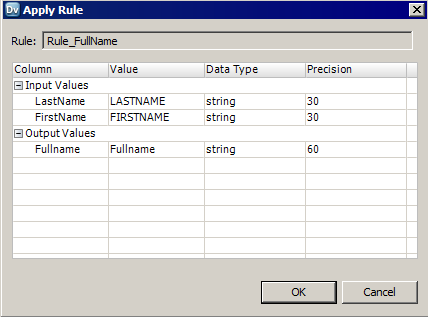
The following image shows a rule titled Rule_FullName that merges the LastName and FirstName columns into the Fullname column:

The Apply Rule dialog box contains a column for input and output column names. It also contains columns for values, datatypes, and precision. The profile in this image contains a rule titled Rule_FullName that merges the LastName and FirstName columns into a Fullname column.