Rule Specification Components
When you create a rule specification, you configure a series of shapes in the Design workspace. Each shape describes an aspect of the business rule. The top-level shape stores the name and the general properties of the rule specification. The other shapes describe the business rule logic.
The shapes below the top-level shape are rule sets. A rule set contains rule statements that define the business rule requirements at a low level. Each rule statement reads a column of input data and verifies that the input data meets the conditions that you specify.
The rule set that connects to the top-level shape is the primary rule set. The primary rule set summarizes the business rule. The output from the primary rule set determines whether each row of input data meets the requirements of the business rule.
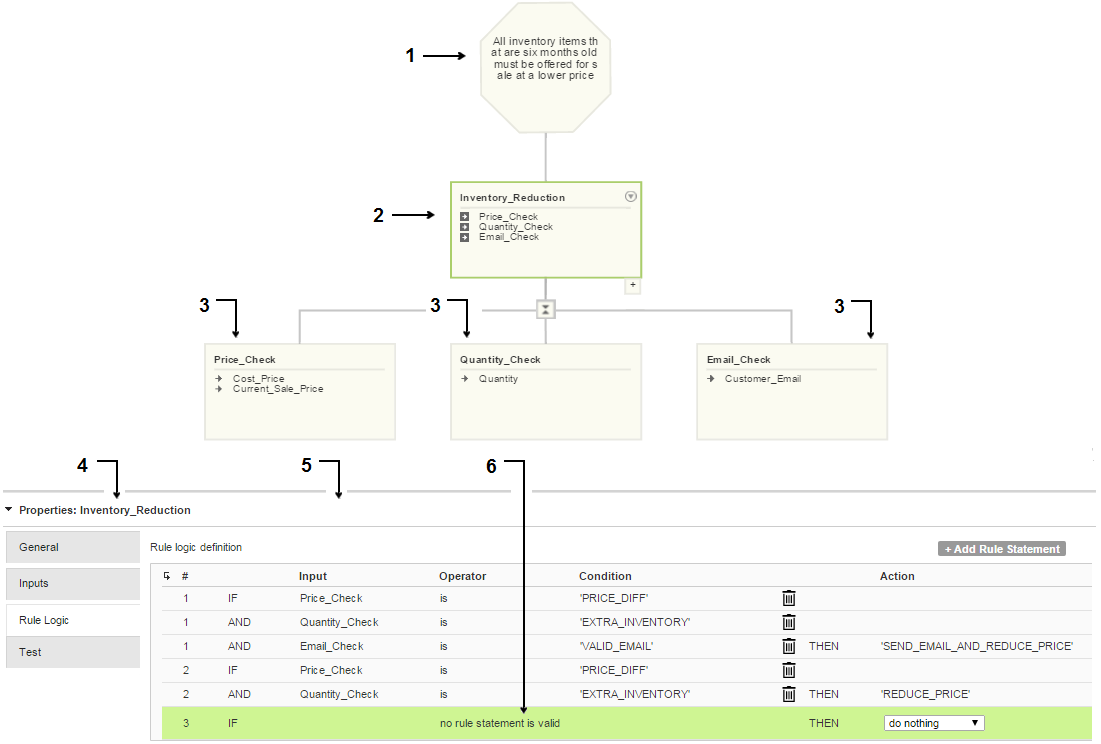
The following image shows a rule specification in the Design workspace:
The rule specification contains the following elements:
- 1. Top-level shape.
- 2. Primary rule set.
- 3. Child rule sets of the primary rule set.
- 4. Property options on the rule set that you select.
- 5. Rule statements in the rule set that you select.
- 6. Rule statement that the system defines.
Rule Sets
Rule sets define the logical flow of data through the rule specification. Data flows upward through the rule specification from the lowest rule set to the primary rule set.
You can add a rule set below any rule set in the rule specification. The rule sets have a parent-to-child relationship. When you add a rule set, the output of the rule set that you add becomes an input to the parent rule set.
Use rule sets to define the rule statements that analyze and update the input data. You can configure a rule set with a single rule statement, or you can add multiple rule statements to the rule set. Within a rule set, data flows from the first rule statement to the final rule statement.
You can copy or move a rule set to another location in a rule specification, and you can copy or move a rule set to another rule specification.
Inputs
An input describes a column of data that a rule statement can analyze. An input represents a column in a data set, or an input represents the output from another rule set in the rule specification.
Use the Manage Global Inputs dialog box to define an input.
When you define an input, specify the following properties:
- •The data type of the data that the input represents. Create an input with a date/time, float, integer, or string data type.
Note: You can specify an integer data type for numbers in the range -2147483648 through 2147483647. To read numbers that are outside the integer range, use the float data type.
- •The maximum number of characters that a value in the column can contain.
You can optionally enter a text description of the input.
An input does not store information about the business data, such as the name of a column, table, or database. The developer who configures the mapplet connects the inputs to the business data. You advise the developer about the columns to connect. The developer can connect an input to any column that matches the properties that you define.
When you create a child rule set, the output from the rule set becomes an input to the parent rule set. You must use the input in a rule statement in the parent rule set. When you create an input in the Manage Global Inputs dialog box, you can optionally add the input to a rule statement. To view the inputs that a rule set uses, select the rule set in the workspace.
Rule Statements
A rule statement is an IF-THEN statement that analyzes a column of data and generates an output based on the result of the analysis. You add a rule statement to a rule set.
A rule statement uses conditions and actions to define the IF-THEN logic. A condition is a data operation that determines a single fact about a data value. You can add multiple conditions to a rule statement.
An action is a data operation that generates the output from the rule set. An action generates data when the input that you add to the rule statement satisfies the conditions that you define. The rule set uses the output from the first rule statement that generates output data.
Each rule set contains a system-defined rule statement that specifies the action to take if no other rule statement generates output data. The rule statement is the final rule statement in the rule set. You can edit the action in the system-defined rule statement. By default, the rule statement specifies that the rule set does not generate any output data if the other rule statements do not generate output data.