Starting the ingestion and replication task wizard
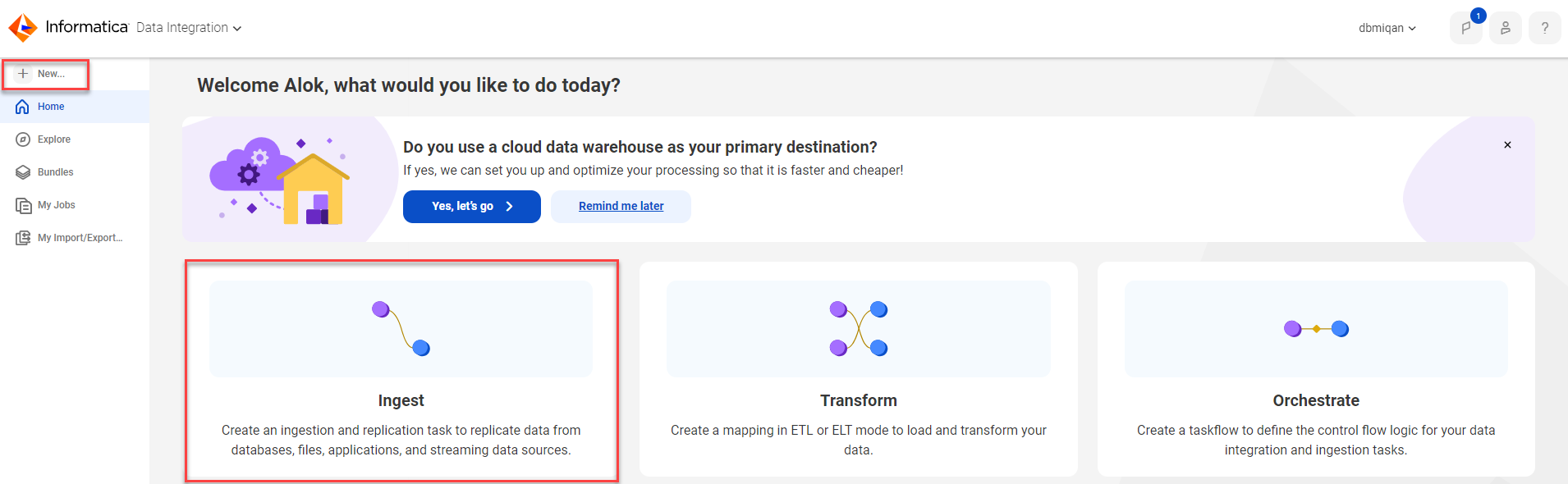
If the latest task wizard is enabled for your organization, you can start the wizard from the Home page.
Start the wizard in one of the following ways:
•Click the Ingest panel. Then in the Ingestion and Replication Tasks dialog box, select Application Ingestion and Replication Task or Database Ingestion and Replication Task.
•In the navigation bar on the left, click New. Then in the New Asset dialog box, click Data Ingestion and Replication and select either Application Ingestion and Replication Task or Database Ingestion and Replication Task.
If you previously selected a primary cloud data warehouse and use this method to start the wizard, the wizard does not recognize the primary cloud data warehouse as the destination. You'll need to select a destination for the task.
Note:
File Ingestion and Replication and Streaming Ingestion and Replication use the pre-existing wizard.