You can configure the maximum number of load job errors at the target that a mapping task can encounter before it stops. You can also capture the rejected rows in an error file.
The error threshold can include malformed rows and data conversion errors in the load job, but the errors resulting from update, delete, or merge queries are excluded.
You can set the error threshold value in the Stop on errors session property in a mapping task. You can set the value from 0 to 2147483647. Values less than 0, alphabets, and special characters are not allowed.
When you run a mapping task with bulk operations on the target, such as delete or load data, the mapping task executes operations in parallel instead of in sequence.
The following examples describe the mapping task behavior based on the error threshold you set:
•When you set the error threshold to the maximum value of 2147483647, the mapping task continues to run even after encountering errors.
•When you set the error threshold value to 0 or 1, the mapping task stops at the first error.
•When you set the error threshold value more than 1, the mapping task continues to run until the cumulative number of errors reaches or exceeds the configured threshold value, then it stops. Since the MongoDB V2 mapping task is executed in batch mode, the cumulative number of errors might exceed the configured threshold value before the mapping task stops.
For example, consider the following scenario when you set the error threshold value to 4 in a mapping task that processes 5 batches:
- Error count 1 after processing batch 1
- Error count 2 after processing batch 2
- Error count 5 after processing batch 3
Here, the mapping task continues through batch 2 because the cumulative errors have not yet exceeded the threshold of 4. After batch 3 completes, the cumulative errors increase to 8, which exceeds the threshold, so the mapping task stops and doesn't proceed to the next batch 4 or batch 5.
You can't configure the stop on error functionality in mapping tasks that are based on mappings in advanced mode.
Capture rejected rows in an error file
When you write data to a MongoDB V2 target in a mapping task configured with an error threshold, you can capture the rejected rows in an error file.
Use the error file to understand why the Secure Agent didn't write data to the MongoDB V2 target.
The Secure Agent writes rejected rows to the error file for all target operations and for tasks that capture changed data.
1Create a mapping task that uses the configured MongoDB V2 mapping.
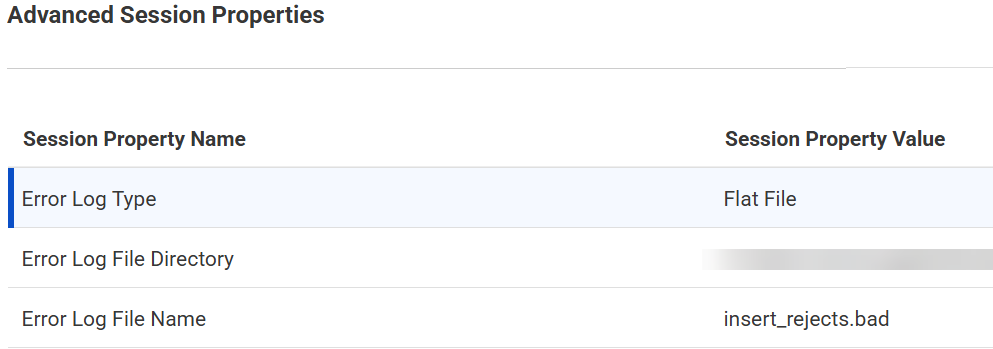
2On the Runtime Optionstab, go to theAdvanced Session Properties section.
3From the Session Property Name list, add the following properties, and then set the values:
aSelect the Error Log Type property and set the value to Flat File.
bSelect the Error Log File Directory property and enter a directory for the error file.
If you don't configure this property, the Secure Agent generates the error file in the following default directory:
cSelect the Error Log File Name property, and enter a file name with the .bad extension for the error file.
If you don't configure this property, the Secure Agent names the error file in the following format:
<Mapping task ID>_error.csv
4Click Save > Run to run the mapping task.
Rules and guidelines for generating error file
Consider the following rules and guidelines when you generate an error file for the rejected rows in a mapping task:
•The Secure Agent doesn't capture rows that the mapping task skips because the update columns contain null values.
•You can enter a directory in the Error Log File Directory property of a mapping task, in the Secure Agent, or in both settings. If you set a directory in both settings, the directory in the mapping task takes precedence.