TDM Architecture
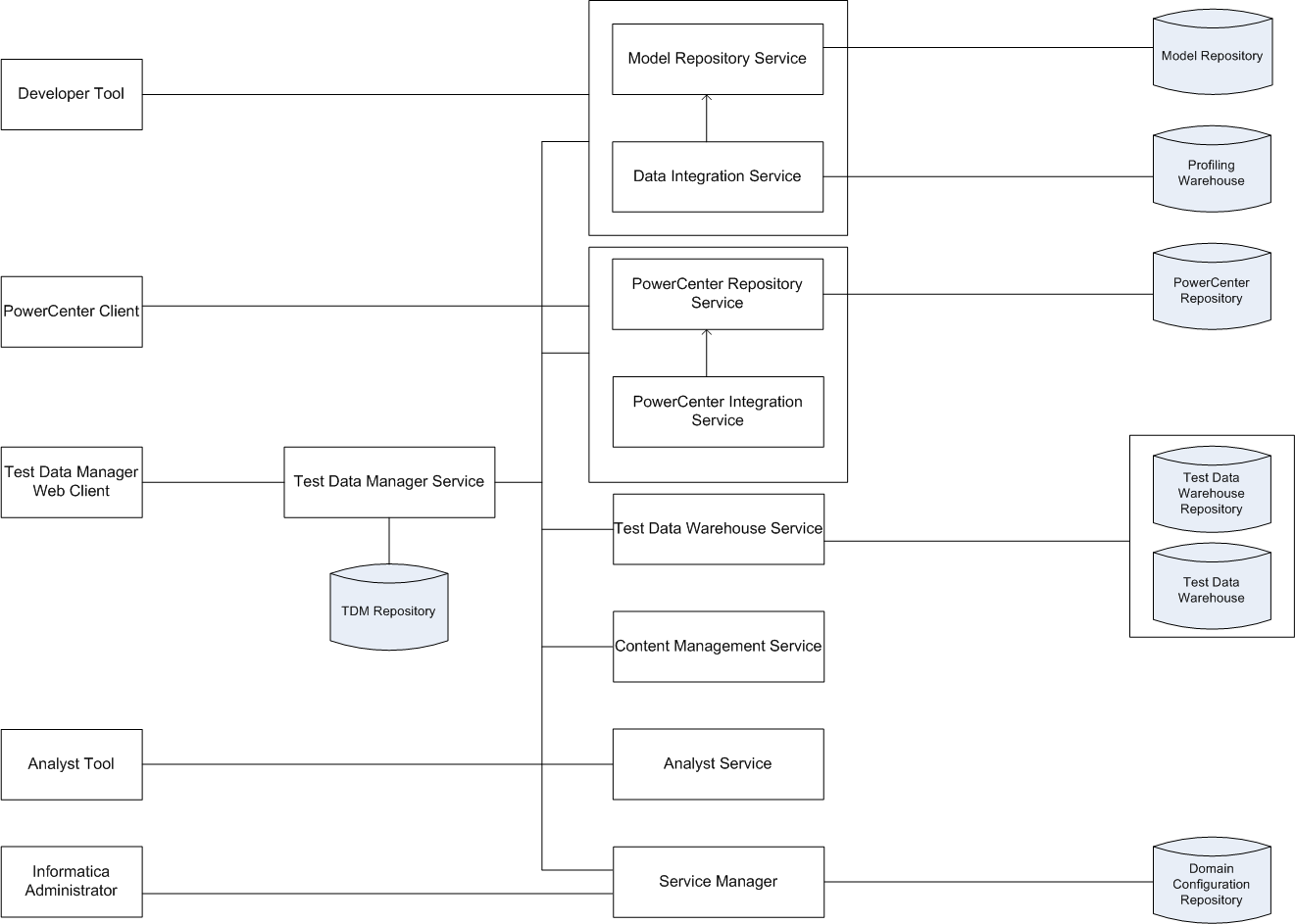
The TDM architecture consists of tools, the Test Data Manager Service and other application services, and databases.
The following image shows the components of TDM:
The following table describes the architecture components:
Component | Description |
|---|
Test Data Manager | A web-based client that you can use to perform data discovery, data subset, data masking, data generation operations, and operations on data sets in the test data warehouse. |
Developer Tool | A thick client that you use to create and run profiles to analyze the data. |
PowerCenter Client | The PowerCenter Client application consists of the tools to manage the repository and to design mappings, mapplets, and sessions to load the data. |
Informatica Administrator | A web application that you can use to manage, monitor, deploy, and undeploy data flows. |
Model Repository Service | An application service that manages the Model repository. |
Data Integration Service | An application service that performs data integration tasks for the Developer tool and external clients and data coverage tasks for the test data warehouse. |
Test Data Manager Service | An application service that runs Test Data Manager and manages connections between service components and Test Data Manager users. |
PowerCenter Repository Service | An application service that manages the PowerCenter repository where the metadata for workflows and mappings that you generate in Test Data Manager are stored. |
PowerCenter Integration Service | An application service that runs sessions and workflows that you run from Test Data Manager. |
Test Data Warehouse Service | An application service that runs the test data warehouse and manages the test data warehouse repository and the test data warehouse. |
Content Management Service | An application service that manages reference data. It fetches dictionary reference data from the reference data warehouse when you use relational dictionaries to mask Hadoop source connections. |
Analyst Service | An application service that manages the connections between service components and the users that have access to the Business Glossary. |
Service Manager | The Informatica Service that manages all domain operations and manages the domain configuration repository. |
TDM repository | A relational database that stores the components that you define in Test Data Manager, such as policies, projects, entities, and rules. The TDM repository stores metadata that you import into Test Data Manager from a source database or from the PowerCenter repository. |
Test data warehouse repository | A relational database that stores the source table metadata and project metadata for data sets that you create. |
Test data warehouse | A relational database that stores the source data that you include in a data set. |
Profiling warehouse | A relational database that stores profile results. |
Model repository | A relational database that stores the table metadata for data discovery profiles. The Model repository also stores connection information for connections that you create in TDM. |
Domain configuration repository | A relational database that stores the connections used to run profiles, users for the Informatica domain, and metadata for the Informatica domain. |
PowerCenter repository | A relational database that stores the metadata for workflows and mappings that you generate from Test Data Manager. It stores information required to extract, transform, and load data. It also stores administrative information such as permissions and privileges for users and groups that have access to the repository. |
TDM Tools
TDM tools consist of Test Data Manager, Informatica Developer, Informatica Administrator, and the PowerCenter Client.
You can use the following tools to perform administrative tasks for TDM:
- Test Data Manager
- A web-based application that you can use to create connections, integrate a test tool with TDM, and manage preferences and dictionaries.
- Informatica Developer
- A client application that you use to create and export profiles for data discovery.
- Informatica Administrator
A web-based client that a domain administrator uses to manage application services and create users and user groups.
- PowerCenter Client
- A client application that you use to configure permissions on folders and connection objects for the PowerCenter repository.
TDM Server
The TDM Server runs TDM and integrates with the Test Data Manager Service and other Informatica application services to perform data subset, data masking, data generation, and data discovery operations.
TDM Services
TDM application services consist of the Test Data Manager Service, profiling services, and PowerCenter application services. The application services are created in the Administrator tool.
TDM requires the following services:
- PowerCenter Repository Service
- An application service that manages the PowerCenter repository. The PowerCenter Repository Service accepts requests from the PowerCenter Integration Service when a workflow runs.
- PowerCenter Integration Service
An application service that runs workflows that users generate in Test Data Manager for TDM operations.
- Model Repository Service
- An application service that manages the Model repository for data discovery operations.
- Data Integration Service
- An application service that performs data discovery operations. The Data Integration Service connects to the Model Repository Service to store metadata from data discovery profiles in the Model repository. When you run a profile, the Data Integration Service also stores data from data discovery profiles in the profiling warehouse. The Data Integration Service performs data movement and data masking operations in the Hadoop environment. To run a Hadoop plan, TDM uses the Data Integration Service to push down the transformation logic into Hadoop clusters.
- Analyst Service
- An application service that manages the Analyst tool. TDM uses the Analyst tool to link TDM global objects to objects in the Business Glossary. The license for the Analyst Service must support Business Glossary.
- Test Data Warehouse Service
- An application service that manages the test data warehouse repository and the test data warehouse. The Test Data Warehouse Service connects to the test data warehouse repository to copy the metadata created when you create a data set. It creates the tables for data sets in the test data warehouse.
- Test Data Manager Service
- The TDM application service that manages the TDM repository. Test Data Manager accesses the Test Data Manager Service to use database content from the TDM repository and to connect to other services to perform TDM operations.
TDM Databases
The databases component of TDM consists of the TDM repository, the Model repository, the PowerCenter repository, the profiling warehouse, the test data warehouse repository, and the domain configuration repository.
TDM uses the following databases:
- TDM repository
- A relational database that contains tables that TDM requires to run and the tables that store metadata.
- Model repository
- A relational database that stores table metadata for data discovery profiles and the connections that you create in Test Data Manager.
- PowerCenter repository
- A relational database that stores all of the metadata required to run workflows.
- Profiling warehouse
- A relational database that stores profile results for data discovery.
- Test data warehouse repository
- A relational database that stores the source table metadata and project metadata for data sets that you store in the test data warehouse.
- Test data warehouse
- A relational database that stores the source data that you include in data sets that you store in the test data warehouse.
- Domain configuration repository
- A relational database that stores the connections used to run profiles, users for the Informatica domain, and metadata for the Informatica domain.
TDM Connections
To perform data discovery, data subset, data masking, and data generation operations, you need a profiling connection, a repository connection, and source and target database connections.
To perform data discovery operations, an application requires connections to a database source and a Data Integration Service. To perform data subset and masking operations, workflows that you generate from plans require connections to services, the TDM repository, the PowerCenter repository, and source and target databases. To perform data generation operations, workflows that you generate from plans require connections to services, the TDM repository, the PowerCenter repository, and target schema metadata. To create data sets and to perform operations on data sets TDM requires a connection to a source and to a Test Data Warehouse Service.
TDM uses the following connections:
- •Profiling connection. Create a connection to the Data Integration Service that you want to run data discovery operations. The profiling connection includes connection details for the Model Repository Service associated with the Data Integration Service.
- •TDM repository connection. Create a connection to the TDM repository when you create the Test Data Manager Service from the Administrator tool. Test Data Manager uses the TDM repository to store the metadata from sources that you import.
- •PowerCenter repository connection. Create a connection to the PowerCenter repository that you want to store workflow metadata. If the TDM repository and the PowerCenter repository exist in the same schema, copy the connection information for the TDM repository.
- •Test data warehouse connection. Create a connection to the test data warehouse repository and the test data warehouse when you create the Test Data Warehouse Service.
- •Database connections. Create connections to the source and target databases to perform data discovery, data subset, and data masking operations. Import target metadata schema into the TDM repository to perform data generation operations. When you create a database connection in Test Data Manager, you define connection information for workflows and profiles. When you run a workflow or profile, Test Data Manager uses the connection information to create connection objects in the PowerCenter repository or the Model repository.
- •Test tool connection. To run workflows to copy flat file results to a test tool, you must first integrate the test tool server with TDM. TDM connects to the integrated server to copy the flat file to the configured location.