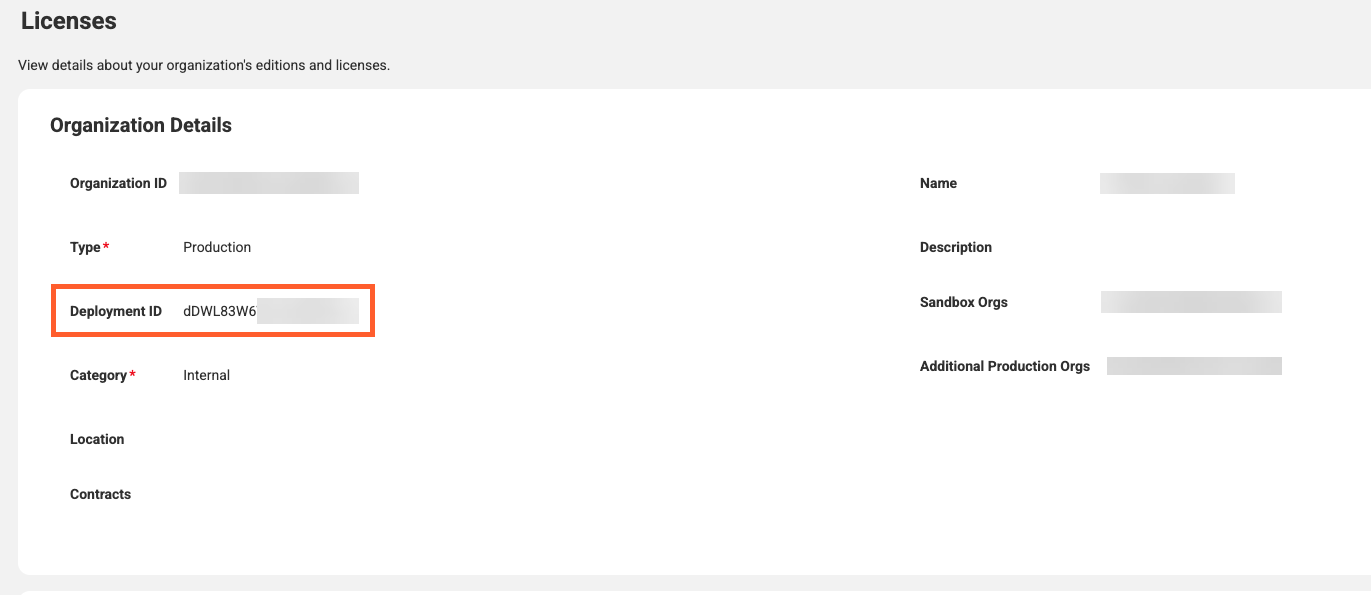
The Licenses page now displays the deployment ID for your organization. The deployment ID is a unique identifier for your organization hierarchy and is the same across your linked organizations. Use the deployment ID to compare consumption metrics from your IDMC metering dashboard with the IPU consumption reported in Salesforce.
The following image shows the Deployment ID property on the Licenses page:
Elastic runtime environments
Elastic runtime environments include the following new features and enhancements:
•Flexible EFS directory projection for data storage. Organize your EFS data storage using any directory structure. You can now specify custom projected file paths in your environment configuration to route files to the appropriate paths within your Kubernetes Pods.
•Enhanced security with IMDSv2. Elastic runtime environments now enforce IMDSv2 (Instance Metadata Service Version 2) with a hop limit of 2 on both custom AMIs and master nodes.
•Improved reliability, security, and monitoring. Elastic runtime environments include improved cluster stability, clearer monitoring metrics, and better lifecycle management:
- Installation messaging is more accurate.
- Monitoring graphs separate master and worker node counts.
- Configuration updates now avoid unnecessary node rotations when AMIs remain unchanged.
- Updated kernel requirements ensure full compatibility with underlying Kubernetes components.
- Expanded access controls, certificate validation, and automated cleanup routines improve cluster security and master node recovery.
In addition to existing login and session events, the audit log now captures the following events:
•Failed login attempts
•Account lockouts
•Agent login failures
•Password changes
•IP whitelisting
•User group updates
•User role updates
•Organization attribute updates
•Organization name changes
•Password requirement changes
•Password reuse policy changes
•Password expiration policy changes
•Email notification changes
•CLAIRE preferences changes
•Organization environment type changes
These new events give administrators more visibility into security-related changes.
Stopping and starting a serverless runtime environment
You can now stop and start a serverless runtime environment to make platform configuration changes and bring the environment back online with its updated settings. You can also stop a serverless runtime environment to reduce costs during periods of inactivity.
Swagger files
The Swagger Files page is updated and reorganized for improved usability.
Large repositories in GitHub
You can now check in large repositories in GitHub. These are projects containing 500 or more assets in a single project or folder.
To enable this feature, you need to accept new permissions. If you've configured a GitHub OAuth App for IDMC source control, you may have received an email with a link leading directly to accepting the new permission. If you haven't received this email, follow the directions in the Checking in large repositories in source control Knowledge article.