If your organization has the Intelligent Cloud Data Management feature, you can download metering usage data using the REST API.
To download the metering data, you send an export job request, check the job status, and then download a ZIP file that contains the data. The ZIP file can't exceed 50 KB.
You can download the following data:
Summary IPU usage data
You can download summary IPU usage data for production organizations, additional production organizations, sub-organizations, and sandbox organizations for a specified date range. The ZIP file includes data for the requesting organization and the organizations under it.
For example, if the requesting organization is the production organization, the ZIP file contains data for the production organization and its additional production organizations, sub-organizations, and sandbox organizations. If the requesting organization is an additional production organization that has a sub-organization, the ZIP file contains data for the additional production organization and its sub-organization.
You can request usage information for all organizations in one CSV file, or you can receive individual CSV files for each organization.
Project-level details
You can download metering data by project and folder for a specified date range.
By default, the ZIP file includes data only for the requesting organization. You can request to receive data for the requesting organization and its sub-organizations.
You can request usage information for all organizations in one CSV file, or you can receive individual CSV files for each organization.
Asset-level details
You can download metering data by asset for a specified date range. You can specify a meter ID in the request to receive usage information for a specific meter.
Job-level details
You can specify a meter ID in the request to receive usage information for a specific meter.
If a service supports job-level detail reports, you can download job-level details for a specified date range. You can request job-level details for a particular meter or for all meters. The ZIP file includes data for the requesting organization.
Note:
An organization can have a maximum of 5 active jobs. A job is active when the status is CREATED or PROCESSING.
Requesting summary IPU usage data
You can run a job to export summary IPU usage data for the parent organization and its linked organizations such as additional production organizations, sub-organizations, and sandbox organizations for a specified date range.
To request and receive summary IPU usage data, you must have access rights to the parent organization and all of the linked organizations.
The following table describes the fields to include in the request:
Field
Type
Required
Description
startDate
String
Yes
Start of the date range in ISO 8601 format. For example, 2022-08-12T00:00:00Z
endDate
String
Yes
End of the date range in ISO 8601 format.
When you request summary data, the range can be a maximum of 180 days.
jobType
String
Yes
Type of metering data to export.
Use SUMMARY.
combinedMeterUsage
Boolean
-
Indicates whether to return usage information for all organizations in one CSV file. Include one of the following values:
- TRUE. Return usage information for all organizations in one CSV file.
- FALSE. Return usage information for each organization in a separate CSV file.
Default is FALSE.
allLinkedOrgs
String
-
Indicates whether to return usage information from the parent organization and all its linked organizations. Include one of the following values:
- TRUE. Return usage information for the parent organization and all linked organizations.
- FALSE. Return usage information for the parent organization only.
Default is FALSE.
callbackUrl
String
-
A valid, publicly available URL where the service posts the job status.
Note:
When you send a request with both allLinkedOrgs and combinedMeterUsage set to "true," the response excludes internal organization roll-up meters from the IPU usage total. This makes the IPU usage total match the usage total shown in the Administrator UI. For any other combination of values for these two fields, roll-up meters are included in the total. IDMC uses the roll-up meters to display the Organizations IPU Usage, Sub-Organizations IPU Usage, and Additional Production Organizations IPU Usage totals in Administrator.
POST request example
You might use a request similar to the following example:
POST <baseApiUrl>/public/core/v3/license/metering/ExportMeteringData Content-Type: application/json Accept: application/json INFA-SESSION-ID: <sessionId>
The following table describes the fields to include in the request:
Field
Type
Required
Description
startDate
Date/time
Yes
Start of the date range.
endDate
Date/time
Yes
End of the date range.
The range can be a maximum of 180 days.
combinedMeterUsage
Boolean
-
Indicates whether to return usage information for all organizations in one CSV file. Include one of the following values:
- TRUE. Return usage information for all organizations in one CSV file.
- FALSE. Return usage information for each organization in a separate CSV file.
Default is FALSE.
callbackUrl
String
-
A valid, publicly available URL where the service posts the job status.
Note:
When you send a request with combinedMeterUsage set to "true," the response excludes internal organization roll-up meters from the IPU usage total. This makes the IPU usage total match the usage total shown in the Administrator UI. If the combinedMeterUsage value is set to "false," roll-up meters are included in the total. IDMC uses the roll-up meters to display the Organizations IPU Usage, Sub-Organizations IPU Usage, and Additional Production Organizations IPU Usage totals in Administrator.
POST request example
You might use a request similar to the following example:
POST <baseApiUrl>/public/core/v3/license/metering/ExportMeteringDataAllLinkedOrgsAcrossRegion Content-Type: application/json Accept: application/json INFA-SESSION-ID: <sessionId>
For certain meters, you can run a job to export job-level details for a particular service and meter for a specified date range.
After the job starts, you can check the job status. When the job completes successfully, you can send a request to download the data. For more information, see Getting the metering data export job status.
POST request
To send the export job request, use the following URI:
The response includes the following fields for organization configurations:
Field
Type
Description
orgName
String
Name of the organizaiton.
orgId
String
ID of the organization.
parentOrgId
String
ID of the parent organization. This field only applies to sub-organizations. Otherwise, it's NULL.
thresholdValue
Integer
Threshold value configured.
ipuConsumed
BigDecimal
Specifies how many IPUs are consumed. This field's value relates to the ipuThresholdPrefType field and displays either an absolute value or a percentage.
ipuThresholdPrefType
String
Type of threshold. Returns one of the following values:
- ABSOLUTE.
- PERCENTAGE.
The response includes the following fields for tag configurations:
Field
Type
Description
orgId
String
ID of the organization.
projectName
String
Name of the project.
folderName
String
Name of the folder. For project based thresholds, the folder name is NULL.
thresholdValue
Integer
Threshold value.
currentConsumption
BigDecimal
Specifies how many IPUs are consumed. This field's value relates to the ipuThresholdPrefType field and displays either an absolute value or a percentage.
ipuThresholdPrefType
String
Type of threshold. Returns one of the following values:
- ABSOLUTE.
- PERCENTAGE.
GET request example
To get the custom IPU alert configurations for your organization, you might use the following request:
GET <BaseApiUrl>/public/core/v3/metering/ipuAlert/org('3nqii4jGTiLda0M3ympy4E') Content-Type: application/json Accept: application/json INFA-SESSION-ID: <SessionId>
To get the custom IPU alert configurations for your tags, you might use the following request:
GET <BaseApiUrl>/public/core/v3/metering/ipuAlert/org('3nqii4jGTiLda0M3ympy4E')/viewTagsPreference Content-Type: application/json Accept: application/json INFA-SESSION-ID: <SessionId>
GET response example
If succesful, you might receive a response similar to the following for organization configurations:
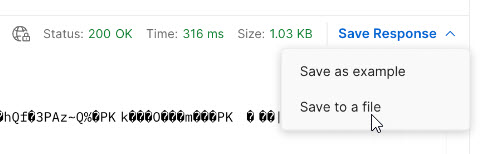
If successful, you receive the ZIP stream in the response body and the response type will be application/zip. To download the file, save the response to a file as shown in the following image using Postman:
If the ZIP file exceeds 50 KB, the response is an error.
Meter IDs
When you create a request to export job-level or asset-level data, you can include a meter ID in the request to get data for a single meter.
The following table lists the meter IDs that you can use for each type of request:
Meter name
Request type
Meter ID
Advanced Data Integration
Asset and job
3TaYTMo6BFYeNIABfVmH0n
Advanced Data Integration with Advanced Serverless
Asset and job
8tXWie0ZQLWlG1cyxxLwQM
Advanced Data Quality
Asset and job
3qh0uqEkx2KjCOnnPoB786
Advanced Data Quality with Advanced Serverless
Asset
gzNg8hRHqusd8TkG3qOpws
Advanced Pushdown Optimization
Asset and job
dMN0VeTW4cThHyPovp4GEX
Application Integration
Job
Classic mode - 3uIRkIV5Rt9lBbAPzeR5Kj
Turbo mode - 4610adb7f5e945e98da246
Application Integration with Advanced Serverless
Job
Classic mode - bN6mes5n4GGciiMkuoDlCz
Turbo mode - 4c6fec02782546879713aa
B2B Gateway
Asset
4136oNHy3dPeKfhCDzv9sl
You can use this IPU meter to view the metering information for B2B Gateway prior to the October 2025 release.
B2B & Industry Solutions
Asset
68c4cbf9f1d84b6fb52e9f
You can use this IPU meter to view the metering information for both B2B Gateway and Industry Solutions from the October 2025 release.
Cloud Data Integration for PowerCenter
Asset and job
eNYBoIrr3KDgtDN9E6lXid
Cloud Data Integration for PowerCenter - Change Data Capture and Real-Time
Asset and job
5rtHwmyoQ6HjmJt8mqXTwc
Cloud Data Integration for PowerCenter - Pushdown Optimization
Asset and job
8y72urWKS85gGBRVi6tJGA
Data Access Management - Rows Processed
Asset
8tJNWEJFAhojeO8ZAx6ZGT
Data Integration
Asset and job
a2nB20h1o0lc7k3P9xtWS8
Data Integration with Advanced Serverless
Asset and job
35m9fB23Tykj4Fb3rN5q2J
Data Integration - Change Data Capture
Asset and job
0sDTANKFZBSbqjzKaXKlmB
Data Loader
Asset
aBNLpHvKynqb33VYVDl3y2
Data Masking
Asset
1gUb7oRmAAXbpqeR8uRyye
Data Quality
Asset
cPnPIT3XYAziLqIoXtd0KC
Data Quality with Advanced Serverless
Asset
kFBW9yYl4QHfru384cRMmp
Data Validation
Asset and job
2qJ9COoAhfMrsH7mCyh86M
Industry Solutions
Asset
7a2Fd4622Da044a38b7EB1
You can use this IPU meter to view the metering information for Industry Solutions prior to the October 2025 release.