The Monitor page provides real-time analytics about the AI agents deployed by users in your organization.
The Monitor page is a dashboard that provides the following features:
•Multiple tabs that let you quickly see AI agents in the following categories: All, Running, Faulted, or Completed.
•Advanced filtering based on flow name, session ID, status, or duration.
•Downloadable CSV file that contains a superset of the monitoring data.
•Duration tracking for each AI agent session.
•Number of tools used in each AI agent session. Hover over the tool count to see which tools were used.
•Conversation logs for each AI agent session. See exactly what was asked of the agent and how the agent responded.
To access the Monitor page, click Monitor from the navigation menu.
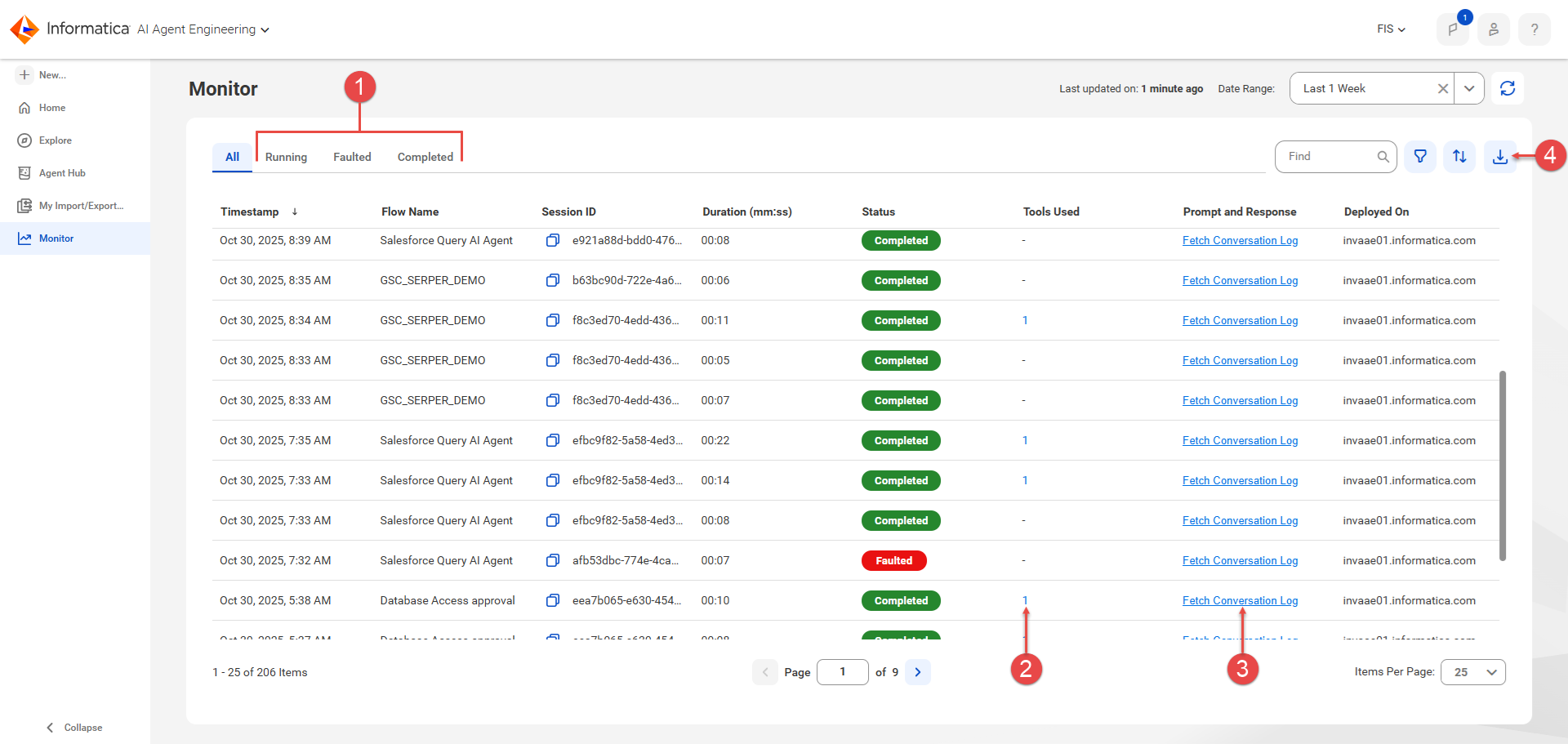
The following image shows the Monitor page:
1Quickly filter the AI agents based on state: Running, Faulted, and Completed. AI agents in the faulted state contain errors and can't complete.
2Hover over a tool count to see the list of the tools used by the agent during a session.
3Select a conversation log to see the prompts issued to the agents and the responses from the agents.
4Download the monitoring details to a CSV file that you can search and manipulate later. The downloaded file contains a superset of the information shown on the Monitor page, including locations of internal logs files.