To write data to PostgreSQL, configure a PostgreSQL object as the target in a mapping.
Specify the name and description of the PostgreSQL target. Configure the target and advanced properties for the target object.
The following table describes the target properties that you can configure in a Target transformation:
Property
Description
Connection
Name of the target connection, or create a connection parameter.
If you want to overwrite the target connection properties at runtime, select the Allow parameter to be overridden at run time option. Specify the parameter file directory and name in the advanced session properties.
Target Type
Type of the target object. Select Single Object or Parameter.
Object
Name of the target object. You can select an existing target object from the displayed list or you can create a target at runtime. When you want to create a target at runtime, specify the target object name and the path for the target object.
For a list of supported data types that you can write to PostgreSQL using the Create New at Runtime option, see the Data Type References chapter.
Parameter
A parameter file where you define values that you want to update without having to edit the task.
Select an existing parameter for the target object or click New Parameter to define a new parameter for the target object.
The Parameter property appears only if you select parameter as the target type.
If you want to overwrite the target object at runtime, select the Allow parameter to be overridden at run time option.
When the task runs, the Secure Agent uses the parameters from the file that you specify in the advanced session properties.
Operation
Type of the target operation.
Select Insert, Upsert, Update, Delete, or Data Driven.
To perform an upsert operation, you need to set the target advanced property Update Mode to Update Else Insert.
Data Driven Condition
Enables you to define expressions that flag rows for an insert, update, delete, or reject operation.
Appears only when the operation type is Data Driven.
Note:
When you configure the DD_REJECT operation in the data driven mode to reject data to PostgreSQL, the rejected records are not written to the error files and the session log shows the number of rejected rows as zero.
Update Columns
Specify the columns that you want to use as a logical primary key for performing update, upsert, and delete operations on the target.
This field is not required if the target table already has a primary key. If the target table does not have a primary key, ensure that the columns selected in the Update Columns field has a unique constraint for the upsert operation.
This property is not applicable for the insert operation.
The following table describes the PostgreSQL advanced target properties:
Property
Description
Update Mode
Specifies the mode to write data to PostgreSQL target. You can specify the following modes:
- Update As Update. Updates all rows flagged for update if the entries exist.
- Update Else Insert. Updates all rows flagged for update if the entries exist in the target. If the entries do not exist, the Secure Agent inserts the entries.
Override Target Query
An SQL statement to override the default update query that the Secure Agent generates for the update operation.
Schema Name
Overrides the schema name of the target object.
Target Table Name
Overrides the default PostgreSQL target table name.
Pre-SQL
The pre-SQL commands to run a query before you write data to PostgreSQL.
You can partially parameterize pre-SQL with values specified in a parameter file.
Post-SQL
The post-SQL commands to run a query after you write data to PostgreSQL.
You can partially parameterize post-SQL with values specified in a parameter file.
Truncate Target
The Secure Agent truncates the target before writing the data.
Enable target bulk load
Performs bulk upload when you configure an insert operation to write to PostgreSQL. Select this option to improve the performance of inserting data in bulk to PostgreSQL.
Default is unselected.
Note:
When you enable the target bulk mode to insert data to PostgreSQL, error files are not generated for rejected records.
Enable Transactional Commit
Enables advanced recovery or commit interval for a mapping that writes to a PostgreSQL target.
Default is unselected.
When you enable this option, the Enable target bulk load and Batch size properties are ignored.
Applicable if you select the Enable target bulk load option.
The number of rows that the Secure Agent writes in a single batch to PostgreSQL. Specify a batch size value that is greater than zero.
Note:
You can use a batch size smaller than the DTM buffer size to manage failures and reliably track statuses when a batch is rejected due to errors.
Reject File Directory
The directory that stores the rejected files.
Specify the directory where you want to store the rejected files.
Reject File Name
Name of the rejected file that is stored in the reject file directory.
Forward Rejected Rows
Not applicable.
Specifying a target
You can use an existing target or create a target to hold the results of a mapping.
To specify the target properties, perform the following tasks:
1Select the Target transformation in the mapping.
2On the Incoming Fields tab, configure field rules to specify the fields to include in the target.
3To specify the target, click the Target tab.
4Select the target connection as PostgreSQL.
5For the target type, choose Single Object or Parameter.
6Specify the target object or parameter. Click Select, choose a target object, and then click OK.
You can select an existing target object or create a new target object at run time and specify the object name.
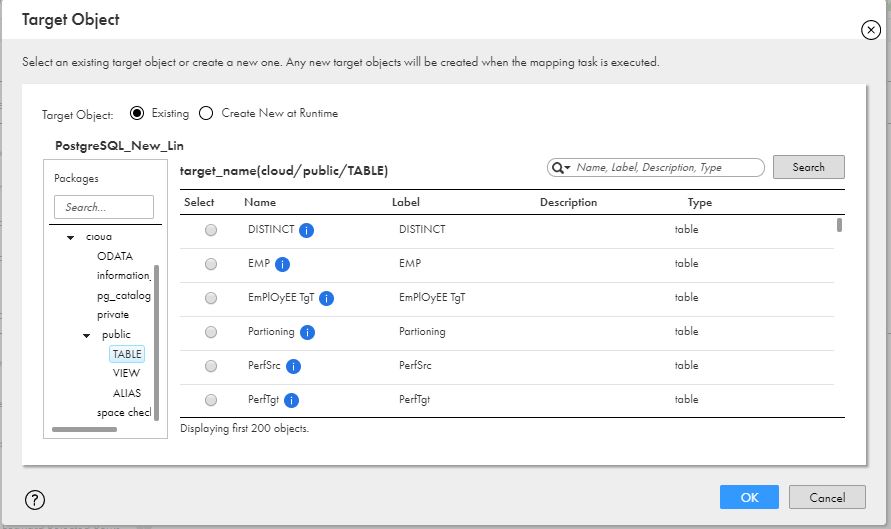
7To select an existing target object, select Existing and then select the required target table.
The following image shows the available target tables:
8To create a new target at run time, perform the following tasks:
Note:
When you choose to create a target at runtime and if the target table does not exist in the target database, the Secure Agent creates the table when you run the task. If a table with the same name already exists in the database, the Secure Agent uses the existing table.
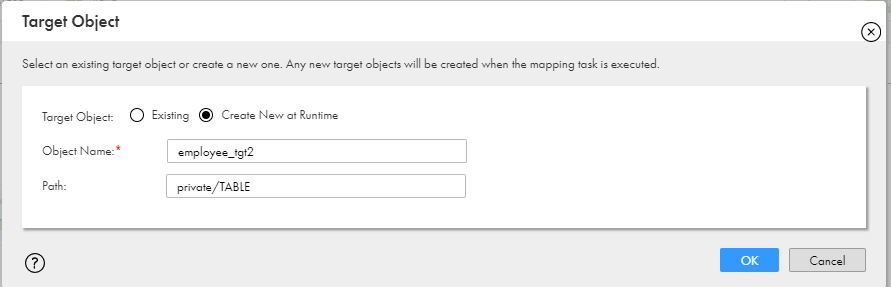
aSelect Create New at Runtime.
bIn the Object Name field, specify the table name for the PostgreSQL target.
cIn the Path field, specify the schema for the PostgreSQL target.
You must specify the schema in the following format: <Schema_Name>/<TableType>, where the TableType is TABLE. For example, if you specify the path as private/TABLE, the table is created in the schema named private in PostgreSQL. If you do not specify the path, the Secure Agent considers the schema from the connection properties. If you do not specify the schema in the connection properties, the target table is created in the public schema.
The following image shows the target object properties for the Create New at Runtime option:
9Specify the operation and advanced properties for the target, as required.
Override the target query
You can configure an override target query to override the update query that the Secure Agent generates for the update operation. To override the update query, select Update As Update from the Update Mode list in the advanced target properties.
You must specify the override target query with a valid SQL syntax because PostgreSQL Connector does not validate the update query.
Specify the override target query in the following format:
UPDATE <schema name>.<Target table name here> SET <Column1> = :TU.<Column1>, <Column2> = :TU.<Column2>, <ColumnN> = :TU.<ColumnN> WHERE <Upadate Column1> = :TU.<Upadate Column1>
where, :TU. in the update query, that represents the incoming data source for the target port, must match the target table column names and the WHERE clause is mandatory in the query.
If the number of :TU columns are less than the total number of columns in the PostgreSQL target, you must map the required fields to the PostgreSQL target.
When you use the Override Target Query property for a PostgreSQL target, consider the following rules:
•You cannot use the override target query for an insert, upsert, delete, or data driven operation.
•You cannot change the order of the column mappings using the override target query.
•You cannot specify multiple override target queries for an update operation.
Configure the commit interval
The Target transformation writes data to the PostgreSQL target as the data is processed. You can configure a commit interval to manage how frequently the transformation commits data to the target.
To enable the commit interval, set the following properties:
•Set the Commit Type property to Source and set the commit interval value in the Commit Interval property within the Advanced Session Properties of the mapping task.
If you don't set the Commit Interval or Commit Type properties, the connector applies the default values of 10000 and Target, respectively.
•Enable the Enable Transactional Commit property in the target advanced properties of the mapping.
Advanced recovery with CDC sources
Change Data Capture (CDC) advanced recovery enables mapping restart capabilities in the event of a mapping failure. When a mapping fails, the recovery mechanism allows it to resume processing from the last successful commit point, ensuring data consistency and preventing data loss or duplication.
You can configure advanced recovery for the target and the recovery state is managed by the target in the database tables. The recovery table is created in the same schema where the target table exists. If the recovery table doesn’t exist, the mapping creates one at runtime.
Complete the following steps to configure advanced recovery:
•Grant the CREATE TABLE permission on the schema where the target table exists in the database. If this permission is not granted, you need to create the recovery table manually before starting the advanced recovery.
•In the mapping task, set the Commit Type property to Source and the Recovery Strategy property to Resume from last checkpoint.
•Enable the Enable Transactional Commit target advanced property in the mapping.
When you create the recovery table manually, use the following DDL template:
CREATE TABLE IF NOT EXISTS <SCHEMA_NAME>.infa_postgres_recovery_table( recoveryjobid varchar(255) PRIMARY KEY, recoverytoken varchar(65535), recoverytokenlength int, recoverytokenid int );
The mapping fails at runtime if the mapping configuration includes multiple targets or multiple pipelines for the PostgreSQL endpoint and you enable advanced recovery.