To read data from an SAP HANA database, configure an SAP HANA object as a source in a mapping.
Specify the name and description of the SAP HANA source. Configure the source, query options, and advanced properties for the source object.
You can parameterize the SAP HANA source connection at run time with values specified in a parameter file.
The following table describes the SAP HANA source properties that you can configure in a Source transformation:
Property
Description
Connection
Name of the source connection.
You can select an existing connection, create a new connection, or define parameter values for the source connection property.
To overwrite the source connection properties at run time, select the Allow parameter to be overridden at run time option.
Object Type
Type of the source object.
Select one of the following object types from the list:
- Single Object
- Multiple Objects
- Query
- Parameter
Default is Single Object.
Object
The source object for the task.
Select the source object for a single source.
Filter
Filters record based on the filter condition in a read operation.
A simple filter includes a field name, operator, and value. Use an advanced filter to define a more complex filter condition, which can include multiple conditions using the AND or OR logical operators.
Use single quotes to specify a filter value.
Select distinct rows only
Select this option to extract only distinct rows.
The following table describes the SAP HANA source advanced properties that you can configure in a Source transformation:
Property
Description
Pre SQL
Pre-SQL command to run before reading data from the source.
Post SQL
Post-SQL command to run after reading data from the source.
Output is Deterministic
When you configure this property, the Secure Agent does not stage source data for recovery if transformations in the pipeline always produce repeatable data.
Output is repeatable
When the output is deterministic and the output is repeatable, the Secure Agent does not stage the source data for recovery.
SQL Override
The SQL statement that overrides the default query generated by the specified source object used to read data from the SAP HANA source.
Schema Name
Overrides the schema name specified in the connection.
Table Name
Overrides the table name of the imported SAP HANA source table.
Tracing level
Sets the amount of detail that appears in the log file.
Select one of the following options from the list:
- Terse
- Normal
- Verbose Initialization
- Verbose Data
Default is Normal.
Input types for HANA modelling views
You can use the following input types when you read data from HANA modelling views:
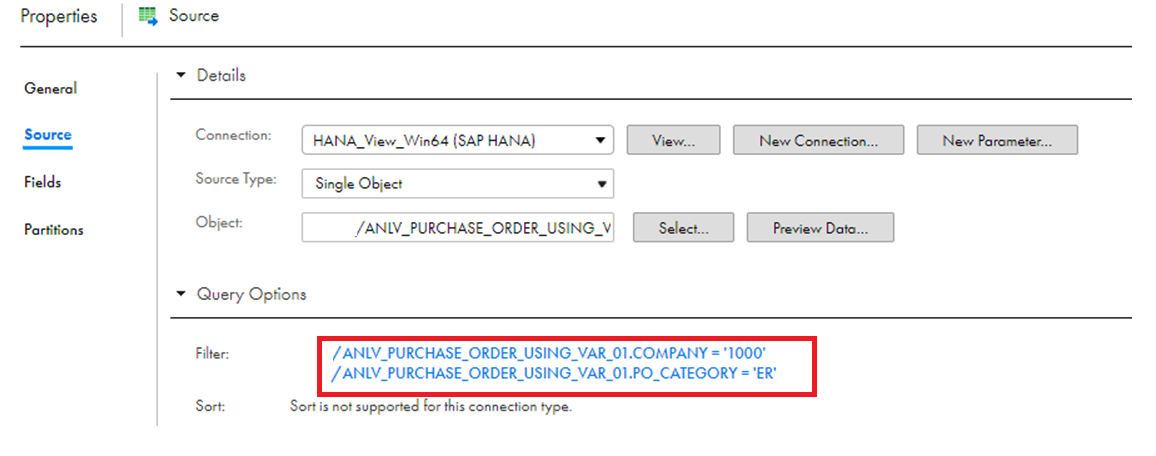
•Variables. A variable is a filter. A variable is associated with a field, for example, company name, of the view.
Provide the variable value in the field that you specified in SAP.
The following image shows the variable VAR_01 associated with COMPANY and PO_CATEGORY fields:
•Parameters. An input parameter is a placeholder to the query. You can use parameters to insert values for analytical views and calculation views. The data type for an input parameter in Data Integration is char. Specify the data for input parameters in the format that you defined in SAP.
When you create a mapping and use input parameters, do not connect the input parameters in the source to the output fields. Otherwise, the mapping fails. For more information, see Input parameter types.
Input parameter types
When you select a HANA modelling view, Informatica adds a prefix to the parameter name. The prefix is used to indicate the parameter type.
You can use the following types of parameters:
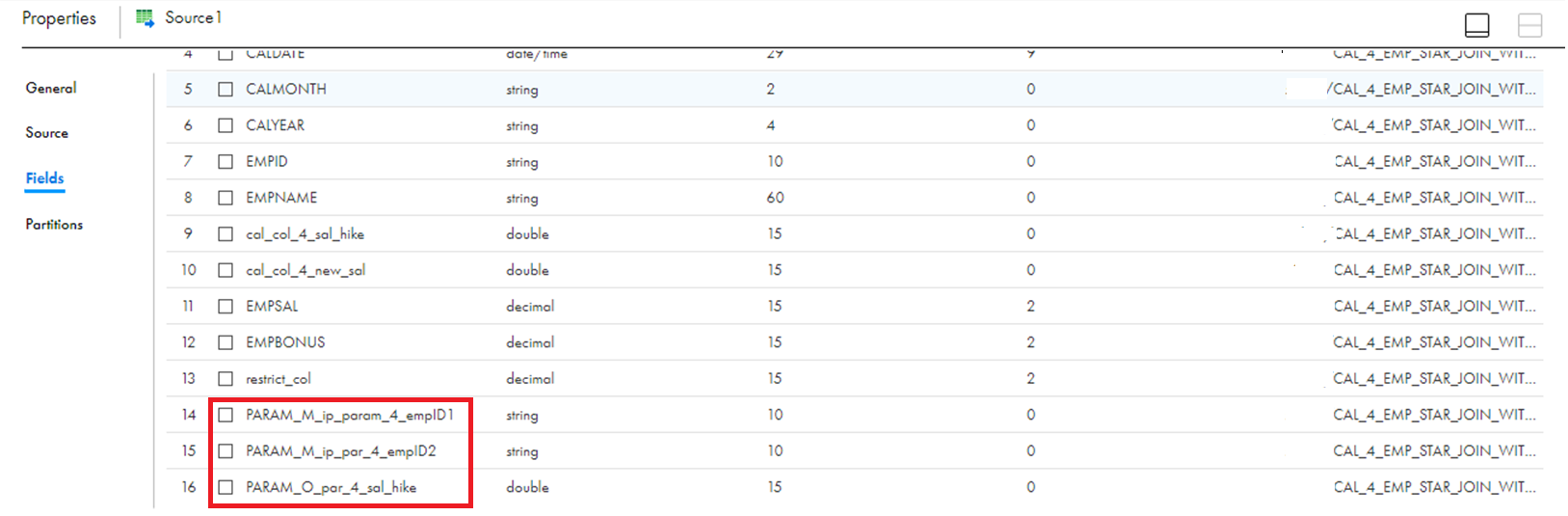
•Mandatory Parameter. A parameter for which you are required to specify a value. For example, in the field PARAM_M_ip_param_4_empID1, PARAM_M is the prefix for a mandatory parameter that Informatica adds. ip_param_4_empID1 is the parameter name that is a part of HANA modelling views.
•Optional Parameter. A parameter for which you do not need to provide a value. For example, in the field PARAM_O_par_4_sal_hike, PARAM_O is the prefix for an optional parameter that Informatica adds. par_4_sal_hike is the parameter name that is a part of HANA modelling views.
The following image shows the mandatory parameter PARAM_M_ip_param_4_empID1 and the optional parameter PARAM_O_par_4_sal_hike: