1On the My Secure Agents page, click the Configure Agent Properties link for your Secure Agent.
The Runtime Properties page appears:
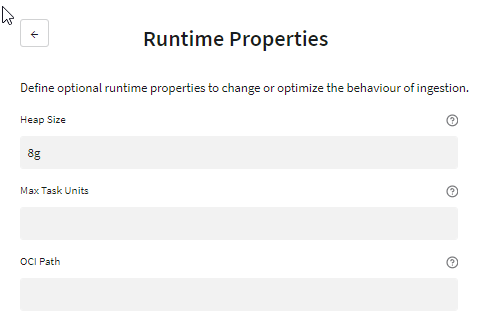
2Optionally, set the following properties:
- Heap Size
- The maximum heap size, in gigabytes, for task execution. This value, in conjunction with Max Task Units property, affects the number of concurrent tasks that can run on a Secure Agent. If you want to run more tasks concurrently, try increasing the heap size. Enter this value followed by "g" for gigabytes, for example, 9g.
- Max Task Units
- The maximum number of replication task units that can run concurrently on the on-premises machine where the Secure Agent is running.
- OCI Path
- For Oracle sources, the path to the Oracle Call Interface (OCI) directory that contains the oci.dll or libcIntsh.so file. By default, Oracle uses $ORACLE_HOME/lib on Linux or %ORACLE_HOME%\bin on Windows. The OCI library is used by replication tasks to connect to Oracle.
You can use this property to control CPU usage. However, task units are not related to the capacity and availability of your hardware or software.
For initial load processing, this property determines the number of source tables that can be unloaded simultaneously. Other tables are queued and start unload processing when resources become available. For incremental load processing, this property determines the number of jobs that can run simultaneously.
Valid values are 1 to 2000000000 (2 billion).
Note: A value greater than the number of cores on the Secure Agent machine can increase parallelism for task execution but cause performance bottlenecks at task execution time.
3Click Save.