1Open the data set for which you want to compare profile results over time.
2If multiple profiles exist for the data set, click Switch Profile and select the profile for which you want to compare the results.
3On the Data Profiling tab, click the action menu on the top of the page and select Compare > Profile Runs.
The Compare Profile Runs window appears.
4Choose any two job instances to compare, and click Select.
The comparison of column statistics from both runs appear. An up arrow with a numeric count indicates an increase in the statistic compared to the earlier run. A down arrow with a numeric count indicates a decrease in the statistic. A warning icon besides a column name indicates that the column was not a part of one of the profile instances. You can hover over the icon to see the details.
The following image shows a comparison of column statistics: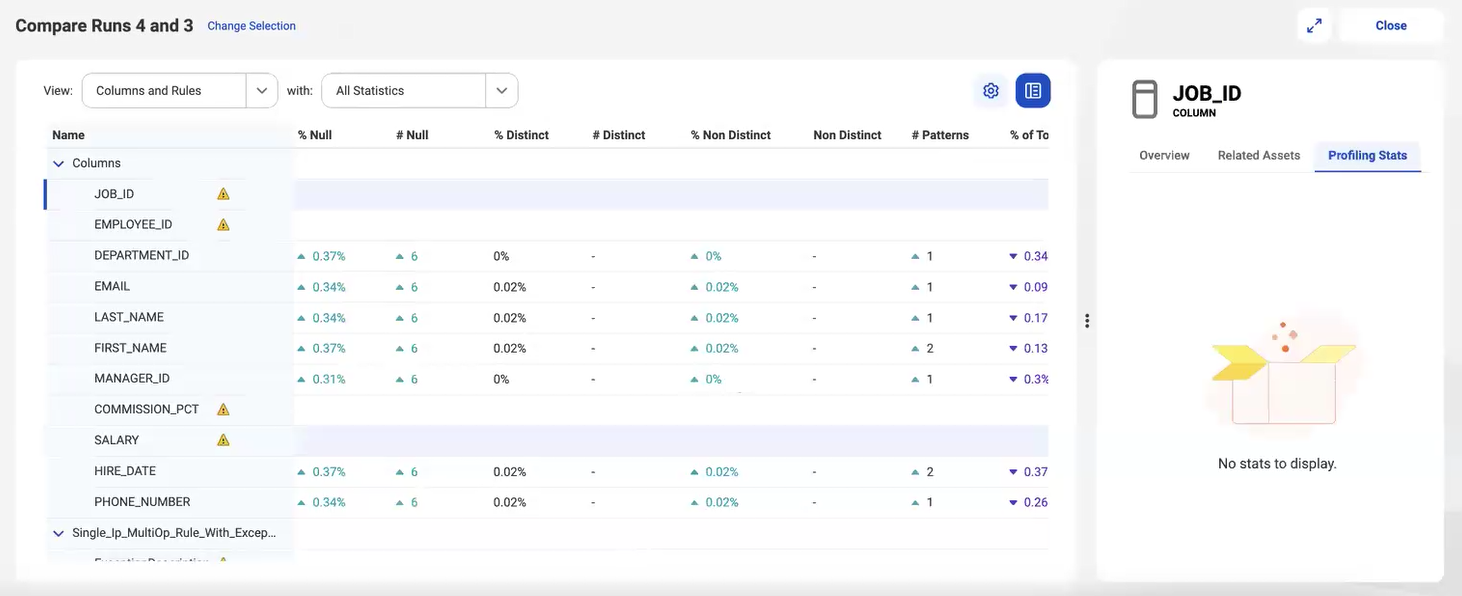
5Optionally, customize the view based on your requirements.
You can sort the compared results in ascending or descending order. You can apply filters or search for a result. To add or remove a column statistic, right-click the name and then select or clear the column statistic.
When you click a column, a detailed view of the changes for the column appears in the preview pane. The profile results include statistics such as data types, patterns, and values.
The following table describes the options that you can use to filter the data:
Option | Description |
|---|---|
View | Displays data for columns, rules, or for both columns and rules. |
With | Filters the results based on the type of comparison. You can choose from the following types:
|
Find | Looks for results that contain a keyword that you enter. |
6Click Close to return to the results page.