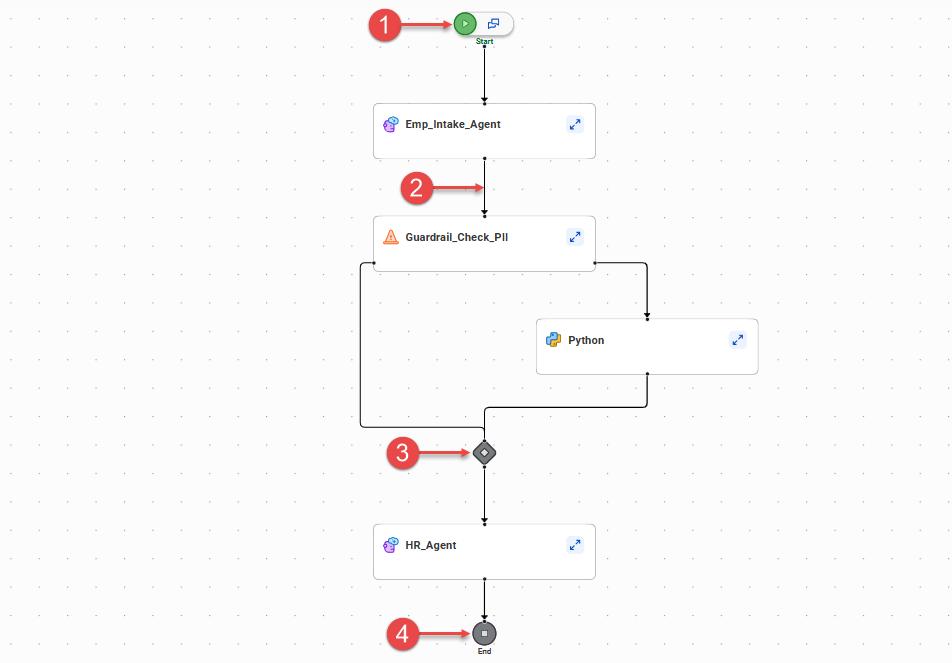
The agent flow canvas contains flow controls like the start and end nodes, connectors, and merge nodes. To configure an agent flow, drag and drop building blocks like agent blocks and tool blocks onto a connector between the start and end nodes.
The following image shows some flow controls in an agent flow:
1Start node
2Connector
3Merge node
4End node
An agent flow can contain the following flow controls:
Start node
The start node marks the beginning of the workflow. An agent flow must contain one start node.
Note:
In the current release, the chat icon on the start node isn't functional.
Connector
A connector links two components in the workflow. The arrow indicates the direction of flow.
To add components to the flow, drag them onto a connector in the appropriate location.
You can rearrange the flow by dragging the start or endpoint of a connector to a different component on the canvas.
Merge node
A merge node merges two branches of the flow.
When you add a guardrails block to the flow, a merge node is automatically added after the guardrails block to merge the Pass and Fail branches into a single path.
Note:
If your agent flow contains multiple guardrails blocks and end nodes, and you delete a guardrails block, an orphaned merge node might remain on the canvas. To delete it, select the orphaned node and press Backspace.
End node
An end node marks the end of the workflow. An agent flow can contain one or more end nodes.
You might add an additional end node to an agent flow when the flow contains a guardrails block. For example, to end the flow when a guardrails check fails, add an end node to the Fail branch of the guardrails block.
To add an end node to the flow, drag it from the toolbar onto the appropriate connector. To delete an end node from the canvas, select the node and press Backspace.