You can configure guardrails in an agent flow to enforce safety, security, and content policies and to help prevent your AI agent from straying from its intended purpose. Each agent block that you add to an agent flow contains a default prompt with some basic guardrail checks. To configure more robust guardrails, add a guardrails block to the agent flow.
When you configure a guardrails block, you select the guardrail types and configure the specific checks to perform. Some AI guardrail types like content moderation and hallucination checks also require you to select a model connection.
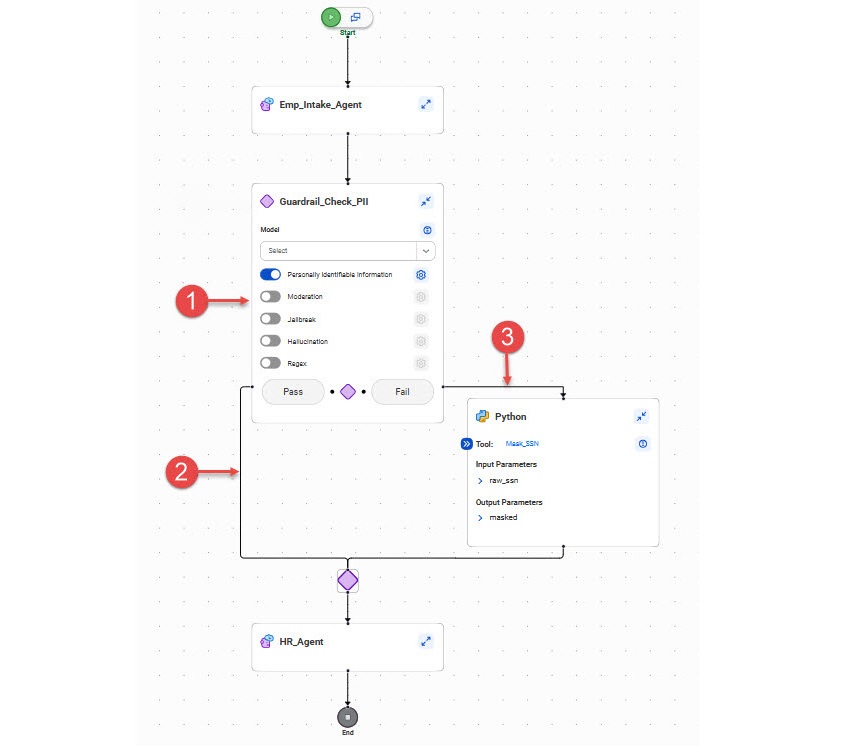
The following image shows a guardrails block in an agent flow:
1Guardrails block
2Pass branch. This branch is executed when all guardrails checks pass.
3Fail branch. This branch is executed when any of the guardrails checks fail.
Add a guardrails block in the following locations based on when you want to perform the checks:
Before an agent block
Add a guardrails block before an agent block to validate input before sending it to the agent block. For example, you want to check whether a user is trying to bypass the agent's instructions, or you want to prevent the AI agent from responding to hate speech.
After an agent block
Add a guardrails block after an agent block to check the output from the agent block. For example, you want to detect personally identifiable information before passing it to a downstream agent block, or you want to perform a hallucination check before returning information to an end user.
Each guardrails block has two output branches. The Pass branch is executed when all guardrail checks pass. The Fail branch is executed when any guardrail check fails. You can add additional controls like agent blocks or tool blocks in either branch. For example, if personally identifiable information is detected, you might add a Python block to the Fail branch to mask the sensitive information.
You can configure any of the following types of guardrail checks in a guardrails block:
Personally Identifiable Information
Detects personally identifiable information (PII) like credit card numbers, email addresses, and geographic location. You can flag global PII and PII that varies by country.
Moderation
Flags text by content moderation classifiers like hate speech or violent content based on a confidence threshold.
Jailbreak
Detects attempts to bypass AI safety measures or exploit the model based on a confidence threshold.
Hallucination
Identifies factually incorrect or fabricated information based on a confidence threshold.
Regex
Detects specific content that matches a Python regular expression pattern.
When you configure a moderation, jailbreak, or hallucination guardrail check, you need to select the model connection that you want to apply the guardrails to.
Example: Detecting and masking personally identifiable information
You are designing an agent flow to help your company onboard new employees. The agent flow contains an agent block named "Emp_Intake_Agent" that performs a background check and helps the new employee fill out their work authorization forms. When these tasks are completed, the agent flow calls a second agent block named "HR_Agent" that helps the Human Resources department perform onboarding tasks like order a phone and laptop and grant the employee access to their work location. The HR_Agent block needs access to some of the employee's personal information, but not to other information used in the background check like the employee's passport number.
You add a guardrails block to the agent flow after the Emp_Intake_Agent block. You configure the guardrails block to detect PII like the passport number. If PII is detected, you call a Python code block to mask the sensitive information before calling the HR_Agent block.
Personally identifiable information guardrails
Configure personally identifiable information guardrails to detect personally identifiable information (PII) like credit card numbers, email addresses, and geographic location.
You can detect global PII like credit card numbers, cryptocurrency addresses, date and time information, or email addresses. You can also detect country-specific PII like social security numbers for the USA, NHS numbers for the UK, or voter ID numbers for India.
To enable a specific guardrail check, enable its check box. You can also enable all global guardrail checks or all guardrail checks for a specific country.
Moderation guardrails
Configure moderation guardrails to flag text by content moderation classifiers like hate speech or violent content based on a confidence threshold. Moderation guardrails are applied to the model you select in the guardrails block.
To configure a moderation guardrail, choose the categories to moderate and set the confidence threshold. You can flag content that falls into any of the following categories:
•Hate speech
•Sexual content
•Violent content
•Offensive language
The confidence threshold is set to 70% by default.
Jailbreak guardrails
Configure jailbreak guardrails to detect attempts to bypass a model's safety measures or exploit the model based on a confidence threshold. For example, you can detect possible prompt injection or "Do Anything Now" attacks. Jailbreak guardrails are applied to the model you select in the guardrails block.
To configure a jailbreak guardrail, adjust the confidence threshold. The confidence threshold is set to 70% by default.
Hallucination guardrails
Configure hallucination guardrails to detect factually incorrect or fabricated information based on a confidence threshold. Hallucination guardrails are applied to the model you select in the guardrails block.
To configure a hallucination guardrail, adjust the confidence threshold. The confidence threshold is set to 70% by default.
Regex pattern guardrails
Configure a regex pattern guardrail to detect text that matches a specific, regular expression pattern.
You can use this guardrail to validate data, for example, to verify email formats. You can also use this guardrail to search for data or parse data in a large text block.
To configure the pattern to match, enter the pattern string in the Regex Pattern field using Python regular expression syntax.
You can include string literals, special characters, and logical operators in the pattern string. To enter groups of patterns, enclose each pattern within parentheses. You can use a pipe character (|) as a logical OR to match multiple patterns in the same string.
For example, you want to flag a string in the user prompt that contains any of the following information:
•Email IDs in the format "name@domain.com," or
•Phone numbers of 10-15 digits optionally starting with a plus sign (+), or
•Indian PAN card numbers of five uppercase letters, followed by four digits, followed by an uppercase letter