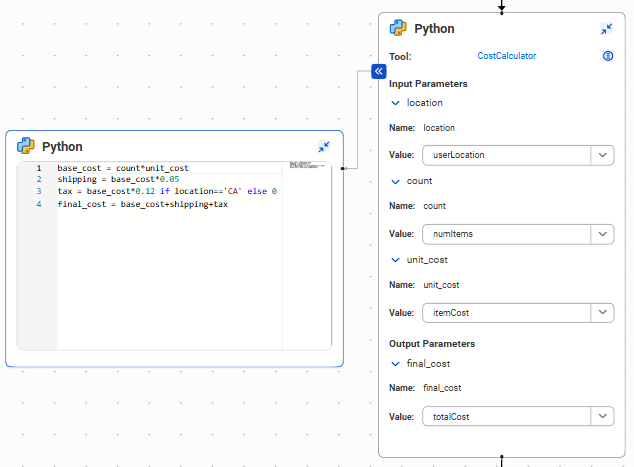
You can execute custom Python code in an agent flow. To do this, add a Python block to the flow and select the Python Code tool that contains the code you want to execute. Then configure the input and output parameters.
To add a Python block to an agent flow, drag and drop a Python Block from the Activities menu into the flow. When you add a Python block to the flow, the AI agent executes the Python Code tool in the order in which it appears in the agent flow. So, if you add a Python block in an agent flow after an assignment block, the Python code is executed after the variable's value is updated.
Tip:
If you want the agent to decide whether and how often to execute the Python Code tool, add the Python Code tool to the agent block instead.
A Python block executes the code that's configured in a Python Code tool. You can't create or edit Python code in a Python block. For information about creating a Python Code tool, see Python Code tool.
A Python block contains input and output parameters that represent the values that you pass into and receive from the Python Code tool. You set the value of each input and output parameter to an agent flow variable.
The following image shows a Python block in an agent flow:
To view the Python code, click >>.
Example: Use a Python block to calculate final cost
You need to call a Python Code tool named CostCalculator in your agent flow to calculate the final cost for a shipment.
The tool contains the following parameters:
Type
Name
Data type
Input parameter
location
string
Input parameter
count
integer
Input parameter
unit_cost
float
Output parameter
final cost
float
The following code block shows the cost calculation: